
 Worksheets
Intro to Arduino Test__
Total questions: 30
Worksheet time: 23mins
How many void setup( ) functions can you include in a sketch
As many as you declare in the void setup( ) function.
two
As many as you want.
one

A push-button switch is connected to Pin 2.
A red LED is connected to Pin 3.
A green LED is connected to Pin 4.
What word needs to be inserted into blank A?
INPUT
input
Write
OUTPUT

A push-button switch is connected to Pin 2.
A red LED is connected to Pin 3.
A green LED is connected to Pin 4.
What word needs to be inserted into blank C?
INPUT
input
OUTPUT
output

A push-button switch is connected to Pin 2.
A red LED is connected to Pin 3.
A green LED is connected to Pin 4.
Complete the program so that when the button is pressed, the red LED is on and the green LED is off. When the button is not pressed the red LED is off and the green LED is on.
What word needs to be inserted into blank D?
DigitalRead
digitalread
DigitalWrite
digitalRead

A push-button switch is connected to Pin 2.
A red LED is connected to Pin 3.
A green LED is connected to Pin 4.
Complete the program so that when the button is pressed, the red LED is on and the green LED is off. When the button is not pressed the red LED is off and the green LED is on.
What word needs to be inserted into blank E?
high
ON
LOW
HIGH
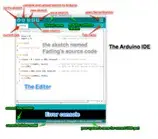
A program written with the IDE for Arduino is called a ____________
Editor
Console
Sketch
IDE error
The (-) column on your breadboard represents the ground and is conected to GND on your Arduino.
true
false
An output is something that happens when a circuit is in use. An example of an output is:
Light flashing
Buzzer sounding
Temperature being given on a screen
All of the answers are correct
digitalWrite (LED1, HIGH);
delay(1000);
digitalWrite (LED1, LOW);
What does the program do?
LED Switch ON at the beginning, wait for 1s and then switch OFF.
LED Switch Off at the beginning, wait for 60s and then switch ON.
LED Switch ON at the beginning, wait for 10s and then Switch OFF.
LED Switch ON at the beginning, wait for 1s and then switch ON.

These pins are:
Digital pins
Analog pins
PWM pins
Oscillating pins
This symbol is used to end a statement
!
"
;
\
Which command is called when a sketch starts. Use it to set pin modes, start using the serial monitor, etc. It will only run once, after each power up or reset of the Arduino board.
loop ( )
setup ( )
delay( )
input( )
Which command is called repetitively over and over again as long as the Arduino has power.
loop ( )
delay( )
setup ( )
input( )
Comparison operator which means assign a name to.
++
==
=
!=
Where should you assign names to components or variables?
At the top
At the bottom
In the setup()
In the loop()
Where should you set a component as an Input or Output?
At the top
At the bottom
In the setup()
In the loop()
In a sketch, where is the command to start the serial monitor usually placed?
In the void loop( ) function
In the void setup( ) function.
Before the void setup( ) function
Anywhere
what does a delay( ) function do?
It slows down the speed of a motor.
It returns the number of milliseconds that have elapsed since the Arduino board was last reset
It pauses the program for a designated time.
It pauses the program while a specified condition is true
Code comments start with what symbol?
#
{
**
//
int Led1=4; // Row1
void setup() { // Row2
digitalWrite (LED1, HIGH); // Row3
} // Row4
Error message: LED1 was not declared in this scope.
Pick rows you can edit to correct the error?
Row1
Row2
Row3
Row4
correct syntax for receiving Digital Signal in Arduino from an input
digitalRead(buttonPin);
digitalread(buttonPin);
digitalRead(buttonPin)
DigitalRead(buttonPin);
correct syntax to send a Digital Signal in Arduino to an output
digitalWrite(LEDPin, HIGH);
digitalwrite(LEDPin, HIGH);
DigitalWrite(LEDPin, HIGH);
digitalWrite(LEDPin);
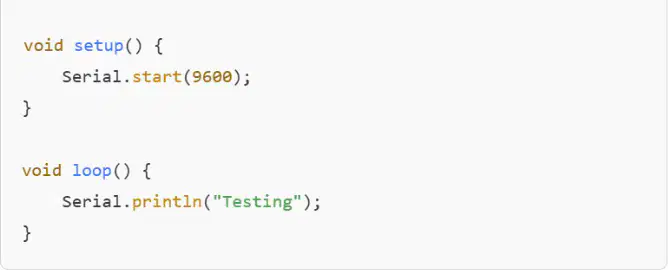
Why won’t this code compile?
Serial.start(9600); should be Serial.begin(9600);
Serial.println("Testing"); should be Serial.print("Testing");
The baud rate must be 57600.
There is no delay in loop()
What does this function does?
digitalWrite ()
writes output value to either HIGH or LOW
writes output value using PWM sequence
sets a pin to either INPUT or OUTPUT
pauses the program
What does this function does?
pinMode ()
writes output value to either HIGH or LOW
writes output value using PWM sequence
sets a pin to either INPUT or OUTPUT
pauses the program
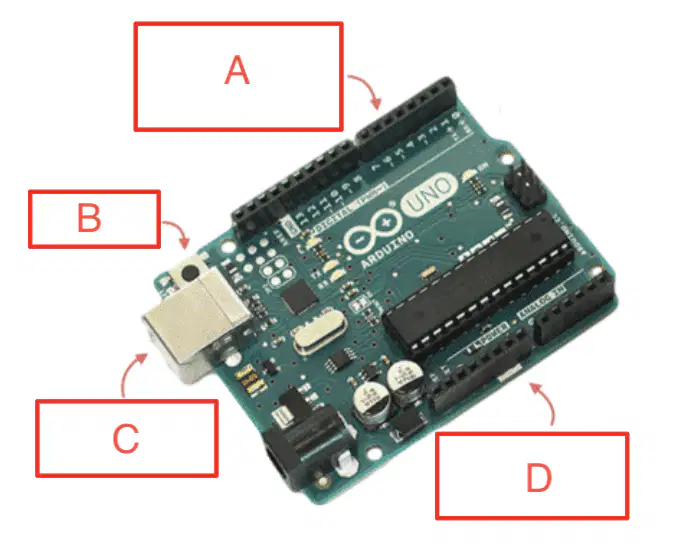
What is B pointing to?
Arduino Button
Power Button
Reset Button
Digital Pins
What is C pointing to?
Arduino Button
USB Port
Pins 6 through 7
Input Pins
Error messages appear at the bottom of the Arduino IDE and highlight the lines of code associated with the errors
True
False
There are always an even amount of curvy brackets { in a sketch
True
False
void loop() {
buttonState = digitalRead(buttonPin);
}
What does this code do?
Sends an electrical signal to a button
Turns on an LED
Receives a signal from a button and names the signal buttonState
Turns on an LED
Receives a signal from a button

