
 Worksheets
2.1 - Sketching
Total questions: 25
Worksheet time: 13mins
The units of a document can be changed under Workspace Units in the Document Menu.
TRUE
FALSE
Which of the following is an indicator that you are in sketch mode?
All of these are correct
The feature toolbar changes to the sketch toolbar
The sketch dialog box shows on screen
None of these are correct
One way to remove an existing sketch entity is to select it and then press the _________ key on the keyboard.
Delete
Enter
Space
Backspace
When box-selecting multiple items, to include only items completely enclosed within the box, drag the selection box from left to right.
TRUE
FALSE
How can you select each entity in Onshape?
Click each entity with the left mouse button
Click each entity with the right mouse button
Hold the Ctrl key and click each entity
Hold the Alt key and click each entity
Which of the following is NOT a type of arc in Onshape?
Equal Radius Arc
3 Point Arc
Tangent Arc
Centerpoint Arc
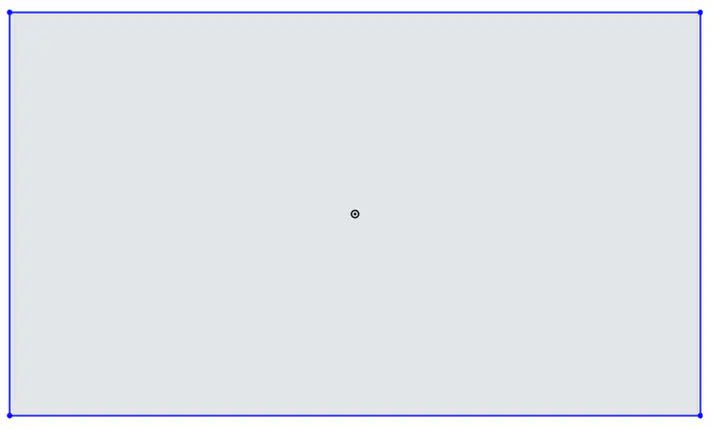
Which tool should be used to create a rectangle from the center point?
Use the Center Point Rectangle tool
Use the Corner Rectangle tool
Draw lines around the Origin to form a box
Create a polygon
Which type of Arc requires another entity to specify its start point?
Tangent Arc
Center Arc
Three-Point Arc
Two-Point Arc
You can fully define the shape and size of a sketch using only dimensions and geometric constraints.
TRUE
FALSE

If an endpoint of a line has a defined horizontal geometric constraint, and is dragged in any direction, it will maintain its horizontal constraint.
TRUE
FALSE
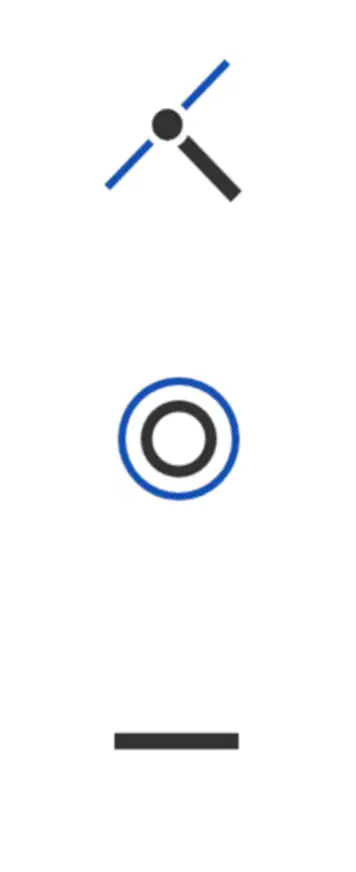
Which of the following geometric constraint flags indicate that sketch entities are coincident?
First symbol (two lines intersecting at a point)
Second symbol (concentric circles)
Third symbol (horizontal line)
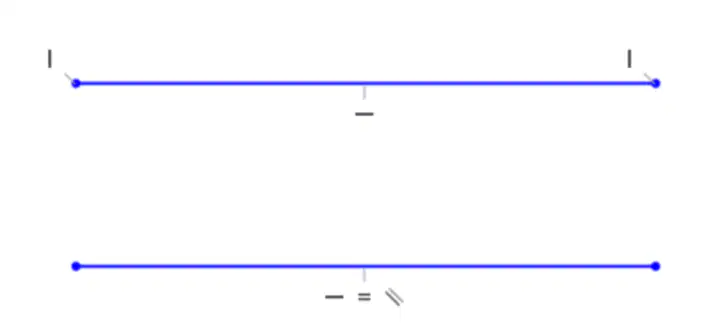
Which constraint has NOT been defined for the 2 segments shown?
Coincident
Horizontal
Parallel
Equal
What will happen when a sketch becomes over defined?
All of these are correct
The sketch will not update
The sketch will become unstable
The sketch will lose constraints
Which of the following signify that a sketch is fully defined?
All lines are black.
All lines are blue.
None of these are correct.
The sketch is shaded.
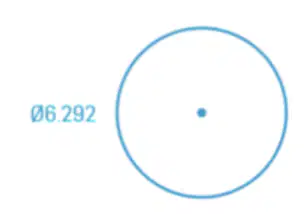
While in sketch mode, what does the number displayed near a sketch entity represent?
The sketch element's exact size.
The number of sketch elements.
The color of the sketch.
The type of sketch element.
When sketched geometry is displayed in blue, the geometry is considered:
Under-defined
Selected
Deleted
Over-defined
When sketched geometry is displayed in black, the geometry is considered:
Fully defined
Under-defined
Over-defined
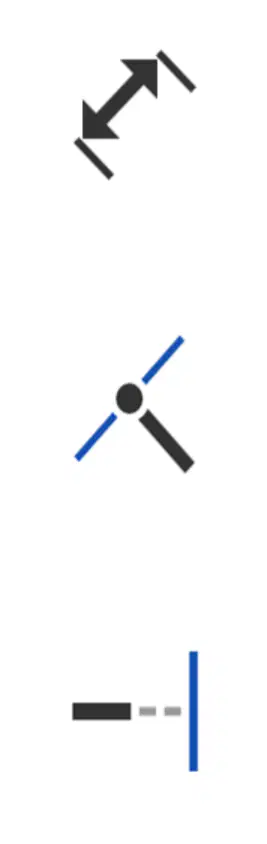
Which icon would you click to activate the Dimension tool and add dimensions to a sketch?
Icon with two arrows pointing in opposite directions
Icon with a single line and a dot
Icon with a dashed line and a solid line
The Extrude feature can be used to remove material.
TRUE
FALSE
Which end type of an Extrude is used to add an equal amount of material to both sides of the sketch plane?
Symmetric
Up To Face
Blind
Through All
If you select a face to draw a sketch, the sketch entities cannot extend beyond the edges of that face.
TRUE
FALSE
You can double-click a feature in the graphics area to display its dimensions.
TRUE
FALSE
In order to create two-dimensional geometry such as lines, arcs, and rectangles, what mode should Onshape be in?
Edit Sketch
Edit Part
Edit Feature
After an extruded feature has been created, you can always go back and edit the feature. When you edit an existing extrude feature, which of the following cannot be changed while editing the feature?
The shape of the sketch profile
The end type
The depth
The direction of the extrude
To edit an existing feature, right click on the feature in the Feature List and select "Edit Sketch."
TRUE
FALSE

