
 Worksheets
Cambridge National in IT R060 Summative Assessment HT3
Total questions: 56
Worksheet time: 27mins

What does this symbol mean?
Decision
Start/End
Input/Output
Step of process

What does this symbol mean?
Step or process
Start/End
Input/Output
Decision

What does this symbol mean?
Input/Output
Step or process
Decision
Start/End

What does this symbol mean?
Decision
Input/Output
Step or process
Start/End
Define the data type: Text
A sequence of characters
Any number with or without decimal places
A value containing True or False
What is the purpose of a length check?
It checks the length of a data entry
It sets an upper and lower boundary for data entry
It checks that the data has been entered
It looks up acceptable values in a list
What is the purpose of a limited choice?
It checks that the data has been entered
It sets an upper and lower boundary for data entry
It provides a user with a limited choice to select using drop-down lists, radio buttons, and tick boxes
It looks up acceptable values in a list
What is the purpose of a range check?
It provides the user with a limited choice including drop-down lists, radio buttons, and tick boxes
It looks up acceptable values in a list
It sets an upper and lower boundary for data entry
It sets the length of the data entry
Which tool is best to design the look of a spreadsheet?
Wireframe
Flowchart
mindmap
Which tool is best to generate ideas about a spreadsheet solution?
Mindmap
Flow chart
Wireframes
A flow chart is a planning tool.
True
False
Data validation helps to make sure that the data in the spreadsheet is
correct and sensible
sensible and reasonable
correct, accurate and sensible
correct, reasonable and sensible
A _________________ is an interactive view of data in a worksheet.
2D graph
graph
pivot table
3D chart
What type of chart/graph would you use to show changes over a period of time?
line chart
bar chart
scatter graph
What is the lookup value in a VLOOKUP function?
The value that you wish to search for
The range of cells containing all the value
The value that you want to be returned
Which of these is not a design tool?
flow charts
HCI
mind map
visualization diagram

Which planning tool is this an example of?
Mind map
Wire frame
Visualization Diagram
Flow chart
Which design tool is used to plan layouts?
Mind map
Wireframe
Visualization Diagram
Flow chart
What is NOT a component of a mind map?
nodes
connecting lines
diamond
sub-nodes
"Can show sequence/steps that needs to be followed in order"
This is an advantage of which design tool?
Mind map
flow chart
visualization diagram
wire frame
What is the first step in creating a spreadsheet?
Close the spreadsheet software
Ignore the spreadsheet software
Open the spreadsheet software
Delete the spreadsheet software
How can you format a cell to display currency?
By changing the font color to green
By using the 'Bold' formatting option
By selecting the cell or range of cells, then clicking on the 'Number Format' drop-down menu in the 'Number' group on the Home tab and choosing 'Currency' from the list of options.
By applying a strikethrough to the cell
What is the function of the SUM formula in spreadsheets?
To find the average of the values in a range of cells
To multiply the values in a range of cells
To subtract the values in a range of cells
To add up the values in a range of cells.
What is the purpose of data analysis in spreadsheets?
To write essays and stories
To play games and pass time
To organize, interpret, and visualize data to make informed decisions
To create colorful charts and graphs
How can you create a bar chart in a spreadsheet for data visualization?
Use the 'Format' tab to create a bar chart
Type 'Bar Chart' in the search bar and press enter
Select the data and choose 'Bar Chart' from the 'Insert' tab
Right-click on the data and choose 'Bar Chart'
What is the difference between a relative reference and an absolute reference in formulas?
The cell reference changes in an absolute reference, while it remains constant in a relative reference.
Relative references are used for text values, while absolute references are used for numerical values.
There is no difference between relative and absolute references in formulas.
The cell reference changes in a relative reference, while it remains constant in an absolute reference.
How can you use the IF function in spreadsheets?
By changing the font style
By inserting a new row
By performing a logical test and returning different values based on the result
By adding two numbers together
What are some common data analysis tools available in spreadsheet software?
3D modeling
Pivot tables, charts, filters, VLOOKUP, SUMIF
Word processing
Animation
How can you customize the appearance of a spreadsheet to improve its design?
By inserting random images into the cells
By adding more rows and columns
By changing the language of the spreadsheet
By changing the font style, size, and color, adjusting cell borders and shading, and using conditional formatting.
What is a correct name for a cell?
C3
Cell3
Field3
C3PO
Which is the correct formula to divide?
B6/C6
=B6/C6
/B6C6
B6C6/
What function do you use to find the lowest number?
SUM
MAX
MIN
AVERAGE

What is happening in Total Sales?
(What will happen to the green selection?)
Replication
Formatting a cell
Creating a formula
Using a function

Name this
Cell
Row
Column
An animal charity is organising a discovery trail competition which will last for three weeks. Painted statues of dogs will be placed in different locations of a town for people to find. To take part people have to register using a HCI on a mobile app and pay an entry charge. Each person who registers is allocated an entry number that is exactly 6 Digits long.
What validation checks would be suitable for the entry number?
Range Check
Length Check
Input Mask
Lookup Check
Which of the following is a characteristic of a well-designed Human-Computer Interface (HCI)?
It is clear in its layout.
It uses complex navigation.
It hides feedback from the user.
It is inconsistent in its layout.
Which of the following best describes the layout of a well-designed HCI?
Consistent
Random
Complicated
Unpredictable
What is the definition of data according to the document?
Raw facts and figures before they have been processed
Processed information with context
Structured and meaningful information
A combination of letters, symbols, spaces, or numbers
What is the relationship between data and information?
Data is structured information
Information is in context, while data has no context
Data is always more accurate than information
Information is raw facts and figures
What is the purpose of an input mask format check?
To ensure data is in a specific format
To check data is entered twice
To verify data against the source
To set a length for data entry
Which of the following is a characteristic of verification?
Checks if data is identical to the source
Ensures data is in a specific format
Sets the length of data entry
Provides a limited choice for data entry
What is an example of a text data type?
Ab1£
01/01/2023
£1.09
1 or 0
What is a main feature of spreadsheet software?
Format text
Records
Calculations
Voice calling
Human Computer (a)
A well designed HCI will have a clear (a)
A well designed HCI will be (a) to use.
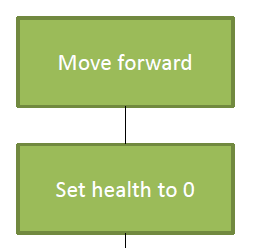

19
Identify one component of a wireframe.
Button
Database
Operating System
Website
Complete the sentence. The alphanumeric data type can include ............................ and ............................ .
Numbers and Letters
Symbols and Spaces
Letters and Symbols
Numbers and Spaces
What type of software allows the use of Functions and Formulae?
Desktop Publishing
Word Processing
Spreadsheet
Database

