
 Worksheets
Computer Aided Drawing (Fall 2025-2026) — Questions Bank
Total questions: 66
Worksheet time: 33mins
Select only one. One of the following is not a way to specify any point to draw?
Right Click
Left Click
Cartesian Coordinates
Polar Coordinates
Select only one. When determine a text height in the Text Style window to be 4.00 units, what is the effect of this in the other dependent features?
There is no effect
Any feature that depends on this style would not allow changing it again
Any feature that depends on this style would allow changing it again at any time
No relation between the text style and any feature in AutoCAD
Select only one. Within the Trim command, the default choice in the Edge option is set to
Extent
No Extent
Select only one. Within the Trim command, the default choice in the Project option is set to
None
UCS
View
Select only one. Command Align is a substitute for the following three commands respectively:
Move, scale, Rotate
Move, offset, Rotate
Move, stretch, Rotate
Move, Lengthen, Rotate
Select only one. Modifying order "Change Space" can
Exchange objects between Model space and Paper space from Model Space
Exchange objects between Model space and Paper space from Paper Space
Exchange space between Model space and Paper space
Exchange space between Model space and layout space
Select only one. Which command is used to create polygons in AutoCAD?
ARC
POL
REC
EL
Select only one. When creating a polygon in AutoCAD, which first input is required?
Radius of the inscribed circle
Number of sides
Diameter of the polygon
Length of each side
Select only one. What can Chamfer command do in AutoCAD?
To scale objects
To create a beveling transition between two lines
To explode objects
To stretch objects
Select only one. When using the Trim command, the option "Project" must be set to ........................., to ensure the objects are kept in the same plan.
None
UCS
View
No guarantee for keeping drawing in the same plan
Select only one. When using the Trim command, the option "Project" must be set to ........................., for the ability of trimming in any view.
None
UCS
View
There is no ability for trimming in any view except the XY plan
Select only one. Layer of constructed block can be changed to any required layer, if the block built-layer was
0
Defpoints
Layer1
Layer2
Select only one. One of advantages of CAD softwares
Decrease Productivity
Decrease Errors
Disability for sharing
All of choices
Select only one. Which order can be used to convert from discrete lines to a continuous polyline?
Explode
Join
Match
Move
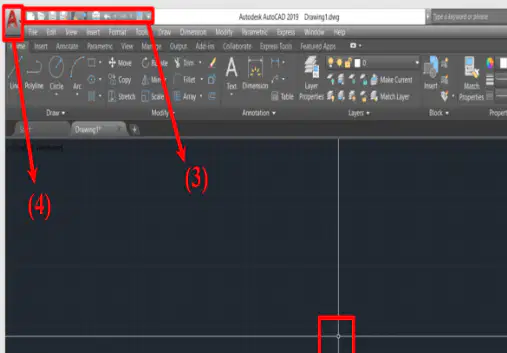
For the shown screen, select only one. What do numbers 1 to 7 symbolize?
Crosshair-Quick Tool bar- View Cube- AutoCAD app icon-Command line-Navigation bar-User Coordinate System-
Crosshair-AutoCAD app icon-View Cube-Command line-Quick Tool bar-Navigation bar-User Coordinate System-
Crosshair-View Cube-Quick Tool bar- AutoCAD app icon-Navigation bar-Command line-User Coordinate System-
Crosshair-Navigation bar-View Cube-Command line-Quick Tool bar- AutoCAD app icon-User Coordinate System-
Crosshair-Command line-View Cube-Quick Tool bar- Navigation bar-AutoCAD app icon-User Coordinate System-
Select only one. You can create many Layer State for some layer in AutoCAD, and exchange between them during the drawing process?
true
false
Layer State involves other uses
Select only one. In the "Polygon" command, how do you describe a polygon with respect to a circle?
By its side length
By its radius
By the number of diagonals
By its perimeter
Select only one. You can create many Group Filters in AutoCAD far from any existing layers?
true
false
Group filter involves other uses
Select only one. What is the correct sequence for creating a hatched area in AutoCAD?
REC, specify height, then hatch
HA, pick a closed area, then hatch
EL, pick a point, then hatch
ARC, draw arc, then hatch
By default, controlling the Grids to be ON/OFF, function key .............. must be used
F1
F2
F7
F8
By default, controlling the Ortho mode to be ON/OFF, shortcut ................. must be used
Ctrl+ L
Ctrl+ M
Ctrl+ N
Ctrl+ O
In Plot within AutoCAD: Margins of a specific paper in a plotter, can be Edited?
True
False
You can only setup a new paper size, then control it margins.
Nothing in AutoCAD can be edited
By default, to view a clean screen, shortcut .............. must be used
Ctrl+ 0
Ctrl+ 1
Ctrl+ 8
Ctrl+ 9
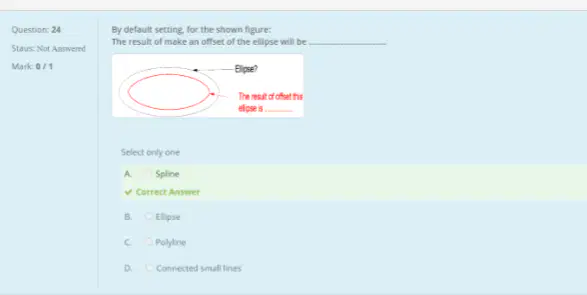
By default setting, for the shown figure: The result of make an offset of the ellipse will be ...........................
Spline
Ellipse
Polyline
Connected small lines
If the unit of a constructed block was "mm", and it is desired to be inserted in a drawing with insertion units "cm", a distance of 20 units on block would be ............... units in drawings
2
0.2
20
200
One of methods to input an order to AutoCAD
Ribbons
Command Line
Toolbars
Menu bar
All of the choices
When using the trim command, the option "Project" option must be set in ......................, for the ability of trimming in any view.
None
UCS
View
Their is no ability for trimming in any view except the XY plan
The main difference between (Freeze and turn off) for any layer properties?
Both are used for hide the layer from view.
Freeze is used for delete a layer and turn off the layer is used to hide the layer from view.
Boths are used to hide a specific layer while freeze eliminates the layer size from the file
Boths are used to hide a specific layer while turning off eliminates the layer size from the file
Number of diagonals must be determined to locate any closed shape is..............
n-1
n-2
n-3
n-4
By default, controlling the Ortho mode to be ON/OFF, function key ................. must be used
F1
F2
F7
F8
What are the uses of Design Center in AutoCAD
Can transfer layers from any drawing to another
Can transfer DimStyles from any drawing to another
Can transfer Xrefs from any drawing to another
Can Transfer any user's setup settings like styles, layers, blocks and Xrefs
The shortcut can be used to pop-up the Design Center window in AutoCAD?
Ctrl+1
Ctrl+2
Ctrl+3
Ctrl+4
Ctrl+5
By default, to view the properties of any object, shortcut ................. must be used
Ctrl+ 0
Ctrl+ 1
Ctrl+ 8
Ctrl+ 9
By default, controlling the command line to be ON/OFF, shortcut ................. must be used
Ctrl+ 0
Ctrl+ 1
Ctrl+ 8
Ctrl+ 9
By default, controlling the Osnap mode to be ON/OFF, shortcut ................. must be used
F3
F4
F5
F6
By default, to activate the ortho mode, a shortcut of ..................... can be used?
Ctrl+h
Ctrl+s
Ctrl+l
Ctrl+w
The default number of layers would be shown in AutoCAD after dimensioning any object?
1
2
3
4
Which order can be used to convert from a continous polyline to discrete lines?
Explode
Join
Match
Move
The Object snap tracking can be controlled ON/OFF using .............
F3
F4
F10
F11
The selection window that is opened from left to right can select.............
Any intersected object
Only object locates in the selection window
Can not select any thing
Draw a rectangle object
Tabs in ribbon can be edited easily in AutoCAD
true
false
True but under conditions
To close an arc to be a circle, you must follow..........
Select the arc', enter, select the close option.
Draw a closing arc, Select them, J Enter
All of the mentioned ways
To save as the activated drawing, a shortcut .............. can be used
Ctrl+S
Ctrl+shift+ S
Ctrl+Alt+ S
Ctrl+ 0
When turn off some layers in a drawing and use a shortcut of (Ctrl+A), what result can be observed?
All objects in all layers would be selected
All objects in only the turned on layers would be selected
All objects in only the turned off layers would be selected
When turn off some layers in a drawing and use a windowing selection on all objects, what result can be observed?
All objects in all layers would be selected
All objects in only the turned on layers would be selected
All objects in only the turned off layers would be selected
Could you Freeze the current layer?
No
Yes
Yes, by many setting must be modified
By default, to copy a something in the same sheet, a command of .............. can be used?
co+ enter
c+enter
cc+enter
co+enter+enter
What is the main purpose of using layers in AutoCAD? Select only one
To reduce file size
To organize objects by purpose
To speed up rendering
To increase drawing precision

What Options may be used to draw "Line A B"? Refer to the image showing a vase-like profile with two points labeled A (top) and B (side). Select only one
By : line "tangent to both curves"
By: Make a Fillet between two curves with a radius "10000000...etc"
By: Make a "trr Circle" with a radius "10000000...etc"
By: Defined Constraints from the parametric tab.
All of these Options may be used
To redo any step in AutoCAD, a shortcut of .................. can be used Select only one
Ctrl+c
Ctrl+z
Crly
Ctrl+o
When execution the "Align" Command, the third source point must be determined in 2D? Select only one
True
False
The default positive direction of an angular typing is .............................. Select only one
Counter Clockwise from Y-axis to X-axis
Clockwise from Y-axis to X-axis
Counter Clockwise from X-axis to Y-axis
Clockwise from X-axis to Y-axis
The required area in the properties Palette for Open Polyline would be.................... Select only one
Un listed in the palette
Listed with Unknown reason
Listed and equal to the same polyline with a closed nature
Zero
The command modifier allow to track any source point is? Select only one
tk
r
'tk
'Tr
To activate the temporary object snap, the following action must be performed? Select only one
Shift + Right Click
Shift + Left Click
os + Enter
ps + Enter
When transfering the UCS, the ortho mode directions would be.................... Select only one
similar to the original UCS’s directions
similar to the new UCS’s directions
To draw any inclined line on an arbitrary line (not in x or y direction), the following must be execute? Select only one
Move UCS in the required point and control the + X direction parallel to the line, and the + Y direct on the same side of angle
Move UCS in the required point and control the + X direction parallel to the line, and the + Y direct on the reverse side of angle
Move UCS in the required point and control the + X direction parallel to the line, and the + Y direct on the same side of angle
Move UCS in the required point and control the + X direction parallel to the line, and the - Y direct on the same side of angle
Size of Sheet A2 is .............. Select only one
84.1 cm*118.9 cm
59.4 cm*84.1 cm
42 cm*59.4 cm
29.7 cm*42 cm
21 cm*29.7 cm
Within the trim Command to exchange to Extend Command, you must hold press in .................... and select the line to extend. Select only one
Shift
Ctrl
Alt
Tab
To Execut the "Stretch" Command,the following methodology must be trialed? Select only one
s , enter, choose the part of an object to be stretched.
s , enter, choose the object to be stretched.
Size of Sheet A0 is .............. Select only one
84.1*118.9
59.4*84.1
42*59.4
29*74.2
21*29.7
When using the trim command, the most general choice of "Project" option to trim at any position is Select only one
None
UCS
View
None of the choices
What is the extension of AutoCAD Template File Select only one
.dwt
.dwg
.dxf
.dws
When drawing a line from the origin with polar coordinates ( -1<45), the end point of this line would be located in................ quadrant Select only one
first
second
third
fourth
What is your Expectation about ".dwt Files"? Select only one
Built-in template files are used every time to start the drawing from scratch
Preferred templates include all essential settings and properties, allowing users to avoid starting from scratch.
It works like a .dwg file with the same settings but a different file type.
To construct a new work plan, UCS order would be used and the direction of ............................ must be specified. Select only one
X & Y directions
Z & Y directions
X & Z directions
All directions

