
 Worksheets
Page 1
Total questions: 56
Worksheet time: 28mins
Which item is listed as an advantage of HTML5?
Easy to learn and use
Requires plugins for multimedia
Limited mobile support
Not SEO optimized
Select all applications listed for HTML5.
Website development
Web applications
Mobile web apps
Online media platforms
Device driver programming
According to the comparison table, which is the correct HTML5 doctype declaration?

Which statement about multimedia support is correct for HTML5?
Provides native
Requires Flash plugins for audio/video
Supports multimedia only via Java applets
Has no built-in multimedia capability

Which are introduced as semantic elements in HTML5? Select all that apply.

Which HTML5 technology enables drawing 2D graphics directly in the browser?
Flash
Silverlight
VRML

What enhancement to forms is highlighted for HTML5 in the comparison table?
New input types with built-in validation like required
Forms were removed entirely
Only text inputs are supported
Validation depends solely on external plugins
HTML5 semantic elements are described in the passage. Which statement best reflects their role?
They clearly describe the meaning and purpose of content to both the browser and the developer.
They are used only to control visual styling without affecting document structure.
They automatically speed up page loading regardless of markup quality.
They are a replacement for CSS and JavaScript in modern web pages.
In this context, what does the word semantic mean?
Meaningful
Graphical
Numerical
Procedural
The passage explains why semantic elements are needed compared with earlier HTML. What is the key limitation of heavy use of div and span?
They do not explain the content’s meaning.
They are not supported by modern browsers.
They significantly increase file size compared with semantic tags.
They prevent the use of CSS for layout.
According to the passage, which benefits are provided by semantic elements? Select all that apply.
Improves code readability
Helps search engines (SEO)
Enhances accessibility
Automatically writes page content
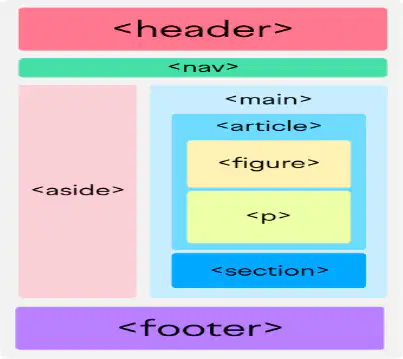
Based on the diagram, which of the following is a semantic HTML element?
div
span
header
br

Refer to the diagram titled "What Is Semantic HTML?" Which panel depicts non-semantic HTML?
The left panel labeled Non-Semantic HTML
The right panel labeled Semantic HTML
Neither panel
Both panels
Which items are listed under Applications in the passage? Select all that apply.
Personal websites
Business websites
Blogs
Video game consoles
Educational portals
Which advantages are listed at the top of the page? Select all that apply.
Easy maintenance
Better SEO structure
Reusable layout
Time-saving
Guaranteed cross-browser animation

Based on the diagram’s bullet list of semantic HTML tags and roles, which element represents the bottom section of a page?
nav
section
article
footer
According to the advantages listed for semantic elements, which benefit is explicitly mentioned?
Better SEO ranking
Requires CSS/JS for functionality
Neutral container for inline styling
No inherent benefits

From the table comparing semantic vs non-semantic elements, which of the following is a non-semantic element example?
header
article
nav
div

In the Browser Behavior row of the comparison table, what best describes non-semantic elements?
Default styling and accessibility support
Improves screen reader navigation by default
Requires CSS/JS for styling/functionality
Conveys a specific content role

According to the SEO & Accessibility row, which type of elements improves search ranking and screen reader navigation?
Semantic elements
Non-semantic elements
Only inline elements
Only block-level non-semantic containers

From the Use Case row, which statement aligns with semantic elements?
Layout grouping or inline styling
Structural content definition
Neutral container for arbitrary content
Primarily for visual effects only
According to the applications list shown, which are typical sites where semantic elements are applied? Select all that apply.
Blog websites
News portals
Business websites
Educational websites
Firmware update utilities

From the diagram’s mapping, which element is described as an independent block of content?
section
article
footer
nav
According to the definition provided, HTML5 Forms are primarily used to collect user input and send data to a server. What is the main purpose of HTML5 Forms as stated?
Collect user input and send data to a server
Display images and media content
Apply visual styles to webpages
Execute server-side programs automatically
Forms allow interaction between user and website. Which of the following purposes are explicitly listed for HTML5 Forms in the passage: collect user data; perform user registration/login; submit feedback; search information; process online forms? Select all that apply.
Collect user data
Perform user registration/login
Submit feedback
Search information
Process online forms
In the basic form structure shown:
method
action
name
type
In the basic form structure shown: Which input field is intended to accept an email address?
The input with type="email" and name="email"
The input with type="text" and name="username"
The input with type="submit" and value="Submit"
The label elements for Name and Email
In the explanation, the action attribute is described as "Server file". What does the action attribute of a form denote in this context?
The server file or endpoint that processes the submitted data
A CSS file that styles the form
A client-side validation script
The unique identifier of the form element
In the explanation section,
A form container that groups and submits user input
An external stylesheet for page styles
A site navigation menu
A database table schema
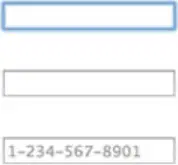
Refer to the image of the "Contact Us" form and code snippet showing an input with a placeholder like 1-234-567-8901. Which HTML5 input type is used for a phone number field in the example?
tel
text
number
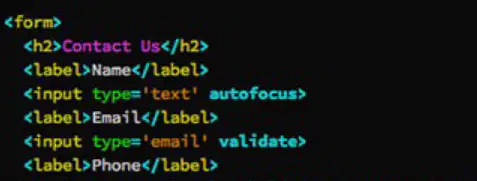
Refer to the code snippet in the image where the text input includes the attribute autofocus. Which attribute causes the cursor to be placed in the first text field automatically when the page loads?
autofocus
placeholder
validate
selected
Refer to the HTML snippet: . Which attribute makes this field mandatory for submission?
required
placeholder
pattern
name
From the line , what is the maximum allowed date value?
2026-12-31
2026-01-01
2025-12-31
2027-01-01
In the example , what increment does the slider use between values?
1
5
10
Depends on browser defaults
Consider the text input connected to a datalist: . What is the value of the list attribute?
browsers
browser-list
options
datalist
Looking at the datalist definition
0
1
2
3
In the button example , what text label appears on the button?
Save
Delete
Open in New Tab
Upload
For the button , which attribute bypasses form validation?
formnovalidate
required
pattern
enctype
In the control , which attribute causes the submission result to open in a new tab or window?
formtarget
target
_blank
value
From the select element containing two options (HTML and CSS), how many choices are listed within the select?
1
2
3
4
Examine the textarea example . What is the maximum number of characters allowed?
300
500
50
Unlimited
In HTML5 forms, which attribute makes a field a mandatory field?
required
placeholder
readonly
autofocus
In HTML5 forms, which attribute provides hint text for an input field?
placeholder
pattern
required
readonly
Which HTML5 form attribute sets auto cursor focus on page load?
autofocus
required
pattern
placeholder
Which HTML5 form attribute specifies a validation pattern for input?
pattern
readonly
placeholder
autofocus
Which HTML5 form attribute makes an input read-only?
readonly
required
pattern
placeholder
For the element , what is the input type?
text
number
url
Which of the following is an advantage of HTML5 forms?
Built-in validation
More JavaScript required
Less user-friendly inputs
Slower form processing
Select all advantages of HTML5 forms.
Built-in validation
Less JavaScript required
User-friendly inputs
Mobile optimized
Faster form processing
Which of the following is an application of HTML5 forms?
Login forms
Image sliders
Media playback controls
CSS grid layouts
Select all applications of HTML5 forms.
Login forms
Registration forms
Feedback forms
Online surveys
Code compilers

Refer to the diagram showing HTML5 semantic layout with boxes labeled header, nav, section, article, aside, and footer. Which element typically contains site-wide navigation links?
nav
header
aside
footer

Refer to the diagram showing HTML5 semantic layout. Which element represents complementary content often displayed alongside the main content area?
aside
section
article
footer
In an HTML document, what does declare?
The HTML document type definition
An external stylesheet
The character encoding
The script type
Which section of an HTML document encloses the visible page content?
body
head
footer
aside
Which section of an HTML document usually contains metadata such as the title?
head
body
article
footer
![MMT [S2025] - Chapter 1.2 - Mechanical Processing Methods](https://cf.quizizz.com/image/image-loader.svg)
