
 Worksheets
Lesson 1: Introduction and Objectives
Total questions: 81
Worksheet time: 41mins
Which URL parts are often visible in the address bar?
Mouse, keyboard, monitor
Scheme, host, path
GPU, PSU, RAM
Ink, toner, paper
Which are examples of wireless Internet connection types?
Dial‑up and DSL
Fiber‑optic and coaxial
Wi‑Fi and cellular data
Tape and floppy disk
Which tasks are typical during web browsing sessions?
Replacing router antennas
Following links, using tabs
Editing motherboard BIOS
Installing printer ink
Which protocol do web pages generally use to load?
SNMP or NTP
SMTP or POP3
SSH or Telnet
HTTP or HTTPS
Which example shows a valid domain with subdomain?
http:example:com
mail.example.com
example@mail.com
example#com@mail
Why is dial‑up considered less suitable today?
Requires special fiber cabling
Low speed and poor media support
Only works within browsers
Blocks all secure connections
Which acronym stands for the system that resolves names to numbers?
RAM
GPU
CPU
DNS
Which action is part of navigating the Web effectively?
Change keyboard layout
Follow relevant hyperlinks
Replace laptop battery
Upgrade power supply
Which item is not a top‑level domain?
.com
.net
.html
.gov
Which example shows a fragment in a URL?
?q=search after path
#section2 at the end
https:// at the start
example.com in middle
Which device translates wireless signals for home Internet?
External webcam
Wi‑Fi router
USB flash drive
Inkjet printer
Which protocol is commonly visible in a web address?
ssh or telnet
smtp or pop3
snmp or ntp
http or https
Which connection type often shares bandwidth with TV services in homes?
DSL connections
Fiber‑optic lines
Cable Internet
Satellite service
Which example shows using HTTPS for online forms?
Opening a text editor offline
Playing a DVD on a laptop
Printing a file on a school computer
Submitting a password on a secure site
Which items are examples of Internet protocols beyond HTTP?
SSH and Telnet
POP3 and DNS
FTP and SMTP
GPU and HDMI
Which differences between TLDs matter when evaluating sources?
.gov often indicates government agencies
.edu vs .com imply different typical owners
.mil relates to military organizations
.jpg indicates an image format
Which items describe how connection types compare?
Dial‑up slower; fiber faster
Satellite higher latency
Cable uses coax wire
DSL uses copper lines
Which actions use browser components to access information?
Solder motherboard chips, flash BIOS
Open calculator app, set alarm
Install car tires, change oil
Type URL, click links, read pages
Which term describes a single user computer that requests services from a networked resource?
Client
Server
Modem
Browser
Which item is used to connect a computer or server to an Internet Service Provider (ISP)?
Modem
Router
Packet
Cloud
What reconciles a website’s numerical IP address with its common name URL?
Hyperlink
Wi‑Fi
DNS
TCP/IP
Which phrase best defines TCP/IP in networking?
Storage space online
Wireless radio connection
A single HTML file
Communication rules for devices
Which description fits a packet in web communications?
A group of computers
A piece of information
A device for wireless
A common name string
What is the unique numerical number assigned to each device attached to the Internet?
IP Address
URL
DNS
Cookie
Which term refers to client-based software that enables reading and interacting with a website?
Web browser
Web page
Server
Cloud
Which option describes a hyperlink?
Number identifying a device
Collection of related pages
Wireless protocol for devices
Clickable link to another location
Which statement best defines the Internet?
Global connection of devices
A single site on HTML
Company providing access
Local wireless hotspot
What does URL represent for a website?
Numerical device identifier
Common name string with parts
Wireless frequency network
Rule set for communication
Which term means storage space on the Internet that anyone can use or access?
Cloud
Server
World Wide Web
Network
Which description matches a server in networking?
Computer sharing data to many
Single user machine
File written in HTML
Clickable text link
Which choice defines a network?
Wireless radio standard
Group of connected computers
One HTML file
Numerical Internet label
What is a web page?
The entire Internet
A browser application
A domain name record
A single file using HTML
Which term refers to a collection of related web pages?
Packet
Web browser
Wi‑Fi
Website
What is Wi‑Fi in this context?
Broadband wireless network
Numerical device address
Communication rules set
Clickable link element
Which phrase best describes the World Wide Web?
Number assigned to devices
Company selling Internet access
Collection of information on HTML
A single website homepage
Which item is primarily part of the World Wide Web rather than the Internet’s hardware?
Network cables and routers moving data
Data centers hosting physical machines
Web browsers that retrieve information
Servers storing information for clients
What do hyperlinks allow users to do on the Web?
Stream music and video in real time
Connect servers to local clients automatically
Browse from page to page by linking resources
Upload files to FTP servers securely

According to the cloud storage slide, what do you need to open files stored in the cloud?
Access rights and a web browser
Physical access to the data center
A local server and VPN tunnel
Admin rights and custom firmware

Select all items that belong to the Application layer in the cloud computing diagram.
Finance and Servers
Collaboration and Communication
Monitoring and Content
Compute and Block Storage

Which example is listed as a common cloud storage service on the slide?
Oracle VirtualBox
GitHub Desktop
Google Docs
Adobe Premiere

A student edits a document from home while a classmate views the changes from another city. Which cloud benefit makes this possible?
Hardware upgrades on local machines
Private offline backups for each user
Centralized files accessible via Internet
Faster printing from school computers
What happens to packets after they reach the destination device?
They are copied to multiple random servers
They are stored as separate files forever
They are reassembled into the original data
They are deleted immediately by the system
Which detail is added to packets to ensure correct reassembly?
Longer file names for each packet
Extra images for better visualization
Special information like order and checks
Random numbers that change each time
Select all items that are among the six elements needed to connect to the Internet.
Client software
A computing device
An operating system
TCP/IP protocols
A personal keyboard collection
Which role does an Internet Service Provider (ISP) play?
It assigns passwords for all your applications
It provides the gateway between you and the Internet
It is the hardware that stores your operating system
It is the browser installed on your device
What is the main purpose of TCP/IP on a device?
To manage photos and music files
To update the device’s screen resolution
To allow communication with other devices
To block all incoming connections
Which statement best describes dial-up access?
Cable company provides TV and Internet service
Modem uses a phone line to reach Internet
High-speed wireless for phones and tablets
Newest fiber-optic light pulse connection
Select all connections that are wireless.
Dial-up modem connection
Wi-Fi hotspots in public places
3G/4G mobile networks
Broadband satellite service
What happens when your device is within range of a Wi-Fi hotspot?
It connects via fiber-optic pulses
It switches to satellite service
It must dial through a modem first
It finds the connection automatically
Which part of the URL www.google.com indicates the server (host) name?
www
com
http
What does DNS primarily map to help users reach websites?
Emails to server folders
Usernames to domain names
IP addresses to MAC codes
Domain names to IP addresses
Which is a correct example of an IPv4 address format?
216.239.39.99
216-239-39-99
216:239:39:99
216,239,39,99
In www.google.com, what does the segment 'com' represent?
Subdomain label
Country code
Second-level domain
Top-level domain
Which statement best describes a domain name?
A registered website name
A browser application name
A local computer username
A file path on a server
What do the three parts server name, domain name, and top-level domain together create?
A unique web address
A local network group
A browser bookmark
A secure password
Which option lists the correct order of URL parts from left to right in www.google.com?
TLD, domain name, server
Server name, domain name, TLD
Domain name, TLD, server
Server, TLD, domain name
Select all TLDs intended for country codes from the list.
us
uk
net
de
ch
Which TLD is generally used by educational institutions?
edu
net
org
mil
Which TLD was originally for organizations like clubs and non-profits?
org
com
gov
us
A business selling shoes online would most commonly use which TLD?
mil
com
gov
edu
Which TLD is intended for U.S. civilian government websites?
gov
mil
us
net
Internet service providers historically used which TLD?
org
net
edu
ch
Which part of www.google.com is the second-level domain?
http
com
www
Which technology provides the rules for sending and receiving information on the web?
DNS translates names into IP numbers
URL identifies web resource addresses
HTML defines page structure and links
HTTP sets communication rules online
What is the main purpose of HTML in a web page?
Store login accounts securely
Format content and create hyperlinks
Assign IP addresses to servers
Encrypt data between browsers
Which statement about web browsers is true?
They replace the need for URLs and HTTP
They are servers that host all websites
They enable computers to retrieve and display pages
They always render HTML exactly the same
Which list contains examples of web browsers?
Google, Bing, Yahoo, DuckDuckGo
Linux, Windows, macOS, Android
HTTP, HTML, URL, DNS
Chrome, Firefox, Safari, Opera
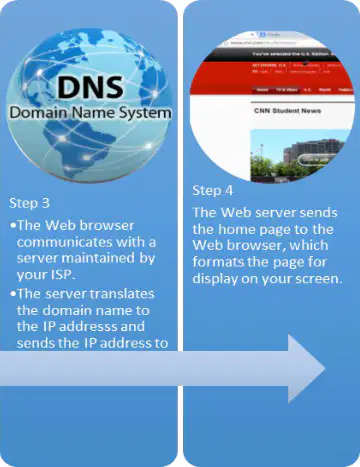
Put these steps in order for a browser loading a home page: click browser, server translates name to IP, browser looks up home page settings, server sends page to display.
Step 3, Step 2, Step 1, Step 4
Step 4, Step 3, Step 2, Step 1
Step 1, Step 2, Step 3, Step 4
Step 2, Step 1, Step 4, Step 3
Which pair correctly matches web term to role?
HTML — formats pages and hyperlinks
HTTP — web addresses for resources
URL — rules for online communication
Browser — retrieves and displays pages
Which action best describes what a hyperlink can do on a website?
Jump to a section within the same page
Close all open browser tabs automatically
Change your browser’s default homepage
Disable images from loading on all sites
Which statement correctly distinguishes internal and external links?
Internal links go to pages on the same site
External links only change text color
Internal links always open new browser windows
External links can never go to different websites
When your pointer hovers over a hyperlink, what common visual cue often appears?
Cursor turns into a hand icon
A pop-up menu always opens
Page scrolls down automatically
Text becomes bold italics instantly
After you click a hyperlink, which behavior sometimes indicates that the page was already visited?
Browser immediately deletes your history
The webpage title disappears entirely
Cursor becomes a loading spinner forever
Link text changes to a different color
Which option describes an external link’s destination?
A page on a completely different site
A hidden setting inside your browser
A file inside your computer’s recycle bin
A non-clickable word in the same sentence
Which is a valid use of a hyperlink beyond simple navigation?
Start an email to a specific address
Download a file to your computer
Open search results for information
Mute all audio on every website
A link formatted as mailto: support@example.com will most likely do what when clicked?
Play a video embedded on the current page
Install a new web browser without asking
Change all links to blue across the site
Open your email app with a pre-addressed message
Which destination is typical for an internal link?
Another page within the same site
A different website’s homepage
A hardware device’s firmware panel
A desktop application’s settings

In the diagram of a web browser, which tool lets you type a website URL or search terms directly?
Menu button with three dots
Address bar at the top
Bookmarks or Favorites bar
Home button icon

Which actions are correctly matched to the Back and Forward buttons in a browser? Select all that apply.
Open a new tab for a fresh page
Move ahead to a page you visited after the current one
Return to the previous page you visited
Bookmark the current page for later

You want quick access to a favorite website later. Which browser tool from the diagram should you use?
Reload button icon
Address bar only
Bookmarks or Favorites feature
Back button arrow

Which set correctly pairs tools with their typical functions? Select all that apply.
Bookmarks bar — close all tabs quickly
Menu button — open settings and more options
Home button — go to a preset start page
Address bar — enter URLs or searches

