

Chapter 1.1-1.2

Presentation
•
Computers
•
6th Grade
•
Practice Problem
•
Hard

Crystal Price
Used 4+ times
FREE Resource
15 Slides • 10 Questions
1

Computer Systems
Chapter 1
2

Vocabulary
●Hardware
●Program
●Software
●programmer/software developer
●Computer science
●running/executing
●Central Processing Unit (CPU)
●Server
●USB drives/Flash drives
●Microprocessor
●Primary memory/main memory
●Random-access memory (RAM)
●Volatile memory
●Read-only memory (ROM)
●Nonvolatile
●secondary memory/Secondary storage
●Flash memory
●Cloud storage/online storage
3

Introduction of Computer Science
A computer is a machine that processes information.
Computers comes in all shapes and sizes.
The physical parts of a computer are called hardware.
Hardware includes the screen, mouse, and keyboard as well as the processing
and storage devices.
4

At school use computers are used to write papers, conduct research and
participate in online classes.
At work people use computers to analyze data, make presentations, conduct
business transactions, communicate, control machines and much more.
At home people use computers to pay bills, communicate, and play games.
As well as their smart devices that connect to the internet such as
televisions, speakers, lights, doorbells and even automobiles.
5

Computers can perform such a variety of tasks because they can be
programmed. A program is a set of instructions that computer follows to
perform a task.
Programs are software. Software controls everything the computer does. A
programmer, or software developer, is person with the training and skills
necessary to design, create, and test computer programs.
Computer Science is the study of computers and computing.
6

Hardware
-Refers to all the physical devices or components of a computer
-A computer is not a single device but a system of devices working together
-Printers, keyboards, video displays
7

The major components of a computer are:
-The central processing unit
-Primary memory
-Secondary memory (storage device)
-Input devices
-Output devices
8

The CPU
When a computer is processing, or performing the tasks that a program tells it
to do, we say that the computer is running or executing the program.
The central processing unit (CPU) is the part of a computer that actually runs
programs. Without the CPU the computer could not run software.
CPUs are small chips known as microprocessors. Smaller and more powerful.
9

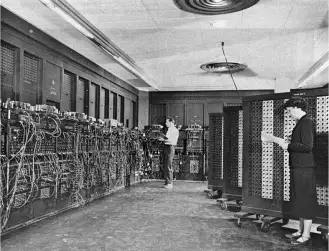
ENIAC
●1st Programmable electronic computer
●Build in 1945
●Designed to calculate artillery ballistic
tables for the US Army
●8 feet tall, 100 feet long and weighed
30 tons
●Two or more people to operate it
●Basically one CPU
10

Primary Memory
●The main memory
●The computer’s work area
●Sometimes referred to as primary storage
●Computers stores a program while it running as well as the data that the
program is working with
●
11

●Random access memory (RAM)is one type of primary memory
●CPU can quickly access data stored at any random location
●RAM is volatile that is used only for temporary storage while the program is
running
●RAM is erased when the computer is turned off
●Read-only memory (ROM) is another type of primary memory
●ROM stores instructions for starting the computer
●ROM is nonvolatile memory and is stores data permanently
12

Secondary Memory
Holds data for long periods of time
Referred to as storage or secondary storage
All programs are stored here and place in main memory as needed
All saved work is stored here as well
13

Disk drive is the most common type of secondary memory.
Solid state drives is another type of secondary storage. Most computers have
secondary storage device mounted inside their case.
External storage devices can be used as backup copies of important data or
move data to another computer
14

One type of external storage device is USB drives.
USB drives-small devices that plug into computer’s USB (Universal serial bus)
port and appear to system as a disk drive
They store information in flash memory and is sometimes referred to as
memory sticks or flash drives
They are small, inexpensive and reliable
15

Cloud storage/online storage is another example of external storage. It storage
space on a network server at a remote location.
Use a software application to upload and download files to the server over a
network.
Examples are Google Drive and Apple iCloud.
16
Multiple Choice
A _______ is set of instructions that a computer follows to perform a task.
17
Multiple Choice
The physical devices that a computer is made of are referred to as
18
Multiple Choice
The part of the computer that runs programs is called
19
Multiple Choice
CPUs are small chips known as
20
Multiple Choice
This a type of memory that is used only for temporary storage while a program is running
disk drive
21
Multiple Choice
The computer stores a program while the program is running, as well as the data that the program is working with, in
main memory
22
Multiple Choice
_____ is a nonvolatile primary memory
23
Multiple Choice
Is a secondary storage on a network server
24
Multiple Choice
A type of memory that can hold data for long periods of time, even when there is no power to the computer is called a
25
Fill in the Blanks
Computer Systems
Chapter 1
Show answer
Auto Play
Slide 1 / 25
SLIDE
Similar Resources on Wayground

20 questions
PART 1 - Canadian and Australian Economics (SS6E4/SS6E10)
Presentation
•
6th Grade
20 questions
Europe- Location/Human-Environment Interaction
Presentation
•
6th Grade
20 questions
Present Perfect and Past Simple
Presentation
•
6th Grade
20 questions
English
Presentation
•
6th Grade
20 questions
Scientific method
Presentation
•
6th Grade
17 questions
Digital Citizenship
Presentation
•
6th Grade
21 questions
Lesson 2 Word Essentials Review
Presentation
•
6th Grade
20 questions
The Scientific Method
Presentation
•
6th Grade
Popular Resources on Wayground
28 questions
US History Regents Review

Quiz
•
11th Grade
36 questions
Biology Regents Review
Quiz
•
9th - 10th Grade
20 questions
Math Review
Quiz
•
3rd Grade
38 questions
Regents Life Science General Review
Quiz
•
9th Grade
20 questions
Math Review
Quiz
•
6th Grade
21 questions
EOY Grade 6 Benchmark Assessment - Content Skills
Quiz
•
6th Grade
20 questions
Inferences
Quiz
•
4th Grade
20 questions
Figurative Language Review
Quiz
•
6th Grade
Discover more resources for Computers
20 questions
Math Review
Quiz
•
6th Grade
21 questions
EOY Grade 6 Benchmark Assessment - Content Skills
Quiz
•
6th Grade
20 questions
Figurative Language Review
Quiz
•
6th Grade
35 questions
MATH 6 FINAL
Quiz
•
6th Grade
20 questions
Math Review - Grade 6
Quiz
•
6th Grade
23 questions
Order of Operations
Quiz
•
6th Grade
16 questions
Summer school Trivia
Quiz
•
5th - 8th Grade
22 questions
Dot Plots and Histograms
Quiz
•
6th Grade