

HTML Lesson 2

Presentation
•
Computers
•
12th Grade
•
Easy

Mr Gabriel
Used 16+ times
FREE Resource
12 Slides • 7 Questions
1
2
H1 - H6 Tags
P tags
Br Tags
Hr Tags
Div
Ul and Li Tags
Ol and Li Tags

3
<h1> </h1>
The <h1> to <h6> tags are used to define HTML headings.
<h1> defines the most important heading and the biggest. <h6> defines the least important heading which is the smallest.

4


5
Multiple Choice
Which heading tag displays the largest text?
<h6>
<h5>
<h1>
<h3>
<h2>
6
Labeling
Place the heading tags in its proper location.
<h2>
</h5>
<h5>
</h3>
<h3>
<h1>
</h2>
</h1>
7
<p> </p>
A paragraph always starts on a new line, and browsers automatically add some space (margin) before and after a paragraph.

8
The <br> tag inserts a single line break.
The <br> tag is useful for writing addresses or other form of text.
The <br> tag is an empty tag which means that it has no end tag.
<br />

9
Multiple Choice
Does the line break tag "<br />" have a closing tag?
Yes
No
10


11
Multiple Select
Select the two tags that breaks the line.
<p>
<hr />
<br />
<dv>
12
The <hr> tag defines a thematic break in an HTML page (e.g. a shift of topic).
The <hr> element is most often displayed as a horizontal rule that is used to separate content (or define a change) in an HTML page.
<hr />
13

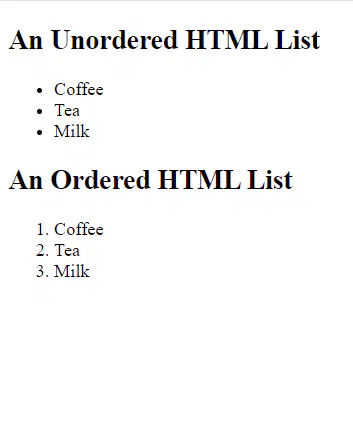
Example of an Ordered and Unordered List
14
<ul> </ul>
An unordered list starts with the <ul> tag. Each list item starts with the <li> tag.
The list items will be marked with bullets (small black circles) by default.
15
Dropdown
<
<
<li> List 2 <
<
16
<ol> </ol>
An ordered list starts with the <ol> tag. Each listed item starts with the <li> tag.
The list items will be marked with numbers by default.
17
Dropdown
<
<
<li> List 2 <
<
18
Open Ended

Utilize this image and write HTML code matching this Image.
Remember:
<h1> </h1> - for heading.
<ul> </ul> - unordered list
<ol> </ol> - ordered list
<li> </li> - lists
19
Create an unordered and ordered list.
Open Visual Studio Code
Name your file Classwork-2.html
Start with the basics <!DOCTYPE html>
Create a random list using the <ol>, <ul> & <li> tags
Classwork will be graded today
Show answer
Auto Play
Slide 1 / 19
SLIDE
Similar Resources on Wayground

13 questions
Exploring the World Wide Web
Presentation
•
12th Grade
15 questions
Social Network
Presentation
•
12th Grade
13 questions
Unidad 2
Presentation
•
University
16 questions
Komputer Akuntansi
Presentation
•
12th Grade
12 questions
Trophic Levels
Presentation
•
11th - 12th Grade
15 questions
แบบทดสอบ react native&expo snack
Presentation
•
12th Grade
12 questions
ASK BAB 1: ULANGKAJI
Presentation
•
12th Grade
16 questions
Collisions
Presentation
•
12th Grade
Popular Resources on Wayground
10 questions
Safety Day 2026 – Student Review

Quiz
•
9th Grade
21 questions
Continents and Oceans
Quiz
•
6th Grade
20 questions
Parts of Speech
Quiz
•
5th Grade
16 questions
Subject & Predicate
Quiz
•
5th Grade
25 questions
Multiplication Facts
Quiz
•
5th Grade
12 questions
Map Skills
Quiz
•
3rd Grade
22 questions
Continents and Oceans
Quiz
•
5th Grade
15 questions
Rounding Decimals
Quiz
•
5th Grade