
T3 P3 Q 10pts
Authored by JP Rocabo
Computers
2nd Grade
Used 22+ times


AI Actions
Add similar questions
Adjust reading levels
Convert to real-world scenario
Translate activity
More...
Content View
Student View
10 questions
Show all answers
1.
MULTIPLE CHOICE QUESTION
1 min • 1 pt

What is the purpose of the Menu in Scratch 3.0?
To draw banana
To access options like saving, loading, or creating a new project
To add hamburgers
To preview your animation
2.
MULTIPLE CHOICE QUESTION
1 min • 1 pt

What does the Filename in Scratch 3.0 help you do?
Add ketchup to your fries
Identify and name your project for saving or sharing
Change the face
Set the speed of animations
3.
MULTIPLE CHOICE QUESTION
1 min • 1 pt

What do the Tabs in the Scratch editor allow you to do?
Change your watermelon
Download
Switch between Code, Costumes, and Sounds
Share your project on social media
4.
MULTIPLE CHOICE QUESTION
1 min • 1 pt

Where can you find different categories of code like Motion, Looks, and Control?
Sprite List
Food Menu
Coding Drawers/Palette
Area 51
5.
MULTIPLE CHOICE QUESTION
1 min • 1 pt

What are Coding Blocks used for in Scratch 3.0?
Drawing circles
Giving instructions to sprites through code
Uploading projects
Adding salt to your omelette
6.
MULTIPLE CHOICE QUESTION
1 min • 1 pt

What is the Backpack used for in Scratch 3.0?
Storing downloaded projects
Saving and reusing scripts, sprites, and sounds across projects
Changing your notebook
Sending messages in Facebook
7.
MULTIPLE CHOICE QUESTION
1 min • 1 pt
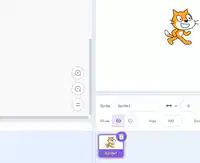
What does the Zoom in or out feature allow you to do in the code area?
Increase the number of children
Adjust the stage size
Make the code blocks appear larger or smaller
Record a video of your face


Access all questions and much more by creating a free account
Create resources
Host any resource
Get auto-graded reports

Continue with Google

Continue with Email

Continue with Classlink

Continue with Clever
or continue with

Microsoft
%20(1).png)
Apple

Others
Already have an account?


