
 Worksheets
Excel Certification Practice test
Total questions: 30
Worksheet time: 31mins

To format the table so that every row is shaded you need to go to:
Click on the table and go to the Design Tab
Design Tab
Data
Page Lay out

Juan is the director of a summer camp. This spreadsheet contains campers’ names, information, and their counselors.
Which two features will help him sort the list by counselor, and then print out a list containing only the campers’ and counselors’ names?
Sort and Track Changes
Format and Hide Columns
Custom Sorting and Formatting
Custom Sorting and Hide Columns

Maria wanted to find the average of all of her grades, but can not get her function work. Her spreadsheet is below. What error is Min making?
She has the incorrect arguments
She has the wrong function name
She is missing an equal sign at the beginning of her formula
The colon should be replaced with a dash (-)
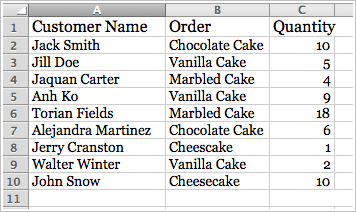
Gloria wanted to find the total amount of vanilla cakes ordered. Which of the following formulas should she use?
=(C3+C5+C9)/3
=SUM(C2:C10)
=AVERAGE(C2:C10)
=(C3+C5+C9)

To have Excel remove any duplicate records that have the same ID#, which value(s) should be checked?
ID# only
ID# and Last Name
ID # and Last Name and First Name
No values should contain a check mark
Which sort option would showing increasing values or alphabetical order?
Ascending
Descending
What functions checks if a condition is met and returns one value if True or another value if False?
SUMIF
COUNTIF
IF
AVERAGEIF
To import a file into Excel go to:
Insert tab -> Object
Data tab -> From Text/CSV
Insert tab
Data tab -> From Other Sources
To modify document properties go to:
File tab -> select Show All Properties
FIle tab -> Settings
File tab - > New
Insert tab-> Object
To show all formulas in a workbook go to:
Formulas tab - > Insert Function
Formulas tab - > Name Manager
Formulas tab - > Define Name
Formulas tab - > Show Formulas
To set an area of the sheet that you would like to print go to:
Page Layout -> Print Titles
Page Layout -> Print Area
Page Layout -> Size
Page Layout -> Margins
TO convert a range of cells into a table go to:
Home tab - > Conditional Formatting
Insert tab -> Pivot table
Home tab -> Format as Table
Insert tab -> Column Chart
To create a custom sort that sorts multiple columns and rows go to:
Home tab -> Find & Select
Home tab -> Sort & Filter
Home tab -> Format Painter
Home tab -> Format
To add a link to a place in the workbook go to
Insert tab -> Hyperlink
Insert tab -> Text Box
Insert tab -> Object
Insert tab -> Header & Footer
What is the Excel function used to provide the greatest value?
LOWER
MIN
MAX
GREATEST
What is the Excel function to join names with a delimiter?
LEFT
PROPER
TEXTJOIN
RIGHT
What Excel function is used to calculate the average of a range of cells?
IF
AVERAGE
SUM
AVERAGEIF
What Excel function counts the characters inside a cell?
LEN
AVERAGE
IF
COUNT
What Excel Function adds the total value of a range of cells?
IF
SUM
SUMIF
AVERAGE
How can you locate and remove personal information in a workbook?
File tab ->Save As
File tab -> Open
File tab -> Show All Properties
File tab -> Check for Issues -> Inspect Document
How do you configure a worksheet so that the column headings on all printed pages?
Page Layout tab -> Print Titles
Page Layout tab -> Margins
Page Layout tab -> Set Print Area
Page Layout tab -> Orientation
What function can be used to display names in lower case?
LEFT
LOWER
PROPER
RIGHT
How do you move a chart to a new sheet?
Chart Tools Design tab -> Format Chart
Chart Tools Design tab -> Chart Colors
Chart Tools Design tab -> Move Chart
Chart Tools Design tab -> Chart Styles


To show all formulas in a workbook go to:
Formulas tab - > Insert Function
Formulas tab - > Name Manager
Formulas tab - > Define Name
Formulas tab - > Show Formulas
To hide the rows in a worksheet go to
Home tab -> Insert
Home tab -> Delete
Home tab -> Find & Select
Home tab - Format
What is the Excel funtion to join names without a delimiter?
LEFT
PROPER
CONCAT
TextJOIN

