
 Worksheets
End of Semester Final: Info Tech
Total questions: 105
Worksheet time: 4hrs 30mins
What does "branding" mean in digital marketing?
Your target market
Market Segmentation
Personal identity/image
All of them
Gives you a soft edge to draw with
Brush tool
Filter
Gradient tool
Lasso select tool
Hand tool
Allows you to move the canvas around
Lets you draw an area to select
Lets you quickly "paint" a selection using an adjustable round brush tip
Allows you to add alphanumeric characters in a variety of fonts
Has the opposite function of a brush in that it eliminates pixels on a layer
Eraser tool
Brush tool
Zoom tool
Quick selection tool

Gradient tool
Magic wand tool
Polygonal lasso tool
Shape tool
Allows you to choose colors throughout the image
Eyedropper tool
Lasso select tool
Paint bucket tool
Quick selection tool

Zoom tool
Polygonal lasso tool
Magic wand tool
Gradient tool
File
Menu you use to open or save
Menu you use to add effects
Allows you to click through the changes you've made to the image. Kind of like "undo" but better.
Lets you see all of the different layers of your design and move them around.
Menu you use to add effects
File
Filter
Layers window
History window
Magic wand tool
Automatically selects areas of similar color
Lets you quickly "paint" a selection using an adjustable round brush tip.
Allows you to create a variety of pre-set objects
Allows you to select rectangular areas
Move tool
Allows you to move elements in the image
Lets you create a straight-edged area to select
Allows you to move the canvas around
Has the opposite function of a brush in that it eliminates pixels on a layer
Lets you quickly "paint" a selection using an adjustable round brush tip.
Quick selection tool
Rectangle Select tool
Polygonal lasso tool
Magic wand tool

Rectangle Select tool
Shape tool
Gradient tool
Lasso select tool
Allows you to add alphanumeric characters in a variety of fonts
Type tool
Move tool
Lasso select tool
Eyedropper tool
If you want to save a project that you will edit later, choose this option:
Export as PNG
Export as JPG
Save As PSD

Identify the correct option for A (Hint: hover mouse over image for larger view)
Font Style
Font Size
Font Name
Identify the correct option for B (Hint: hover mouse over image for larger view)
Font Style
Font Size
Font Name
How do you feel about your Photopea skills so far?
I am comfortable and understand how to use the tools
I'm still learning and sometimes get confused
I don't know how to use the program

Identify the area of the Photopea interface shown in the image.
main toolbar
menu bar
options bar
palettes
workspace

Identify the area of the Photopea interface shown in the image.
main toolbar
menu bar
options bar
palettes
workspace

Identify the area of the Photopea interface shown in the image.
main toolbar
menu bar
options bar
palettes
workspace
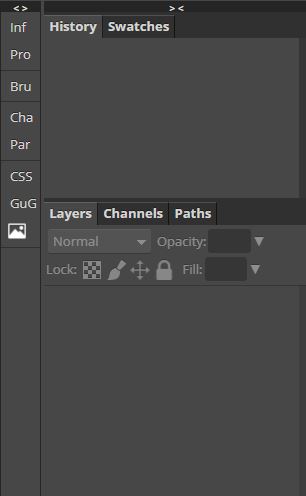
Identify the area of the Photopea interface shown in the image.
main toolbar
menu bar
options bar
palettes
workspace
If you wanted to open an existing project in Photopea, which part of the interface would you access?
main toolbar
menu bar
options bar
palettes
workspace
Shape tool
Allows you to create a variety of pre-set objects
Allows you to add alphanumeric characters in a variety of fonts
Fills an area with a color or pattern
Creates a smooth transition between 2 colors
Hand tool
Allows you to move the canvas around
Lets you draw an area to select
Lets you quickly "paint" a selection using an adjustable round brush tip
Allows you to add alphanumeric characters in a variety of fonts
Photopea is a ________________ software
video editing
Image editing
Font editing
format editing

What tools is this and what is it's function?
Erase Tool: Changes pixels to the background color makes them transparent
Clone Stamp Tool: Paints with pixels from another part of the image
Hand Tool: Pass over different parts of an image
Dodge Tool: Lightens areas in an image

What tool is this and what is it's function?
Spot Healing Tool: Removes marks and blemishes
Bandaid Tool: Heals mistakes
Eyedropper: Selects colors from images
Brush tool: Paints custom brush strokes
How do you create a new layer?
Click the new folder button
Go to the layers panel and click the new layer button
File - New layer
Keep adding design elements and layers will create themselves.

What is this tool called?
Magic Wand
Paintbrush
Pencil
Lasso Select

What is this tool called?
Text Tool
Move Tool
Pen Tool
3D Tool

What is this tool called?
Select tool
Move tool
Resize tool

What is this tool called?
Move tool
Lasso Select
Magnetic Lasso
Shape Tool

What is this tool called?
Add new layer
New Adjustment layer
New Folder
Add raster mask

How do you remove a selection? What button is pressed on the keyboard?
Delete
Remove
Return
Command
What is the term used to making something bigger or smaller?
Free tranform
Free form
Free range
Transform
What keyboard combination do you use to copy something?
Command + C
Command + D
Control + C
Option + Control + C
What keyboard combination do you use to paste something?
Command + P
Command + V
Control + V
Option + Control + P

Which one of these names is a Selection tool?
Free Transform
Paint Bucket
Lasso Tool
Eraser
What tool makes colors lighter?
blur
smudge
eraser
dodge

What is the name of these tools?
blur and sharpen
clone stamp
brush
eraser
Shortut key for brush tool
P
B
D
E
Shortut key for brush tool
P
B
D
E

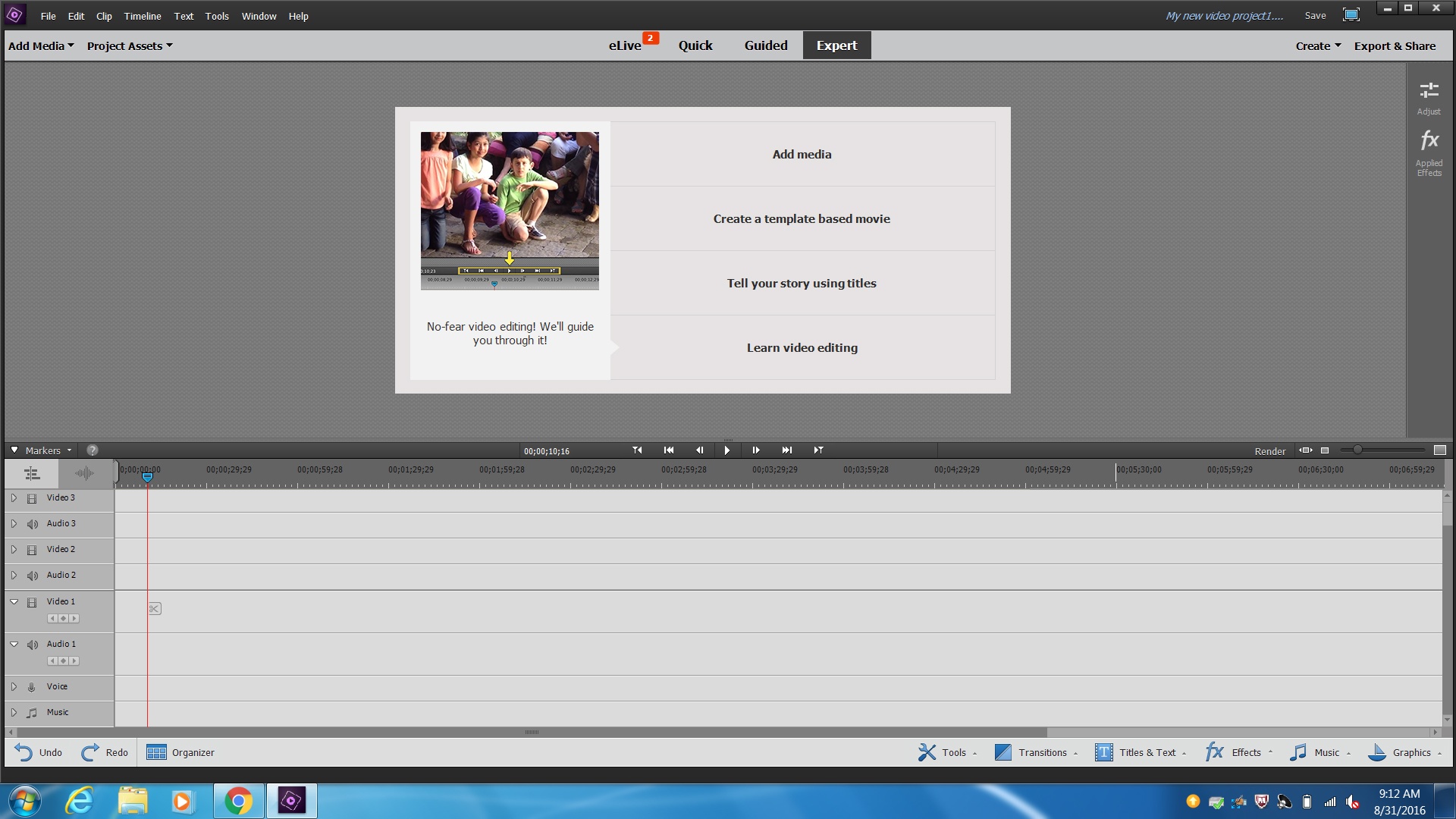
This icon allows you to undo your last edit. What number am I?
1
2
3
4
5
This icon allows you to split your clip. What number am I?
1
2
3
4
5
This icon allows you to copy your clip. What number am I?
1
2
3
4
5
This icon allows you to paste your clip. What number am I?
1
2
6
4
5

What icon allows you to text? What number am I?
1
2
3
4
5
What icon allows you to return to your media? What number am I?
1
2
3
4
5
What icon allows you to do a transition? What number am I?
1
2
3
4
5

If you have video files on your drive you will click on this number to access them.
1
2
3
4
If I use this icon I can film directly from the camera on my chrome book.
1
2
3
4

Which number will show you your media?
1
2
Which number will show you your edited video?
1
2

This icon will bring you to stock footage. What number am I?
1
2
3
4

a piece of narration in a movie or broadcast, not accompanied by an image of the speaker.
edit
voiceover
ducking
fade
A common type of transition in both video and audio.
fade
frame
event
transition
Effects that are applied to edit points to smooth out a change from clip to clip. You can choose from a variety of them, such as a dissolve or wipes.
fade
frame
event
transition
After you've assembled your clips in rough chronological order in the Timeline, you begin to fine-tune the cut point (or edit point) between each pair of contiguous clips.
Blade Tool
Hand Tool
Position Tool
Scissors Tool
The sound added to the film including music, narration, effects, and environmental sounds.
Media
Audio
Sweetening
Transitions
If I needed to cut down a clip what tool would I use?


Computers operate at the most fundamental level in?
machine language
binary code
base ten code
ASCII code

Temporary storage of data in a computer is in the?
Hard disc drive
The USB drive
RAM
ROM

One example of an operating system is?
Office 365
Excel
Word
Windows 8.0

Raw data that is fed into an information system .
Input
Out put
Process

The term used to describe the way information systems converts raw data into useful information
Input
Output
Storage
Processing

visible or audible results of data processing
Input
Output
Processing
Storage

Is the unit which carried out all instructions and it’s the brain of the information system.
Touch screen
scanner
visual display
CPU

Items of hard ware that make up a computer system
Keyboard
Mouse
Monitor
Headphones
All Above

Output is a result of data process
True
False

Data is stored temporarily while a program running
True
False


Databases are used for:
To store information
To create a presentation
To setup information
To entertain your friends

The "Brains" of the computer. Executes the commands of the software installed on the device.
Desktop Computer
Browser
Software
CPU

Programs or Instructions that are installed onto a device that give it instructions on what to do.
Hardware
Software
Input Device
Output Device

PC stands for...
Personal Caterpillar
Panda Canvas
Paper Cutter
Personal Computer

Computers send information around the internet as Binary Code.
True
False

How many bits is one byte.
6
7
8
9

What is information technology?
Technology that enables information to be used to produce products & services
Technology that contains all of the important information of a business
A network that connects people
Computer engineer


What is the meaning of CPU?
Central Processing Unit
Crucial Processing Unit
Critical Processing Unit
Center Processing Unit

The acronym for PC stands for
Private Computer
Personal Computer
Personal Compact
Privacy Computer

Complex scientific research is usually done by
Mainframe computer
Supercomputer
Minicomputer
Microcomputer


Bit is short for what two words?
Bitty Digit
Binary Digit
Bilateral Argument
Bit of Code

How many bits are there in one traditional Byte?
2
8
16
32

RAM is an example of __________ storage type.
permanent
primary
secondary
direct

Once a computer is turned off, the ___________ no longer stores any data.
RAM
hard drive
CMOS
DVD

RAM stands for
Revised Allied Memory
Read access Memory
Reusable Added Memory
Random Access Memory

Which are the computers which are the fastest?
Mini Computers
Mainframe Computers
Super Computers
Micro Computers

OS
Outside System
Other System
Operation Style
Operating System

Define computer.
A machine that can be programmed to accept data (input), process it into useful information (output), and store it away (in secondary storage device) for safekeeping or later reuse
Any technology that helps to produce, manipulate, store, communicate, and/or disseminate information.
The interrelationship of user (people) to communicate with programs (software) and physical components (hardware)
Accept data or commands in a form that the computer can use; they send the data to or commands to the processing unit.

What am I?
Desktop PC
Smart phone
Laptop
Mainframe computer/server

What am I?
Desktop PC
Mainframe/server
Laptop
Smart Phone

Which type of computer is built to support an organization's information?
Mini
Mainframe
Embedded
Super

Name the above device:
Mouse
CPU
Keyboard
Scanner
What's the main difference between a supercomputer and a mainframe?
There is no real difference between both computer systems.
Mainframes are good for large and complex calculations, whereas supercomputers are good in doing a large quantity of small tasks at the same time.
Supercomputers are good for large and complex calculations, whereas mainframes are good in doing a large quantity of small tasks at the same time.
Mainframes are designed to look aesthetically pleasing, whereas this is not the case with supercomputers.

Computers only understand (a) language

