
 Worksheets
Year 11 GAIT Quiz Week 4
Total questions: 150
Worksheet time: 1hrs 17mins
Identify the component that protects the internal hardware of a computer system unit
RAM
Case
Hard Drive
Power Supply
Which component is the brain of the computer?
CPU
RAM
Hard drive
Motherboard
Identify the component that stores the information being accessed by the CPU.
RAM
Hard Drive
Power Supply
Motherboard
Which type of hard drive has no moving parts?
RAM
Motherboard
Magnetic Drive
Solid State Drive (SSD)
Which of the following is an input device?
Monitor
Projector
Speaker
Keyboard
Which of the following is an output device?
Mouse
Monitor
Keyboard
Microphone
Which of the following is a storage device?
Monitor
Scanner
Speaker
Flash Drive
Identify the most common type of connector for a keyboard and mouse.
USB
VGA
RJ-45
DB-25


What is this hardware component?
RAM
Hard Drive
USB
Ethernet
A computers long term memory is stored on the __________.
Random access memory
CPU
Motherboard
Hard Drive

What is this hardware component?
motherboard
CPU
power supply
graphics card
The brain of the computer that processes info and carries out commands.
motherboard
RAM
hard drive
CPU

What hardware component is this?
CPU
motherboard
RAM
Remote Access Memory
The main circuit board that holds and connects main parts of the computer
CPU
RAM
Ethernet
Motherboard

Name these ports.
SSD
USB
RAM
VGA

This port is used to connect.....
The mouse
The keyboard
The Monitor
The printer

The blue cord that connects computers to display devices
HDMI
VDI
DMI
VGA

This cord connects the....
monitor to the computer
computer to the internet
printer to the computer
mouse to the computer

This port is used to connect the computer to the.....
printer
monitor
internet
keyboard
A computers short term memory used to complete calculations
hard drive
cloud storage
RAM
disc drive

You would plug the power cord into port number....
3
6
7
12

You would plug the VGA connector into port number
3
8
10
11

You would plug the ethernet cord into port number...
3
4
7
8

You would plug the mouse into port number....
3
7
8
11
Which of the following would NOT be plugged into a USB port?
printer
mouse
monitor
keyboard
Which of the following is NOT a hardware component for a computer?
mouse
motherboard
Microsoft Word
CPU
What is the smallest measurement used to measure a computer memory ?
Megabyte
Terabyte
Yottabyte
Bits
What are the types of Computer Memory ?
Primary memory and Secondary memory
Non of these
Primary memory
Secondary memory
What are the types of of Primary memory
RAM and ROM
RAM
ROM
CD
What is the full form of RAM
Read only memory
Random Access Memory
Radom Access memory
non of these
What is the full form of ROM
Read only Memory
Read or write memory
non of these
Ram is a Temporary Memory
True
False
A secondary memory can also be called as
Backup Memory
Main memory
Internal memory


Typing an essay in Word is an example of input.
Yes, because you're inserting data into the computer.
No, because you're not introducing data into the computer.
I don't know.
Taking a picture with the cell phone is an example of output.
Yes, because it's the result of processing data.
No, because it's not the result of processing data.
I don't know.
Printing a document is an example of output.
Yes, because it is the result of processing data.
No, because it's not the result of processing data.
I don't know.
Listening to audio through the speakers is an example of input.
Yes, because you're inserting data into the computer.
No, because you're not inserting data into the computer.
I don't know.
Is this a valid example of the Input-Process-Output Model?
Input: Scanning picture.
Process: Editing the picture.
Output: Printed poster with picture.
Yes.
No.
I don't know.
Is this a valid example of the Input-Process-Output Model?
Input: Text and numbers typed on keyboard.
Process: Calculations performed in a spreadsheet.
Output: Bank record.
Yes.
No.
I don't know.
Check all the examples of Input Units.
Keyboard
Microphone
Speakers
Mouse
Check all the examples of Output Units.
Screen.
Printer.
Headphones.
Keyboard.
The control unit, arithmetic logic unit and memory are together called Central Processing Unit or CPU.
Yes
No.
I don't know.
Hardware cannot be touched, only software can be touched.
Yes.
No.
I don't know.
Software is the set of instructions or programs that make a computer function. It cannot be touched or seen.
Yes.
No.
I don't know.
Why is it important to have antivirus software installed on your computer?
To track your finances
To stop others from plagiarizing your work
to prevent others from stealing your device
To stop hackers from harming your computer
Which of the following are malware?
spyware
Trojan Horse
viruses
All these answers are correct
Your computer won't turn on. What should you do first?
Don't Panic
Check Power cords
Check cable connections
Why is it important to know how to troubleshoot your computer?
You can help others
All these answers are correct
To save money
There may not always be someone to help you.
Computer viruses are
Programs that hackers use to harm your computers or steal info.
A sickness that humans catch from computers
can only be acquired through the internet
can only be acquired through email
Why is it better to use a keyboard command to close a pop-up window?
It works faster
Computers only understand keyboard commands
The X or close button may actually be programmed to install
There is no benefit
Which of the following is considered malware?
spyware
anti-virus software
open source software
Apps
You computer is running slow and you are having trouble connecting to websites. What should you do?
Check power source and internet cables
Check internet cables and network connections, and do a virus scan
Check power cords, internet connections, and do a virus scan
Check power cords, all cables going in and out of the computer, check internet connections, check network connections, do a virus scan and restart.
You can't get on your school's network(not internet). What should you check first?
Your cable company
cables going into and out of your computer
your internet connection
cable connected to your monitor

this picture means?
the computer does not give out a sound
the sound is to loud
do talking in the classroom

My computer isn't working correctly. I should:
log out and log back in.
restart my computer.
clear my cache and cookies.
All of these are good choices.
The copy and paste short cuts are:
Ctrl+C and Ctrl+V
Ctrl+C and Ctrl+P
right click copy and right click paste.
Ctrl+Alt+Delete
If you turn on a PC and the system unit is clearly ON, but the monitor is dark, the problem could be that:
The monitor is not turned ON
The monitor is not plugged in
The monitor is not connected to the PC
Any or all of the above
If a PC freezes or behaves otherwise erratically, and the system unit is very quiet, the most likely cause is:
A virus has infected the system
The hard-drive is almost out of space
The CMOS RAM is failing
The power-supply fan has failed and the system is overheating
What should you do if you receive the following message:
Cannot find a device file that may be needed to run Windows or a Windows application...zyvxd.386
Press any key to continue?
Power the machine OFF, then ON to resync the kernel
Replace the hard drive
Start Windows and run Scandisk to reload the missing file(s)
Press any key to continue loading Windows and, then, either reload the missing file or remove the line in SYSTEM.INI that loads it
What is a GPF?
A hard drive with insufficient available space
Part of the Microsoft General Procedures For Windows operating systems
A Windows General Protection Fault
All of the above
For ALL PC generations beyond the first, when most PCs are powered OFF, the clock and calendar in the system:
Continue to function because they are powered by an on-board battery
Continue to function because they are powered by wind-up spring like a wristwatch
Cease to function and must be reset after re-boot
None of the above
What's likely to happen when Windows' System Resources drop below 60%?
Intel Pentium CPU chips run more efficiently
Anti-viral applications can safely scan system files
The system will crash
The system will overheat
Which Windows file loads applications that run when Windows opens?
AUTOEXEC.BAT
WIN.INI
SYSTEM.INI
Either A or C above
If, upon booting up a PC, you see a message that says: Invalid drive configuration, it could very likely be:
The hard drive cable within the system unit is not attached to the controller
The hard drive has failed
The hard drive has not been partitioned
Any of the above
What significance do the "beeps" have during the boot process of a PC?
The number of beeps describe the quality of the processor
The number of beeps describe the speed of the RAM Chips
The number and length of the beeps indicate a hardware problem
You can tell how powerful the PC is by the loudness or intensity of the beeps

Ben will be working on a team to design an improved outdoor light. What should they do BEFORE beginning improvements?
improve their new design
keep the old design just as it is
test their new design
test the old design
What is the MAIN goal of the design process?
to find solutions to problems
to give scientists something to do
to make charts and graphs
to write articles for magazines

Caroline is researching new computers.She wants to find a computer with the newest technology. Which computer is she MOST likely to choose?
the biggest computer
the least expensive computer
the oldest computer
the computer with the fastest processing speed
The design process is....
a systematic way to rule out group ideas
a ranking system where a score is given for categories
a systematic method used by engineers to solve problems
Which step of the design process includes "Brainstorming"?
Define problem
Generate concepts
Build a prototype
When you build your prototype it is really important to do this...
Rebuild it
Test it many times
Present it
Designing a solution means to...
Come up with a detailed plan
Brainstorm
Present your findings
Presenting your solution is like:
Looking for flaws
Pitching your sales idea
Brainstorming
Asking things like "What is the issue we need to solve?", or "What are my criteria/constraints?"...would be which step?
Design a solution
Generate Concepts
Define Problem
When I look for and collect data for FLAWS in my design, I am at this step:
Design a solution
Build/Test prototype
Evaluate solution
We usually draw a rough sketch during this step:
Generate Concepts
Build/Test Prototype
Evaluate Solution
If I find flaws in my solution I should....
Create a technical drawing instead
Be formal and perfect
go back and make modifications before moving forward
What do we call limitations like "time, cost and/or materials" within a challenge?
Complications
Constraints
Criteria
What are the "Must-Haves" in a project or challenge called?
Criteria
Constraints
Brainstorming
Adding a detailed drawing of the group's idea is completed at this step of the design process.
Define the problem
Design a solution
Evaluate solution
Even though we can "always" go back and fix a flawed solution, at what step would it be hardest to "go backwards"?
When you are building/testing a prototype
When you are evaluating a solution
When you are presenting your solution
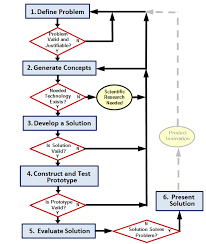
Why are there arrows going in all directions here?
To show that many ideas come from everyone
To show that the chart is incomplete
To show that you can go back to previous steps if needed
Often times creating a Design Brief takes place during this step:
Design solution
Build/Test prototype
Define Problem
State True or False
The design process should suffer from ʻtunnel vision.ʼ
True
False
State True or False
Design is not coding, coding is not design. !
True
False
At which stage is the user guide created?
Analysis
Design
Testing
Documentation
At which stage do the developers interview the client?
Analysis
Design
Testing
Documentation
At which stage do the developers plan the structure of the program?
Analysis
Design
Implementation
Documentation
At which stage do the developers decide the layout of the user interface?
Analysis
Design
Implementation
Evaluation
At which stage do the developers code the program?
Analysis
Design
Implementation
Evaluation
At which stage do the developers consider whether the program meets the requirements?
Analysis
Implementation
Testing
Evaluation
At which stage do the developers consider whether the program can be improved?
Analysis
Implementation
Testing
Evaluation
At which stage do the developers try to discover any logic errors in the code?
Analysis
Implementation
Testing
Evaluation
At which stage do the developers check that only valid input is accepted by the program?
Design
Implementation
Testing
Evaluation
At which stage do the developers interview the client?
Analysis
Design
Testing
Documentation
Identifying the “target population” or “target audience” occurs during which step of the engineering design loop?
Identify the Need
Research the Problem
Develop Possible Solutions
The engineering design process is iterative. This allows engineers to…
become proficient at different engineering software applications
find the most optimal solution to a design problem
incorporate both math and science concepts into a design problem
When finding the solution to an engineering design problem, there is/are usually…
only one possible correct solution
a very limited number of possible correct solutions
many possible correct solutions
Which of these is NOT a purpose
Entertain
Inform
Gender
Advertise

Who is the target audience for this image?
Males
Children
Adults
Females

What is the purpose of this document?
Advertise
Educate
Inform
Entertain

Who is the target audience?
Children
Young Adults
Older Adults
Females

What is the purpose of this image?
Promote
Inform
Educate
Entertain

Who is the target audience for this image?
Males
Children
Females
Flower Enthusiasts

What is the purpose of this document?
Advertise
Educate
Inform
Entertain
What is the definition of a Target Audience?
The people who a document is made for
The group of people that make a product
A particular group at which a product, service or information is aimed
A particular group that decides what a product will look like

What is the purpose of this document?
Promote
Entertain
Advertise
Educate
First, remove your new Smartwatch from the packaging. Attach your charging chord to the watch. Now, using a Blue-tooth connection, sync your phone to your watch. Next, let your watch charge for at least twenty-four hours. Your new high-tech watch will be ready to wear soon.
Who is the target audience for this short passage?
technology gurus
all watch wearers
Smartwatch consumer
iPhone owner
Which TWO of the following are correct definitions of a target audience?
People who will use the product for which the ad is written
People who will create the presentation
People for whom the text is written
People who hold a target
People who are making the product
Who is most likely the target audience for a novel or short story about the old West and cowboys?
young girls who love romance
individuals who are interested in high -tech toys
people who love horses and who wear western wear
an English teacher who loves Shakespeare's sonnets
An informational how-to manual is most likely targeted towards which of the following?
a bicyclist
an automobile racer
someone who just purchased a new product
someone who needs to speak with an accountant about their taxes
A speech written by a parent, complaining about the grading procedure in her child's school would most likely be targeting whom?
other students in her child's class
the school cafeteria manager
the local governing body (supervisors/commissioners)
the local school board

From this list pick the target audience for this film.
Sci-fi Fans
Documentary Fans
Sports Fans
Musical Fans

From this list pick the target audience for this film.
Romance Film Fans
Horror Film Fans
Thriller Fans
Mystery Fans

Who is the intended audience for this film?
Children
Teenagers
Young Professionals
Retired people
Nobody

Choose from the list the considerations for children this film made?
Bright Colours
Likeable characters
Dark and Gritty Story
Short snappy Title
It's Disney

Which of the following groups would be the most likely target for this ad?
Dogs
Pet owners
Teenagers
Parents

Which of the following groups would be the most likely target for this ad?
Elderly people
Teenagers
People on the East Coast
Mothers

Which of the following groups would be the most likely target for this ad?
People who like to travel
People who live in Greece
Teenagers
Elderly people

This Pop Tarts ad is aimed towards kids. What part of the ad reveals that?
the word "Pop-Tarts"
the image of the Barbie doll toy
the flavor
the nutritional facts

Which of the following groups would be the most likely target for this ad?
Parents
Teenagers
Men
Married couples without kids

