
 Worksheets
Computer Solutions Pre-Assessment
Total questions: 50
Worksheet time: 40mins
Software is any set of instructions that tells the hardware what to do.
True
False
Which of these can you do with a computer?
Write letters
Surf the web
Process data
All of the above
PROGRAM
a set of instructions that achieves an objective
adding a few blocks of code at a time and testing the program
the view seen by the end user
data bases and user data

When I want to mute a device, which symbol should I choose?


What is the meaning of this symbol?
volume
power
WiFi
settings
If I want to open a Google Doc, I should click on which symbol?


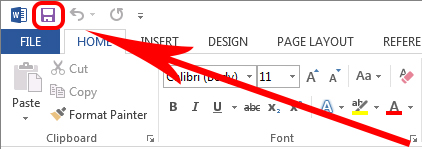
If I am trying to save something, I should look for which symbol?


Select the icon to Microsoft Word



Microsoft Word is used to
Type Documents
Make Presentations
Create Spreadsheets
Update Databases

What function does this icon represent?
Font size
Increase Font
Font color
Font Name


This tab sets up the way that you want to show your presentation to others.
Slide Show
Master Slide
Slide Navigation Pane
Slide
A list of steps to finish a task
algorithm
HTML
function
execute
HTML is the code used to create
games
UI
webpages
In Excel, the name of the bar where information appears as you input data is called?
File Bar
Formula Bar
Help Bar
Window Bar
Microsoft Excel is what kind of software?
Word Processing Software
Spreadsheet Software
Database Software
Presentation Software
What software do you use to make databases?
Access
Excel
PowerPoint
Word
Which of the following is an old method of a database?
Address Book
Textbook
Fax Machine
Typewriter
In your database, information is stored in the ...
Table
Report
Query
Form
Adobe Photoshop is not a software package used by graphic designers.
True
False
Part of computer operation that converts data into information.
Input
Process
Storage
Output
Which of the following is NOT an output device
Monitor
Mouse
Printer
Projector
It is considered a global information library.
Books
Encyclopedia
Internet
For the effective presentation of data and report in front of many people, which
software is appropriate to use?
MS Word
MS Excel
MS Powerpoint
MS Publisher
To select an item such as files and commands, the most appropriate device
to be used is __________.
Arrow keys
Keyboard
Mouse
Monitor
In looking for information in the internet, what type of software will you use?
Web browser
Web portal
Website
MS Excel
Which of the following is an OUTPUT device?
Keyboard
Scanner
Mouse
Monitor
The primary storage device is _________.
CD/DVD
Flash drive
Hard drive
RAM (Random Access Memory)
If the data you entered needs numerical analysis, what you should use?
Excel
Word
Powerpoint
Publisher
Which of the following is an example of a STORAGE Device?
Keyboard
Printer
CPU
Memory Card
Which of the following is a character format?
Bold
Header
Margin
Orientation
Which finger is used to strike the left shift key?
Left index finger
Left middle finger
Left ring finger
Left pinkie finger
It is use to types some information in our computer
Keyboard
Printer
Mouse
Speaker
A display screen to provide the output to the user.
CPU
Monitor
Microphone
Webcam
It is use to drag or click some pictures or informatiin in our screen.
Earphone
Computer case
RAM
Mouse
A drive that plays CD's and read data.
Fan
RAM
CD ROM Drive
Case
Programs that tells the computer what to do.
Software
RAM
Keyboard
Mouse
A short name for Central processing unit.
CUP
PCU
UPC
CPU
It can help us to hear a sound from our computer.
Speaker
Mouse
Keyboard
Flashdrive
It can help the user to see the information in a printed form.
Microphone
Fan
Printer
Touchpad

