
 Worksheets
OCR H446 - 1.3 Exchanging Data - Computer systems - 01
Total questions: 127
Worksheet time: 3mins
Pick the definition of Compression
Making a file smaller in size.
Scrambling a file so that the data is unreadable without the algorithm and key to decrypt it.
Which describes Lossy Compression?
Permanent removing data from a file to make it smaller, cannot be returned to original quality.
Making the file smaller without losing data, can be returned to original quality.
Which describes Lossless Compression?
Permanent removing data from a file to make it smaller, cannot be returned to original quality.
Making the file smaller without losing data, can be returned to original quality.
Which file types are Lossy compressed files?
JPG
PNG
MP3
WAV
.zip
.rar
TIFF
FLAC
ALAC
Which file types are Lossless compressed files?
JPG
PNG
MP3
WAV
.zip
.rar
TIFF
FLAC
ALAC
Benefits of using compression?
File size is reduced
More items can be used on the system
File can be transferred quicker
Files have to be extracted to be read
Which is described: Assigning values to each unique word, then replacing the words with a code. This shortens the file, but a table of words and codes must be stored with the text file. Only suitable when repetition of words.
Dictionary Encoding
Run-Length Encoding
Which is described: Used to compress an image, a code is assigned to a colour then the number of times that colour is repeated is also stored. 100 blue pixels could be stored as B100. This greatly reduces the size of the file.
Dictionary Encoding
Run-Length Encoding
Pick the definition of Encryption?
Making a file smaller in size.
Scrambling a file so that the data is unreadable without the algorithm and key to decrypt it.
Which type of encryption is described: Simpler encryption, generates one key used to both encrypt and decrypt the message.
Symmetric
Asymmetric
Which type of encryption is described: Complex encryption, generates two keys A public key is used to encrypt the message and then a private key is applied. Uses more processing power the encrypt the message.
Symmetric
Asymmetric
A hashing algorithm must?
Very fast to compute
Simple so that it is quick to compute
Always produce the same hash value for the same key.
Provide a uniform distribution of values.
What is added to a Hashing algorithm to make the hashed value more secure from hacking?
Salt
Pepper
Garlic
Oregano
What is described: A structured set of data, persistently stored in an organised way
Flat File Database
Relational Database
Database
Database Management System
What is described: A database made with a single table.
Flat File Database
Relational Database
Database
Database Management System
What is described: A database made with multiple tables that are linked together.
Flat File Database
Relational Database
Database
Database Management System
What is described: Software designed to configure and manage databases.
Flat File Database
Relational Database
Database
Database Management System

What is in the image?
Normalisation
Entity Relationship Diagram (ERD)
Uniform Modelling Language (UML) Diagram
Which type of Key is described: A Unique identifiers selected to be represent a record in the table.
Primary Key
Foreign Key
Secondary Key
Which type of Key is described: This is when a primary key is used in another table. To reference a record in another table
Primary Key
Foreign Key
Secondary Key
Which type of Key is described: A piece of data in a table that is not a primary key but is unique to the record and can be used to find a unique record. Such as an Email or Phone number.
Primary Key
Foreign Key
Secondary Key
Which type of relationship is shown: A relationship where one entity can relate to many other entities. Example – At parents evening a student can book many appointments, but each appointment is for only one student.
One-to-One
One-to-Many
Many-to-Many
Which type of relationship is shown: A relationship where an one singular entity relates to another singular entity. Example – A School can only have one headteacher and a headteacher can only work in one school.
One-to-One
One-to-Many
Many-to-Many
Which type of relationship is shown: A relationship where many entities relates to many entities. Example – A student is taught by many teachers and teachers have many students.
One-to-One
One-to-Many
Many-to-Many
Which type of relationship does not work in a database and must be resolved by a resolution table?
One-to-One
One-to-Many
Many-to-Many
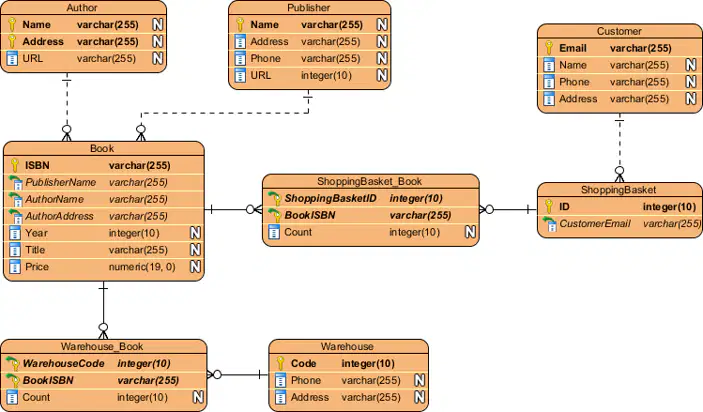
In the diagram which icon shows a Primary Key


In the diagram which icon shows a Foreign Key
In the diagram which icon shows a One-to-Many Relationship
In the diagram which field could be used as a Secondary Key


A method of getting data into a website is using a HTML F (a)
To retrieve data from a database you use a Q (a) .
Queries are written in (a) .
The correct order for SQL command words are?
SELECT
FROM
JOIN
WHERE
ORDER BY
FROM
SELECT
JOIN
WHERE
ORDER BY
SELECT
FROM
WHERE
JOIN
ORDER BY
FROM
SELECT
WHERE
JOIN
ORDER BY
Which symbol do we use in SQL for: ALL
*
%
AND OR NOT
LIKE
Which symbol do we use in SQL for: Wildcard, meaning any value before or after.
*
%
AND OR NOT
LIKE
Which symbol do we use in SQL for: Boolean Logic
*
%
AND OR NOT
LIKE
Which symbol do we use in SQL for: In a where statement to find non matches that contain or are similar.
*
%
AND OR NOT
LIKE
Which is described: Creating tables in order so all primary keys are created before they are referenced by a Foreign key.
Referential Integrity
Normalisation
Abstraction
Which of the following is described: This is the idea that all of the transaction must be committed or none of it.
Atomicity
Consistency
Isolation
Durability
Which of the following is described: This means if a transaction breaks any of the defined rules (constraints) of the database it will be rejected to preserve the integrity of the database.
Atomicity
Consistency
Isolation
Durability
Which of the following is described: This ensures that each transaction can be committed without impacting another.
Atomicity
Consistency
Isolation
Durability
Which of the following is described: This means that once a transaction is committed the data will remain in the database. This means if the user has been told it has succeeded then it must have.
Atomicity
Consistency
Isolation
Durability
Which of the methods DBMS's use for Concurrent Users is described: This means running one command after another, not as efficient as concurrent. However this is the concept that all transactions should be able to produce the same result when ran serial as concurrent, meaning the must not impact/block another transaction.
Serialisation
Record Locks
Commitment Ordering
Timestamp Ordering
Which of the methods DBMS's use for Concurrent Users is described: This is a common method allowing transactions to lock a record whilst it is being updated so other concurrent transaction cannot alter the data at the same time. Once committed with the data will have the lock released.
Serialisation
Record Locks
Commitment Ordering
Timestamp Ordering
Which of the methods DBMS's use for Concurrent Users is described: This avoids deadlocks, where two or more transactions are waiting for another to release locks. This means transactions are evaluated to see their impact on other transactions and then are committed in the order which aims to execute all the transactions in the optimal order minimising interference.
Serialisation
Record Locks
Commitment Ordering
Timestamp Ordering
Which of the methods DBMS's use for Concurrent Users is described: Each record has two timestamps, last read and last written/updated. Timestamp ordering means that transactions are checked against a third timestamps, the operation/transaction timestamp using a protocol such as the one to the right.
Serialisation
Record Locks
Commitment Ordering
Timestamp Ordering
What is the problem that can be caused by record locking? D (a)
The process of changing a single table of data into a set of related tables, that can them be used as a database is known as?
Normalisation
Referential Integrity
Transactions
Entity Relationship Diagram
Which step of normalisation is outlined: Single table with duplicate data, not all data may relate to the primary key.
UNF - Unnormal From
1NF - 1st Normal Form
2NF - 2nd Normal Form
3NF - 3rd Normal Form
Which step of normalisation is outlined: In this normal form you -
Eliminate duplicate columns from the same table
Create separate tables for each group of related data.
Identify columns or groups of columns to create a unique identity for the record.
UNF - Unnormal From
1NF - 1st Normal Form
2NF - 2nd Normal Form
3NF - 3rd Normal Form
Which step of normalisation is outlined: In this normal form you -
Check the data is in 1NF
Remove any data that occurs in multiple row and transfer to a new table.
Create relationships between these new tables, primary and foreign keys.
UNF - Unnormal From
1NF - 1st Normal Form
2NF - 2nd Normal Form
3NF - 3rd Normal Form
Which step of normalisation is outlined: In this normal form you -
Once all the data has been checked it is in 2NF and all columns are removed that are not dependent on the primary key the tables are in this form.
UNF - Unnormal From
1NF - 1st Normal Form
2NF - 2nd Normal Form
3NF - 3rd Normal Form
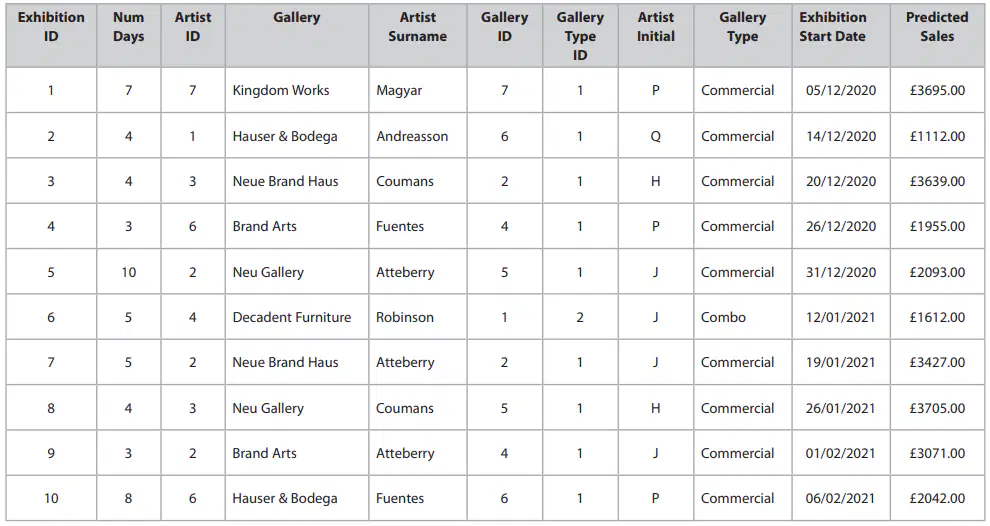
Is this table Normalised?
No - Not all data is related to the primary key
No - There is duplicate data
No - It is just a single table
Yes - Looks good to me!
Which type of network is described: Covers a small geographical area such as one site or building, eg a school or a college. This type owns all their own hardware and are responsible for their upkeep. They can be wired or wireless.
Local Area Network (LAN)
Wide Area Network (WAN)
Storage Area Networks (SAN)
Metropolitan Area Network (MAN)
Personal Area Network (PAN)
Which type of network is described: Connects LANs in different geographical areas. E.g. A business with offices in different parts of a country. Companies often hire the infrastructure to connect and manage this network. This network isoften connected using, telephone lines, satellites or fibre/copper cables. The Internet is one huge this type.
Local Area Network (LAN)
Wide Area Network (WAN)
Storage Area Networks (SAN)
Metropolitan Area Network (MAN)
Personal Area Network (PAN)
Which type of network is described: Provides a dedicated network for large scale data storage in data centers. They are efficient because he servers that make them consolidate their storage devices to provide a disk array of high capacity and performance.
Local Area Network (LAN)
Wide Area Network (WAN)
Storage Area Networks (SAN)
Metropolitan Area Network (MAN)
Personal Area Network (PAN)
Which type of network is described: Provides WAN services in a city between different LANs that exist in different residential and commercial properties.
Local Area Network (LAN)
Wide Area Network (WAN)
Storage Area Networks (SAN)
Metropolitan Area Network (MAN)
Personal Area Network (PAN)
Which type of network is described: Links a personal device with a mobile network to other devices to share data and internet access. Modern phones can be used as hotspots using WI-FI or can use Bluetooth to share internet.
Local Area Network (LAN)
Wide Area Network (WAN)
Storage Area Networks (SAN)
Metropolitan Area Network (MAN)
Personal Area Network (PAN)
Which network device is described: This piece of hardware allows other device to connect wirelessly to a network. It uses Wi-Fi to send signals, often used in homes or businesses to extend the range of a network. This device operates like a wireless switch.
Wireless Access Point (WAP)
Network Interface Controller (NIC)
Switch
Router
Transmission Media
Which network device is described: This piece of hardware is built into other devices allowing them to connect to networks. These devices come in both wired and wireless form. You can purchase a portable dongle version of this device to allow standalone computers to connect to a network. Ethernet and even WI-FI standard versions can be built into motherboards.
Wireless Access Point (WAP)
Network Interface Controller (NIC)
Switch
Router
Transmission Media
Which network device is described: This piece of network hardware connects devices in a LAN. It receives data through ethernet ports and switches that data to transmit it to the device connected with the correct MAC address.
Wireless Access Point (WAP)
Network Interface Controller (NIC)
Switch
Router
Transmission Media
Which network device is described: This piece of network hardware transmits data between networks, example being a home LAN and the internet. It is always connected to at least two networks. Most modern versions of this device contain a switch and a WAP also. Routers use IP addresses to send information.
Wireless Access Point (WAP)
Network Interface Controller (NIC)
Switch
Router
Transmission Media
Which network device is described: The different methods of connecting devices within a network. Some methods are Wired (Ethernet – Twisted pair cables, Coaxial Cables and Fibre Optic) others are wireless (Wi-Fi or Bluetooth both types of radio waves).
Wireless Access Point (WAP)
Network Interface Controller (NIC)
Switch
Router
Transmission Media
WAPs allow you to?
Hiding SSIDs
Encryption
Limiting Access by MAC address
Connecting multiple networks together
Which is described: These are the amount of times the wireless radio signals are sent each second. The most popular are 2.4GHz and 5GHz.
Network Frequencies
Network Channels
Which is described: Each wireless frequency is divided into multiple channels. Channels allow lots of devices to send and receive data with as little interference as possible.
Network Frequencies
Network Channels
Which of the network performance factors is described: The weaker this is the more degradation to the speed and loss of data.
Signal Strength
Bandwidth
Latency
Which of the network performance factors is described: Is the measure of how much data can be transferred over a connection at any given time.
Signal Strength
Bandwidth
Latency
Which of the network performance factors is described: Is a measure of how much time it takes to send data over a network from one node to another.
Signal Strength
Bandwidth
Latency
IP or MAC address: Is a numerical label assigned to each device (e.g., computer, printer) participating in a computer network for communication.
IP Address
MAC Address
IP or MAC address: Is a unique identifier assigned to NICs.
48-bit meaning 281,474,976,710,656 possible values. The first 4 octets identify the manufacturer. The others are to identify the device as unique.
IP Address
MAC Address
When using a DNS server which is the correct order of steps taken?
DNS Resolver
Top-Level Domain Name Server
Authoritative Name Server
Top-Level Domain Name Server
Authoritative Name Server
DNS Resolver
Authoritative Name Server
DNS Resolver
Top-Level Domain Name Server
DNS Resolver
Authoritative Name Server
Top-Level Domain Name Server
Which part of the page rank algorithm affects the algorithm the most?
P - Page being ranked
D - Dampening factor
N - Total number of pages
C - Total count of outgoing links
Which network type is described: Needs to have a server set up and configured. These are high performance to support the large amounts of users, so very costly.
Client-Server
Peer-to-Peer
Which network type is described: Servers can be located in a secure room. They only need to be accessible to specific staff. The room can be monitored by different methods.
Client-Server
Peer-to-Peer
Which network type is described: If the server fails, this will affect all users needing it.
Client-Server
Peer-to-Peer
Which network type is described: Workstations could be in many different locations so cannot manage security.
Client-Server
Peer-to-Peer
Which network type is described: If one device fails, it will have less impact as the other devices still carry on working.
Client-Server
Peer-to-Peer
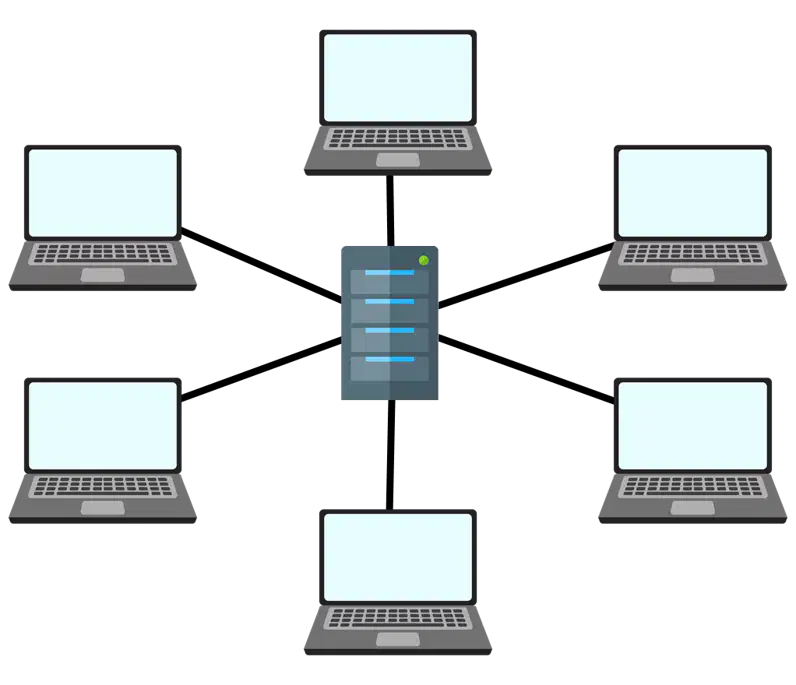
Which network topology is shown in the image?
Star
Full Mesh
Partial Mesh
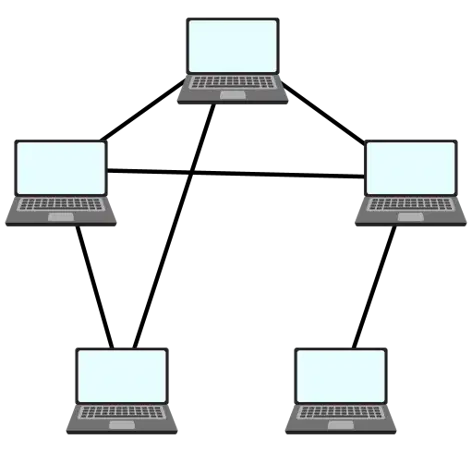
Which network topology is shown in the image?
Star
Full Mesh
Partial Mesh
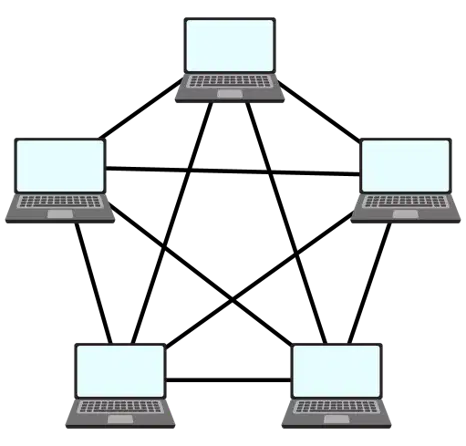
Which network topology is shown in the image?
Star
Full Mesh
Partial Mesh
Which method of sending data is described: is a concept that was create on the telephone network, operators working on a switchboard/patch panel would use physical cable to switch the connection between two phone lines. The problem with this is the physical connection is reserved and cannot be used by anyone at that time.
Packet Switching
Circuit Switching
Which method of sending data is described: means to break a file up into smaller files (packets of data) then sending them along different routes on a network to it’s destination and then is reassembled.
Data is sent between routers and servers on a network. The idea is that data can be sent more efficiently by travelling down different routes. As well as this if any errors occur data can be resent.
Packet Switching
Circuit Switching
Which method of sending data is described: Bandwidth is wasted
Packet Switching
Circuit Switching
Which method of sending data is described: Packets travel independently
Packet Switching
Circuit Switching
Which protocol is used for: Transferring a file.
FTP
HTTP/HTTPS
VOIP
SMTP
POP3/IMAP
Which protocol is used for: Sending a webpage.
FTP
HTTP/HTTPS
VOIP
SMTP
POP3/IMAP
Which protocol is used for: Sending a voice audio.
FTP
HTTP/HTTPS
VOIP
SMTP
POP3/IMAP
Which protocol is used for: Sending an email.
FTP
HTTP/HTTPS
VOIP
SMTP
POP3/IMAP
Which protocol is used for: Receiving an email.
FTP
HTTP/HTTPS
VOIP
SMTP
POP3/IMAP
Which layer is being described: This collates and disseminates the data being sent on the network. Based on human interaction this is where the process of sending is initiated and the data of a recipient presents the data.
Application Layer
Internet Layer
Physical Layer
Which layer is being described: This layer is not concerned about what data is being sent, it is concerned about the network layout(topology) and how best to get the data from the source to the destination.
Application Layer
Internet Layer
Physical Layer
Which layer is being described: This layer is concerned with he physical medium of which the data is transmitted. This typically contains cables, NICs Routers and signals. This just provides a medium for the data to be sent on.
Application Layer
Internet Layer
Physical Layer
Which of the following is a benefit of using Network Layers?
Layers allow for experts to specialise on one layer. Makes it easier for developers as they can focus on one section.
Layers can be have software and hardware changes without interfering with another layer.
This allows for standards for each layer so that companies can make sure everything is compatible.
Which of the following in a not a form of social engineering?
Shoulder Surfing
Blackmail
Phishing
Pharming
Which of the following is not a form of Human Error?
Insider Attack
Accidental Leaking of Information
Shoulder Surfing
Blackmail
Weak Passwords
Which method of social engineering is described: The action of demanding payment or another benefit in exchange for not revealing sensitive information.
Blackmail
Phishing
Pharming
Which method of social engineering is described: A fake phone call, email or text where the caller lies about who they are to extract information form the recipient.
Blackmail
Phishing
Pharming
Which method of social engineering is described: A fake website that looks identical to the original, which collects login details when you sign in to it.
Blackmail
Phishing
Pharming
Which method of Human Error is described: Someone inside an organisation exploits their access to steal information.
Insider Attack
Shoulder Surfing
Which method of Human Error is described: Looking over someone's shoulder to read information from the device they are using.
Insider Attack
Shoulder Surfing
Which piece of malware is described: is malware that is destructive to a system. Virus’ can spread across a network or computers to infect them.
Virus
Worms
Botnet
Rootkits
Which piece of malware is described: is malware that replicates itself to spread across systems.
Virus
Worms
Botnet
Rootkits
Which piece of malware is described: is malware that sits on a computer and waits for a command from a hacker of where to connect to. Millions of botnets will all work together to attack systems and the users won’t even know their computer is doing it.
Virus
Worms
Botnet
Rootkits
Which piece of malware is described: are malware that give hackers administrative access to a computer. These hide themselves on a computer.
Virus
Worms
Botnet
Rootkits
Which piece of malware is described: are malware that pretend to be a useful program until installed then attack the system to cause harm or steal data.
Trojan
Ransomware
Spyware
Scareware
Which piece of malware is described: is malware that encrypts a computers files so the user cannot access them. The hacker will then notify the user of the random (money) to recover their files.
Trojan
Ransomware
Spyware
Scareware
Which piece of malware is described: is malware that records information on a system such as; browsing history, password entries, key presses and Card information.
Trojan
Ransomware
Spyware
Scareware
Which piece of malware is described: This puts a notice on the users computer telling them that their computer is infected and demands they pay money to remove this.
Trojan
Ransomware
Spyware
Scareware
Which type of attack is described: is where an attacker monitors a network, intercepting any data they can.
They will use specialist software and hardware such as packet sniffers.
Passive Attack
Active Attack
Which type of attack is described: are ones where the user exploits vulnerabilities in a system or network.
Passive Attack
Active Attack
Which type of cyber-attack is described: This is a type of active attack, which uses trial and error to crack passwords. It uses automated software to produce hundreds of likely password combinations.
Brute Force Attack
Denial of Service Attack
Data Interception and Theft
SQL Injection
Which type of cyber-attack is described: This is where a hacker tries to stop users from accessing a part of a network or website. Most DoS attacks involve flooding the network with useless traffic, making the network extremely slow or completely inaccessible
Brute Force Attack
Denial of Service Attack
Data Interception and Theft
SQL Injection
Which type of cyber-attack is described: This is where a hacker positions a router between the user and the actual router they usually log on to the network with. Doing this all data will then go through the hacker’s router. This means the Hacker can Intercept data or send incorrect data or malware to the user without them knowing.
Brute Force Attack
Denial of Service Attack
Data Interception and Theft
SQL Injection
Which type of cyber-attack is described: This is a code injection technique, used to attack applications, in which SQL statements are inserted into an entry field for execution. These can be used to gain information such as access details. Another usage of this could be to drop whole tables and damage the back end of the website.
Brute Force Attack
Denial of Service Attack
Data Interception and Theft
SQL Injection
Which tag is used for the section for defining styles and linked files into the html code.
<html>
<head>
<body>
<div>
Which tag is used for outlining where html code starts and ends?
<html>
<head>
<body>
<div>
Which tag is used for the section where html elements will be defined for the page?
<html>
<head>
<body>
<div>
Which tag is used to define a section of html code under one name?
<html>
<head>
<body>
<div>
Which tag is used to define a heading, with large font and size on the page?
<h1>
<title>
<img>
<a>
Which tag is used to define a title for the tab of the page?
<h1>
<title>
<img>
<a>
Which tag is used to define an image and it's source?
<h1>
<title>
<img>
<a>
Which tag is used to define hyperlink tag used to take a user to a different page internally or externally to the website?
<h1>
<title>
<img>
<a>
Which tag is used to define a data entry form within the website?
<form>
<li>
<ul>
<ol>
Which tag is used to define a item in a list?
<form>
<li>
<ul>
<ol>
Which tag is used to define a list with numbers?
<form>
<li>
<ul>
<ol>
Which tag is used to define a bullet pointed list?
<form>
<li>
<ul>
<ol>

