

wayground logo

Free Printable Worksheets

Font size

S
M
L
XL
Worksheets

Computer Science and Engineering final 2023

Total questions: 34

Worksheet time: 9hrs 30mins
Name
Class
Date
1.
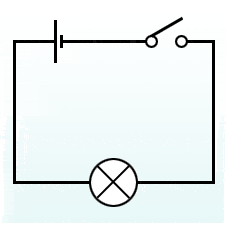
this circuit is .....?
a)
open
b)
parallel
c)
closed
d)
The cutest little circuit evah!
2.
When all parts of the circuit are connected it is a ______ circuit. 
a)
open
b)
closed
3.
Would would best complete this circuit?
a)
A wire
b)
A switch
c)
A battery
d)
A light bulb
4.
Pick the correct sentence.
a)
This circuit will work because it is a closed circuit.
b)
Energy will freely flow in this circuit.
c)
This circuit will not work because there is no energy source.
d)
This circuit will not work because there is no switch.
5.
Which statement is true?
a)
The light bulb will light up because the  circuit is complete.
b)
The light bulb will light up because the  circuit is broken.
c)
The light bulb will not light up because the  circuit is complete.
d)
The light bulb will not light up because the  circuit is broken.
6.
This circuit is _________.
a)
open
b)
parallel
c)
closed
d)
The cutest little circuit evah!
7.

What is the power source in this circuit?

a)

Bulb

b)

Switch

c)

Wire

d)

Battery

8.
What is a current?
a)
A constant flow of electricity 
b)
A path that a current can flow along
9.

What does CAD stand for?

a)

Code and Design

b)

Computer Aided Design

c)

Create and Design

d)

Craft and Design

10.

What is CAD?

a)

An app that lets you analyze different design concepts

b)

A coding program to let you easily write in a computer language

c)

Computer software used to create 2D drawings/3D models of designs

d)

Creation and development for any robot

11.

How do you select more than 1 shape?

a)

Left mouse click.

b)

Drag a box around desired shapes.

c)

Hold shift key.

d)

Hold space bar

12.

What button do you use to join or combine objects together?

a)

Ungroup

b)

Join

c)

Combine

d)

Group

13.

What is the keyboard shortcut for Copy?

a)

Ctrl+Y

b)

Ctrl+Z

c)

Ctrl+V

d)

Ctrl+C

14.

What is the keyboard shortcut for paste?

a)

Ctrl+Z

b)

Ctrl+V

c)

Ctrl+U

d)

Ctrl+C

15.

How do you raise/lower an object?

a)

Use the corner handles

b)

Use the top cone

c)

Use the rotation arrows

d)

Right click the shape

16.

How do you get to your saved designs/dashboard?

a)

Click the TinkerCAD logo

b)

Refresh the page

c)

Ctrl+H

d)

Hit the back button

17.

What is located directly to the right of the workplane?

a)

Toolbar

b)

Shapes panel

c)

Navigation buttons

d)

Google Chrome buttons

18.
What software do we use to create 3D Objects?
a)
Photoshop
b)
Tinkercad
c)
Tindercad
d)
Google Classroom
19.
How can you tell if an object is a hole in tinkercad?
a)
You can't
b)
It is clear & has stripes
c)
The object will say hole
20.
A ____ is a full size working model.
a)
Invention
b)
Prototype
c)
Manufacturing
21.
What is the process of making three dimensional solid objects (laying down material by layer) from a digital file? 
a)
Invention
b)
CNC Router
c)
3D Printing
d)
Manufacturing
22.
What does this tool do?
a)
Duplicate
b)
Zoom
c)
Group
23.
What is this tool called?
a)
View cube
b)
Hole
c)
Nothing
24.

What is the correct name for the tube shape?

a)

Cylinder

b)

Box

c)

Circle

d)

Cube

25.
Drag from Geometric
a)
How do you use workplane?
b)
How do you change shape color?
c)
How can someone place a shape?
d)
How do you use ruler?
26.

If you make a mistake in Tinkercad, just click the ______.

a)

Redo button.

b)

Delete button.

c)

Backspace button.

d)

Undo button.

27.

Tinkercad can be used for designing any 3D object.

a)

True

b)

False

28.
a process of making three dimensional solid objects from a digital file. 
a)
drafting 
b)
3D printing
c)
centerline
d)
hidden line
29.

In TinkerCAD the above image is for:

a)

Align

b)

Paste

c)

Copy

d)

Mirror

30.

In TinkerCAD the above image is for:

a)

Delete

b)

Copy

c)

Paste

d)

Group

31.

In TinkerCAD the above image is for:

a)

Copy

b)

Paste

c)

Ungroup

d)

Duplicate

32.

In TinkerCAD the above image is for:

a)

Delete

b)

Redo

c)

Copy

d)

Paste

33.

In TinkerCAD the above image is for:

a)

Undo

b)

Redo

c)

Align

d)

Move

34.

In TinkerCAD the above image is for:

a)

Undo

b)

Redo

c)

Move

d)

Align
