
 Worksheets
Unit 3: Gmail Review
Total questions: 42
Worksheet time: 3hrs 54mins
What is Gmail?
Which of the below Gmail functions allows you to write an email to another person?
Which of the below Gmail functions allows you to respond to an email someone has sent you?
Which of the following Gmail functions allows you to pass on an email that you received to others.
Which of the following Gmail functions allows you to access your unfinished email messages that are to be completed later.
Which of the following Gmail functions allows you to attach files like pictures, music, software and documents to your email.
Identify the 3 parts that make up an email address. Check all of the following that apply: (Only 3 are correct)
What is a label in Gmail?
How do you change the appearance of your Gmail account?
Apply a new theme to your Gmail account
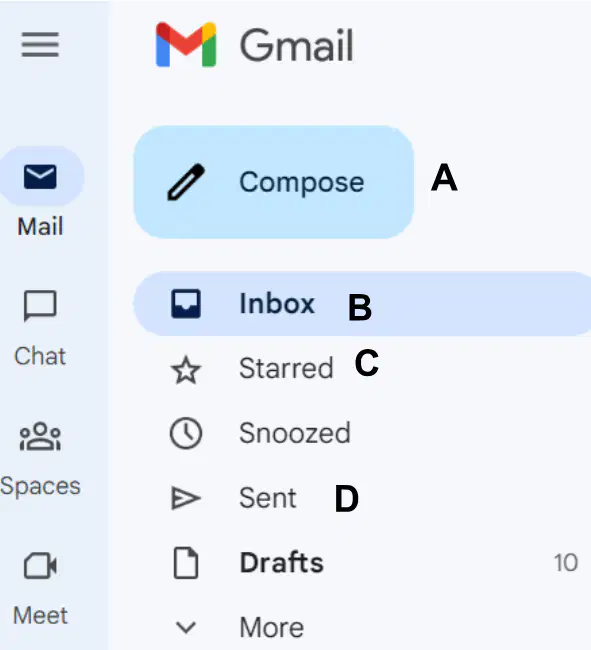
Which button in the image below do you click to begin writing a new email?
When you type an email, what is the subject?
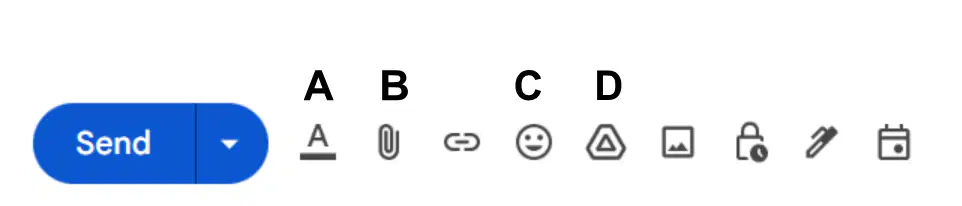
Which of the following is the "Attach files" button?
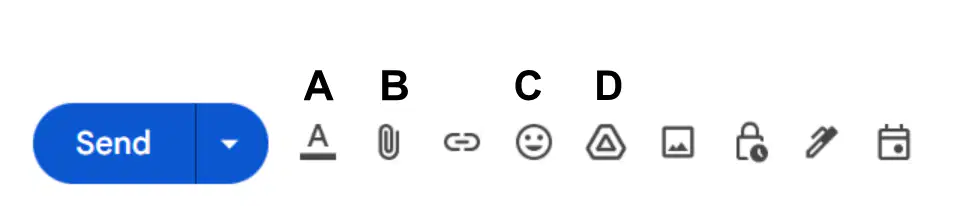
Which button in the image below do you click to insert a file from your Google Drive?
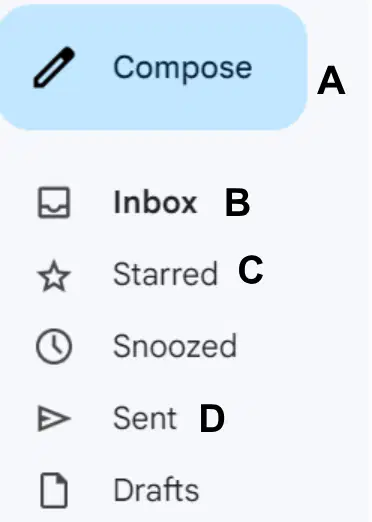
If someone send you an email, which button in the image below do you click to view that email?
You can create a ________ to send emails more efficiently.
To email more than one person efficiently on Gmail, you can create a ______ which consists of more than one contact.
_____ is the person who is going to receive your email?
_______ is when someone is Informed of the conversation in an email, but not main recipient of the email.
_____ is when someone is Informed of the conversation, but their email address is hidden.
What is Google Chat?
What app does Google use for video meetings?
True or False: You can block email addresses that send unwanted emails.
______ is your Gmail folder for unwanted messages.
You ______ emails that you believe to be important.
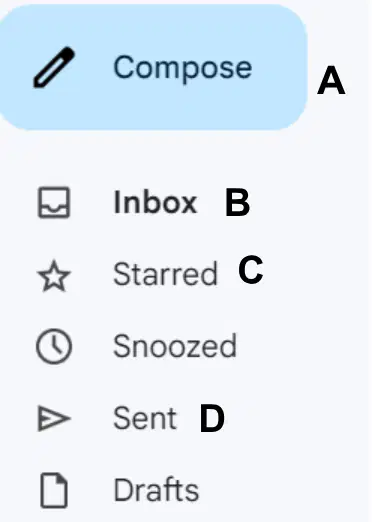
Which folder is meant to hold your important messages?
True or False: You can search your mailbox for specific messages?
A ______ is courtesy email sent to other people when they try to email you while you are on vacation or away from your Gmail account for an extended period of time.
_________ is when Information is automatically included below all messages sent. This part often includes your name, title, and organization.
When someone tries to email you after you have blocked their email, where do their email messages go?
Inbox
Spam Tab
Starred Tab
Important Tab
Match the following:
Google Docs

Gmail

Google Sheets

Google Slides

Google Drive
(a) is a free emailing service provided by Google

The attached image is the logo of which google application?
Gmail
Google Photos
Google Meet
Google Chat
If you identify an email as important, you should (a) that email.
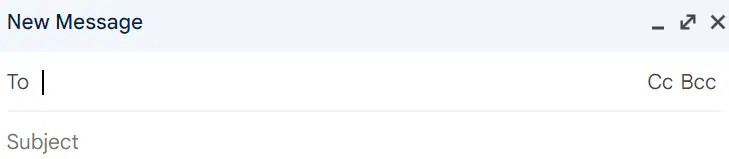
In the attached image, what does Cc stands for ______ ____.
(a)
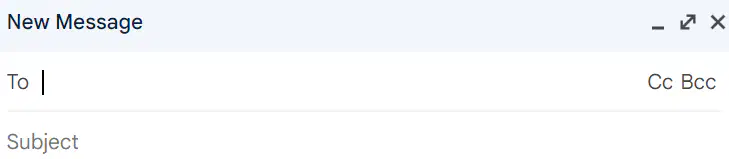
In the attached image, Bcc stands for _____ ______ ____.
(a)
Match the following:
A brief description of what your email is about.
Subject
Where you type in the recipient's name.
To:
Where you type a user's email whom you want to be informed of the conversation, but they are not the main recipient.
Carbon Copy
Where you type a user's email whom you want them to be informed of the conversation while also hiding their email address from others.
Blind Carbon Copy
Where you type the text or main message of the email.
Body
When you're organizing your messages, you can create one or more ______ to categorize them.
Replies
Stickies
Labels
Spam
True or False: Gmail requires that you create an email signature.
True
False
If you want to respond to a group of people, you should use the ________ option.
Forward
Signature
Reply to all
Reply
To get to your settings, you'll first need to click the ________ icon.
Gear
Notifications
Envelope
Lock
What is the maximum size for attachments in Gmail?
50 MB
25 MB
10 MB
30 MB
What is the purpose of the Spam folder in Gmail?
To filter and store unwanted or potentially harmful emails.

