
 Worksheets
Unit 4: Google Docs Review
Total questions: 42
Worksheet time: 22mins
___________ is an online word processor that allows you to create word documents and work with others for free.
Identify the 3 possible things you can do whenever you first open up google Docs: Check all that apply (Only 3 are Correct)
File / Edit / View / Insert / Format / Tools / Extensions are called _______ in Google Docs.
Where is the Google Docs toolbar located when working on a Google Doc?
When using Google docs, misspelled word will be underlined in what color?

The attached photo is which of the following Google Doc features?

The attached photo is which of the following Google Doc features?
The attached photo is which of the following Google Doc features?
The attached photo is which of the following Google Doc features?

The attached photo is which of the following Google Doc features?

The attached photo is which of the following Google Doc features?
If I made a mistake while typing on a Google Doc, which button would I need to click to erase my mistake?
Bold, Italicize, and underline are located where in the Google Docs window?

Which Icon do you click to print a Google Doc?
The attached photo is which of the following Google Doc features?
What is the difference between a bulleted list & a numbered list?

Which of the buttons in the attached image is the right align button?
Which menu do you click to access the Word Count feature in Google Docs?
You _________ text if you want to duplicate it and move it to another position in your document.
You _______ text if you want to remove it entirely from your document.
Once you have copied or cut text, you ______ the text to place it back on your document.
Which menu do you click to access the find & replace feature?
Which menu do you click to add a Header or Footer to your Google Doc?
A header is located at the ______ of a page and the footer is located at the ______ of a page.
When using Google Docs, inserting a header means it will appear on which specific pages of your document?
To format your document into columns, which menu would you click?
A __________ is a grid of cells arranged into rows and columns.
True or False: When using Google Docs, you are allowed to download your doc as a different file type.
You click the ________ menu to place a table into a Google Doc.

Which of the letters below identifies the spelling and grammar check button?
When using Google Docs, at the top of the user's screen you will see: - File - Edit - View - Insert - Format - Tools - Extensions - Help These are all examples of what?
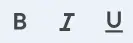
Bold, Italicize, and underline are located where in the Google Docs window?
Google Docs allows you to insert or upload images from which source(s)? Select all that apply.
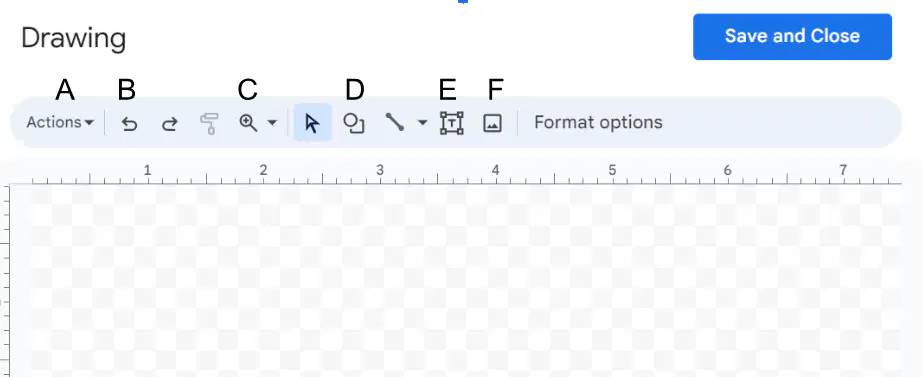
From the drawing menu, what button do I click to add word art to my document?

If you want to add an image, table, drawing, or chart to your Google Doc, which menu would you click?
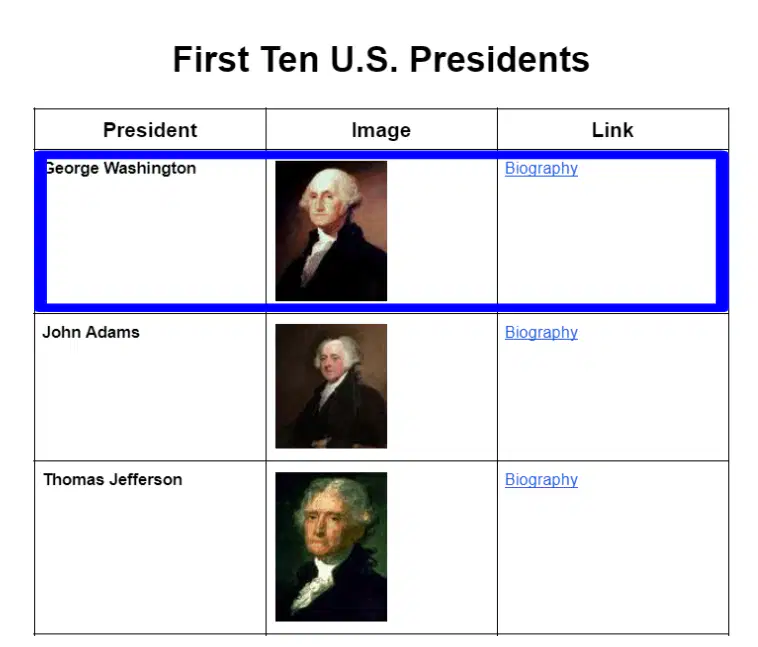
Is the area in the blue box a row or column?
Row
Column

Is the area in the red box a row or column?
Row
Column
True or False: Google Docs does not have an auto save feature.
True
False
You have to create a (a) account in order to access Google Docs.

The ______ _______ is a button that lets you copy format from one part of your document and apply it to other parts of your document.
(a)
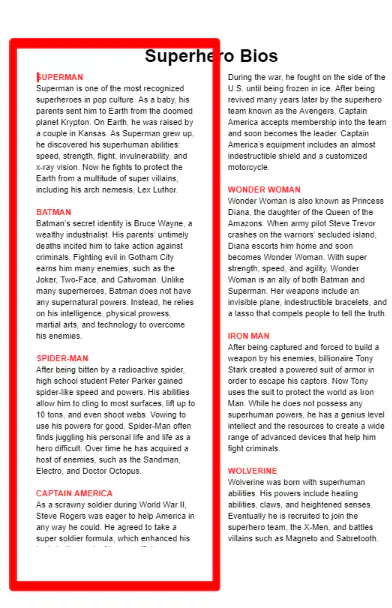
The area inside of the red box is called what? (This formatting change helps make documents with lots of text easier to read.)
Paragraph
Column
Page Break
Row
Cell
A __________ is a clickable word, image, or button that connects you to another web page, resource, or document online.
Hyperfile
Weblink
Hyperlink
Blue Text Link

