
 Worksheets
Robotics Semester Exam
Total questions: 100
Worksheet time: 1hrs 13mins

How far will the VR Robot move based off of this command?
200 millimeters (mm)
300 millimeters (mm)
400 millimeters (mm)
500 millimeters (mm)

What part of the block do you select to change the direction of the [Drive for] block?
1
2
3
4
How can you make the VR Robot move in reverse on the [Drive for] block?
Changing the "forward" parameter to "reverse".
Changing millimeters (mm) to Inches.
Increasing the numeric value.
Moving the block to the bottom of the project.

How will the VR Robot move based off of this command?
Turn left 80 degrees.
Turn right 90 degrees.
Turn left 90 degrees.
Turn right 80 degrees
Which block is used to change the speed of the drivetrain?
[Set turn velocity]
[Set drive velocity]
[Set drive heading]
[Set drive rotation]
What is the default velocity of the VR Robot?
0%
25%
50%
75%
What is the maximum velocity setting for the VR Robot?
50%
100%
150%
200%
What is the range of values used when setting velocity?
1% to 100%
-100% to 100%
1% to 200%
-100% to 200%
What types of values can the [Turn to heading] block NOT accept as parameters?
Numeric values
Decimals
Words or text
Integers

What building on the Castle Crasher Playground will be the THIRD knocked over according to this project?
1
2
4
5

What order will the buildings on the Castle Crasher Playground be knocked over according to this project?
1, 2, 3, 4, 5
3, 2, 5, 4, 1
3, 1, 4, 5, 2
5, 2, 1, 4, 3

Which of the following is the best description of what the VR Robot will do based on this project?
The VR Robot will drive forward 1000 millimeters (mm) at maximum velocity. It will turn right 180 degrees and drive forward 1000 millimeters (mm).
The VR Robot will drive forward 1000 millimeters (mm) at maximum velocity. It will turn right 90 degrees, set velocity back to the default, and drive forward 1000 millimeters (mm).
The VR Robot will drive forward 1000 millimeters (mm) at maximum velocity. It will turn right 180 degrees, set velocity back to the default, and drive forward 1000 millimeters (mm).
The VR Robot will drive forward 1000 millimeters (mm) at maximum velocity. It will turn left 180 degrees, set velocity back to the default, and drive forward 1000 millimeters (mm).
What is the first step in coding the VR Robot to move the VR Pen down to draw a black line?
[Drive for] block set to 2000 millimeters (mm).
Drag the [Turn for] block into the workspace and set the parameter to "400 millimeters (mm)".
Drag the [move pen] block into the workspace and use the drop-down menu to set the position to "down".
Drag the [move pen] block into the workspace and use the drop-down menu to set the position to "up".

How many times will the [Repeat] block repeat the [Turn for] and [Drive for] blocks inside of it?
Only once
Two times
Three times
Four times
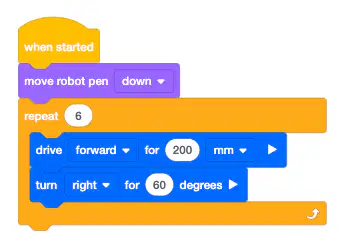
What is the condition that will end this [Repeat] block?
After the VR Robot places the pen down.
After the VR Robot drives forward one time for 200 millimeters (mm).
After the [Repeat] block has repeated the blocks inside of it four times.
After the VR Robot has driven forward 200 millimeters (mm) then turned right 60 degrees six times.

How can the following example be simplified by using a [Repeat] block?
By placing the [Drive for] and [Turn for] blocks in a [Repeat] block that repeats four times.
By placing the [Drive for] block in a [Repeat] block that repeats four times.
By placing the [Turn for] block in a [Repeat] block that repeats four times.
By changing all of the parameters of the [Drive for] blocks to 400 millimeters (mm) instead of 200 millimeters (mm).

When will the VR Robot move the VR Pen up?
Before the [Repeat] block has repeated all of the blocks inside of it twice.
Before the VR Pen is set to the color red.
After the [Repeat] block has repeated all of the blocks inside of it six times.
After the [Repeat] block has repeated all of the blocks inside of it twice.
What values does the <Pressing bumper> block return?
TRUE (pressed) or FALSE (released).
Positive (pressed); Negative (released).
Number values between one and ten.
Distance from object in millimeters (mm).


How is the <Pressing bumper> block used in this project?
It pauses the project indefinitely.
It causes the VR Robot to move forward for 200 millimeters (mm).
It checks the condition of the Bumper Sensor. When TRUE, the VR Robot will turn right 180 degrees.
It instructs the VR Robot to turn to 90 degrees.
Which of the following is the best description of what the Distance Sensor does in a project?
To measure the distance between the front of the Distance Sensor and the object.
To report the location angle of the VR Robot.
To change behaviors of the VR Robot if pressed.
To report the current heading of the VR Robot.
Which of the following best describes how the Distance Sensor works?
The Distance Sensor uses the time it takes for ultrasonic waves to reach an object from the sensor.
The Distance Sensor uses the time it takes for ultrasonic waves to bounce off of an object and return to the sensor.
The Distance Sensor uses the time it takes for the VR Robot to reach all objects in the Playground.
The Distance Sensor uses the time it takes for ultrasonic waves to bounce off yellow and orange objects and return to the sensor.
Which of the following best describes what the <Greater than> block reports?
If the first value is larger than the second value.
If the first value is less than the second value.
If the first value and the second value are equal.
The first value.

Which of the following is the best description of what a <Less than> block reports while inside of a [Wait until] block?
If the distance is a large number.
The total time needed to run the project.
A TRUE or FALSE value.
The total time the VR Robot has until it reaches an object.

Which of the following describes why the VR Robot will not move in this example project?
The distance between the Distance Sensor and the object is less than 150 millimeters (mm) away.
The Eye Sensor is reporting the color red.
The distance between the Distance Sensor and the object is greater than 150 millimeters (mm) away.
The VR Robot will immediately crash into a wall if it moves.
Which of the following best describes what the <Less than> block reports?
If the first value is less than the second value.
If the first value is larger than the second value.
If the first value and the second value are equal.
The second value.
What units does the (Distance from) block use when reporting values?
Inches and centimeters.
Meter and millimeters (mm).
Meter and inches
Millimeters (mm) and inches.
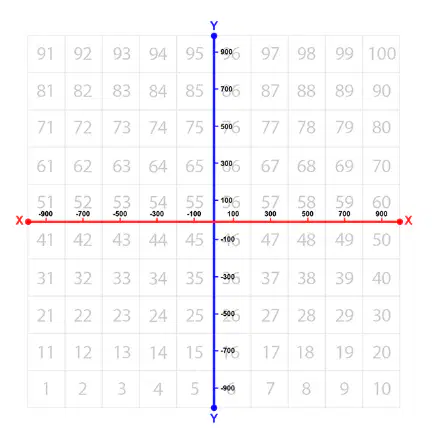
What are the approximate coordinates for the number "56" on the Number Grid Map Playground?
X: 100 millimeters (mm)
Y: 100 millimeters (mm)
X: -100 millimeters (mm)
Y: -100 millimeters (mm)
X: 100 millimeters (mm)
Y: -100 millimeters (mm)
X: -100 millimeters (mm)
Y: 100 millimeters (mm)
What does using comments in a project allow users to do?
Launch the Playground window.
Describe parts of their project for other users.
Attach .VRBLOCKS files.
Watch tutorial videos.
How can I add comments to a project?
Right click or long press in the Workspace to launch the Context Menu. Then select "Add Comment".
Right click or long press on a block to launch the Context Menu. Then select "Add Comment".
Select "File" and "Add Comment".
Drag the [Comment] block from the Tool Box into the Workspace and attach it to any block in a stack.

Which of the following would be the best comment to describe this project?
.
Open a tutorial video
Drive the VR Robot in a triangle.
Drive the VR Robot in a square.
Drive the VR Robot backwards.

How many times will the robot turn left in this code?
Only once.
Two times.
Three times.
Four times.

Identify this block
drive
loop
boolean
hat

What does this block do?
runs code when the program is started.
turn the robot right.
moves the robot forward.
stops the robot from moving.
Finding and fixing errors in a program.
debugging
bug
nested loop
event
What is a behavior?
An action performed by the robot.
How to break down instructions into simpler tasks.
How robots communicate with a person.
The way robots send information back to the user.
Which of the following is the best description of the [Drive for] block?
Moves the VR Robot backward indefinitely.
Moves the VR Robot left or right.
Moves the VR Robot forward or backwards a specific distance.
Moves the VR Robot forward indefinitely.
Which of the following is the best description of what the Eye Sensor does?
It reports the (X,Y) position of the VR Robot.
It reports the distance between the VR Robot and the nearest solid object.
It can be controlled to pick up and drop disks with metal cores.
It detects if there is an object present and if so, the color of that object.

Which two sensors are being pointed to on the VR Robot?
The Left and Right Bumper Sensors.
The Front Eye and Down Eye Sensors.
The Electromagnet and Location Sensors.
The Distance and Front Eye Sensors.
What value will the <Eye Sensor near object> Boolean block report when the Eye Sensor is close to an object that has detectable colors?
It will report TRUE.
It will report FALSE.
It will report how far in millimeters (mm) or inches the Eye Sensor is from the object.
It will report the location angle of the VR Robot in degrees.
What value will the <Color sensing> Boolean block report when the Eye Sensor detects a different color than the one that was selected?
It will report the time elapsed of the project in seconds.
It will report the current heading in degrees of the VR Robot.
It will report FALSE.
It will report TRUE.

What will happen when the Front Eye Sensor detects red in this project?
The VR Robot will stop driving.
The VR Robot will turn left for 90 degrees.
The VR Robot will drive forward.
The VR Robot will check the Front Eye Sensor repeatedly.

In this project, if the condition of the Down Eye detecting red is TRUE, how will the VR Robot move?
It will turn right for 115 degrees.
It will drive forward forever.
It will turn left for 115 degrees.
It will stop driving.

In this project, how many times will the [Drive] block be repeated?
It will be repeated forever.
It will repeat 100 times.
It will repeat 90 times.
It will repeat once.

Describe why a [Forever] block is used in this project.
To continuously check if the VR Robot Pen is up or down.
To continuously check if the VR Robot is near an object with detectable colors.
To draw the color blue with the VR Robot Pen.
To report if the Bumper Sensors are being pressed.

Why is the [If then] block nested inside the [Forever] block for this project?
Conditions of the [If then] block will be checked continually if nested in a [Forever] block. the VR Robot will use the Down Eye Sensor to continually check for an object.
The [Forever] block is not needed.
If the [Forever] block was not used, the [If then] block would only be executed and checked four times.
To turn right for 90 degrees when an object is detected.

The goal of this challenge is to navigate the VR Robot through the Disk Maze and stop at the red Disk. Which of the following could be added to this project in order to solve the Disk Maze challenge?
If the Front Eye Sensor detects blue then stop.
If the Down Eye Sensor detects purple then stop.
Wait until the Front Eye Sensor detects red.
If FrontEye detects red then Stop.
What is the name of the app used to program Sphero?
Sphero EDU
Sphero
EV3 Commander
How does Sphero communicate with your Chromebook?
Wifi
Bluetooth
Magnetism
What function makes Sphero move?
Dance
Run
Skip
Roll
What do you need to do before starting your code?
Aim
Throw Sphero across the room
Clap your hands
Brush your teeth
What is the speed limit of Sphero?
255
Brushing your teeth
50
75
How do you make Sphero wait?
Stop
Wait
Delay
Go
A set of instructions that control a computer in order to accomplish a task.
Block-based coding
Instruction
Program
Scratch
A block-based visual programming language developed by MIT to help children learn to create computer code/programs.
Block-based coding
Instruction
Program
Scratch
Creating computer programs using interlocking blocks, including nested blocks, to represent text-based coding commands.
Block-based coding
Instruction
Program
Scratch
A memory storage location to which a name is assigned to contain a value or item of data (i.e. – age = 13)
Variable
If/Then statement
Loop
Sequence
Coding statement that tests whether a condition is true, after which additional code either is or is not executed based on the result.
Variable
If/Then statement
Loop
Sequence
Control statement that repeats a section of code for a set number of times, until a condition is met, or for the entire time a program is running.
Variable
If/Then statement
Loop
Sequence
Statements and commands that must be executed in exact order until the program has completed.
Variable
If/Then statement
Loop
Sequence

Programmable robotic ball with sensors for speed, acceleration, and direction. Has programmable LED front/back & 8x8 matrix.
Sphero Bolt
Sphero Mini
Sphero Spark
Sphero Rover
Device for determining direction by indicating or pointing to magnetic North.
Robot
Compass
Gyroscope
Motor
A spinning wheel or disk on an axel, mounted on a movable frame, which can maintain its orientation. Used in guidance systems.
Robot
Compass
Gyroscope
Motor
A device that changes electricity or other fuel into mechanical energy or movement.
Robot
Compass
Gyroscope
Motor
Force which causes any two objects to be attracted to each other. Force depends upon mass of objects & distance between them.
Gravity
Velocity
Centrifugal
Inertia
The rate of movement or speed of an object in a given direction.
Gravity
Velocity
Centrifugal
Inertia
A input device or module that detects and responds to physical conditions such as motion, pressure, light, color, heat, etc.
Momentum
Sensor
Lumens
Light Emitting Diode
A measure of the brightness of light.
Momentum
Sensor
Lumens
Light Emitting Diode
A semiconductor that emits light when current flows through it.
Momentum
Sensor
Lumens
LED
A high-level programming language developed for web pages. (can also program Spheros using this)
JavaScript
Syntax
Logic
Runtime
Rules the specify how instructions, variables, and functions are to be used in developing programs or computer code.
JavaScript
Syntax
Logic
Runtime

Which program block group or palette in Sphero can the instruction shown here be found?
Movements
Lights
Sounds
Controls

Which program block group or palette in Sphero can the instruction shown here be found?
Movements
Lights
Sounds
Controls

Which program block group or palette in Sphero can the instruction shown here be found?
Movements
Lights
Sounds
Controls

Which program block group or palette in Sphero can the instruction shown here be found?
Movements
Lights
Sounds
Controls

Which program block group or palette in Sphero can the instruction shown here be found?
Operators
Comparators
Sensors
Communications

Which program block group or palette in Sphero can the instruction shown here be found?
Operators
Comparators
Sensors
Communications

Which program block group or palette in Sphero can the instruction shown here be found?
Operators
Comparators
Sensors
Communications

Which program block group or palette in Sphero can the instruction shown here be found?
Events
Comparators
Sensors
Communications

Bolt has an LED matrix which is .........
4 x 4
8 x 8
16 x 16
24 x 24

What is the Sphero App we use called?
Sphero Everyday
Sphero Educational Coding
Sphero Edu
Sphero a GoGo
You can program the Sphero Bolt by................
drawing on the screen
using Scratch type blocks
using JavaScript
all of the above

The bolt LED Matrix can display animations.
True
False

The Bolt Matrix consists of how many RGB LED pixels?
24
64
68
124

The three individual diodes in the RGB LED pixels of the matrix are.........
red, blue & yellow
red, orange & green
red, green & blue
green, blue & yellow

You can create scrolling messages using the Bolt Matrix.
True
False

IR stands for .......
infrared
internal red
instant red
intralred

Light intensity is measured in ......
lix
lox
lax
lux

Using IR you can send messages from one Bolt to another.
True
False
A language more simple than a programming language that can be used to design a program
Psuedocode
Variable
Loop
Algorithm
Which of the following is NOT used to program Sphero BOLT's?
Javascript
Drawing
Blocks
Voice Recognition
What is a conditional statement?
A statement that runs all of time
A statement that only runs when certain criteria are met
A statement that's only found in the code for games
A statement that's only found in one coding language
What are variables used for?
pseudocode
conditional statements
represent a quantity that can change
flowcharts
Which choice best describes asynchronous programming?
Virtual reality
Interactive
performing one task at a time
performing multiple tasks at the same time
Which choice below is NOT an input for a roll block for Sphero BOLT's?
Color
Duration
Speed
Heading
Which Sphero BOLT roll block input controls Sphero's direction?
Speed
Heading
Duration
Color
To make your robot roll for a longer distance, you can do which of the following?
Change the duration
Change the speed
Change speed and duration
None of these choices

