
 Worksheets
D.P.R
Total questions: 90
Worksheet time: 40mins
What is Data processing ?
When data is stored on a computer
When data is processed into a meaningful and useful forms
When data is sent in useful forms
When data is copied from different devices
When a computer collects and stores data what does it mean?
Data input
Data output
Data process
Data upload
Hardware has no role to play in data processing
True
False
What process helps in extracting meaning from data.
Production
Analysis
Costing
Data processing

_____ _____ _____ is the processing of data WITHOUT using computers
Manual Labor Costs
Examples of hardwork
Manual Data Processing
Heroes of Marvel Comics

_____ _____ _____ is the use of computers for recording, manipulating and summarizing data.
Electronic Dance music
Electric fan
Electric stove heater
Electronic Data Processing
Raw form of facts and figures is called
Information
Data
Collection
Output
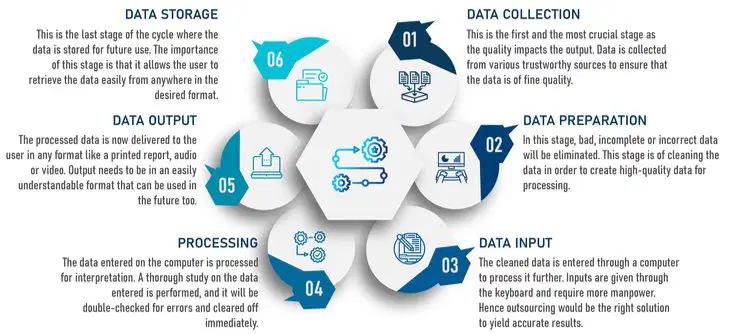
Collection Preparation Input
Processing Output Storage
These are the stages of the _____ _____ _____
Data probiotics
Data bicycle
Data program
Data processing cycle

After data has been input, processed, and output, what is the next stage of the DATA CYCLE?
storage
stoppage
stone age
storm trooper
Smallest unit of data:
byte
bit
kilobyte
nibble
A ________ is a group of 8 bits.
nibble
byte
kilobyte
Yottabyte
Data gets erased when the computer is switched off.
ROM
Memory Card
RAM
Blu - Ray
____________ is a permanent memory.
RAM
ROM
Hard Disk
CD
Which of the following is NOT an internal storage device of a computer?
Cache
ROM
Output stage of data processing cycle is...
data encoding
presenting data to user
retrieving data
data collection
What is Data processing ?
When data is stored on a computer
When data is processed into a meaningful and useful forms
When data is sent in useful forms
When data is copied from different devices
When a computer collects and stores data what does it mean?
Data input
Data output
Data process
Data upload
Hardware has no role to play in data processing
True
False
What process helps in extracting meaning from data.
Production
Analysis
Costing
Data processing
_____ _____ _____ is the processing of data WITHOUT using computers
Manual Labor Costs
Examples of hardwork
Manual Data Processing
Heroes of Marvel Comics
_____ _____ _____ is the use of computers for recording, manipulating and summarizing data.
Electronic Dance music
Electric fan
Electric stove heater
Electronic Data Processing
Raw form of facts and figures is called
Information
Data
Collection
Output
Collection Preparation Input
Processing Output Storage
These are the stages of the _____ _____ _____
Data probiotics
Data bicycle
Data program
Data processing cycle
After data has been input, processed, and output, what is the next stage of the DATA CYCLE?
storage
stoppage
stone age
storm trooper
Smallest unit of data:
byte
bit
kilobyte
nibble
A ________ is a group of 8 bits.
nibble
byte
kilobyte
Yottabyte
Data gets erased when the computer is switched off.
ROM
Memory Card
RAM
Blu - Ray
____________ is a permanent memory.
RAM
ROM
Hard Disk
CD
Which of the following is NOT an internal storage device of a computer?
Cache
ROM
Output stage of data processing cycle is...
data encoding
presenting data to user
retrieving data
data collection
What is word processing?
The creation, editing, formatting, and printing of documents using a computer program.
The process of creating new words
The processing of food using a computer program
The formatting and printing of documents using a typewriter
Name three popular word processing software.
Excel
Microsoft Word, Google Docs, and Apple Pages
PowerPoint
Adobe Photoshop
What is the function of the 'save' feature in word processing?
It sends the document to the printer
It changes the font style
It allows the user to save their document
It deletes the document
Explain the difference between 'cut' and 'copy' in word processing.
Cut removes the selected text and places it in the clipboard, while copy duplicates the selected text and places it in the clipboard.
Cut moves the selected text to a different location, while copy duplicates the selected text and places it in the clipboard.
Cut duplicates the selected text and places it in the clipboard, while copy removes the selected text and deletes it.
Cut removes the selected text and deletes it, while copy duplicates the selected text and places it in the clipboard.
What is the purpose of spell check in word processing?
To identify and correct spelling errors
To insert images
To create new words
To change font styles
What are the advantages of using word processing software over manual typing?
Less efficient
Handwriting practice
Time-saving, easier editing, formatting, and spell checking
Limited font options
Explain the meaning of 'formatting' in word processing.
It refers to the process of converting a document into a different file type
It is the process of adding images to a document
It means rearranging the order of the paragraphs in a document
It refers to the process of changing the appearance of the text, such as font style, size, color, alignment, and spacing.
What is the use of 'find and replace' feature in word processing?
It helps users to create a table of contents for the document
It enables users to add images to the document
It allows users to change the font style of the entire document
It allows users to search for specific words or phrases and replace them with another word or phrase throughout the document.
What are the different types of alignment options available in word processing?
Bold align, italic align, underline align, and strike through align
Red align, blue align, green align, and yellow align
Top align, middle align, bottom align, and stretch
Left align, center align, right align, and justify
Explain the concept of 'mail merge' in word processing.
Mail merge is a feature that allows you to create a set of documents that are essentially the same but contain unique elements, such as individualized names or addresses.
Mail merge is a feature that allows you to send emails directly from a word processing software.
Mail merge is a feature that allows you to merge multiple word documents into one.
Mail merge is a feature that allows you to create animated effects in word documents.
……is a software that communicate with the hardware and allows other programs to run
(a)OS
(b)OP
(c)HS
(d)HS
Which of the following are NOT Operating Systems (tick all that apply)
iOS
Linux
Samsung
iPhone
MacOSX
What is the most used operating system in the world?
Linux
MacOS
Windows
Ubuntu
Windows 7 and Windows Vista are examples of:
IOS Phone
Android
Microsoft Windows

Which of these is not a function of an OS:
Provide a user interface
Communicate with hardware
Allow the computer to multi-task
Improves CPU performance
How many applications can be processed by the CPU at a time?
1
2
3
Several
Explain the difference between 'cut' and 'copy' in word processing.
Cut removes the selected text and places it in the clipboard, while copy duplicates the selected text and places it in the clipboard.
Cut moves the selected text to a different location, while copy duplicates the selected text and places it in the clipboard.
Cut duplicates the selected text and places it in the clipboard, while copy removes the selected text and deletes it.
Cut removes the selected text and deletes it, while copy duplicates the selected text and places it in the clipboard.
What is the purpose of spell check in word processing?
To identify and correct spelling errors
To insert images
To create new words
To change font styles
What are the advantages of using word processing software over manual typing?
Less efficient
Handwriting practice
Time-saving, easier editing, formatting, and spell checking
Limited font options
Explain the meaning of 'formatting' in word processing.
It refers to the process of converting a document into a different file type
It is the process of adding images to a document
It means rearranging the order of the paragraphs in a document
It refers to the process of changing the appearance of the text, such as font style, size, color, alignment, and spacing.
What is the use of 'find and replace' feature in word processing?
It helps users to create a table of contents for the document
It enables users to add images to the document
It allows users to change the font style of the entire document
It allows users to search for specific words or phrases and replace them with another word or phrase throughout the document.
What are the different types of alignment options available in word processing?
Bold align, italic align, underline align, and strike through align
Red align, blue align, green align, and yellow align
Top align, middle align, bottom align, and stretch
Left align, center align, right align, and justify
……is a software that communicate with the hardware and allows other programs to run
(a)OS
(b)OP
(c)HS
(d)HS
Word processing means
Creating a story
Fixing a computer
Make a word processing software
Adding sound to a document
A software is a part of the computer you can not
Touch
See
Use
Destroy
What is word processing?
The creation, editing, formatting, and printing of documents using a computer program.
The process of creating new words
The processing of food using a computer program
The formatting and printing of documents using a typewriter
Name three popular word processing software.
Excel
Microsoft Word, Google Docs, and Apple Pages
PowerPoint
Adobe Photoshop
What is the function of the 'save' feature in word processing?
It sends the document to the printer
It changes the font style
It allows the user to save their document
It deletes the document
Explain the difference between 'cut' and 'copy' in word processing.
Cut removes the selected text and places it in the clipboard, while copy duplicates the selected text and places it in the clipboard.
Cut moves the selected text to a different location, while copy duplicates the selected text and places it in the clipboard.
Cut duplicates the selected text and places it in the clipboard, while copy removes the selected text and deletes it.
Cut removes the selected text and deletes it, while copy duplicates the selected text and places it in the clipboard.
What is the purpose of spell check in word processing?
To identify and correct spelling errors
To insert images
To create new words
To change font styles
What are the advantages of using word processing software over manual typing?
Less efficient
Handwriting practice
Time-saving, easier editing, formatting, and spell checking
Limited font options
Explain the meaning of 'formatting' in word processing.
It refers to the process of converting a document into a different file type
It is the process of adding images to a document
It means rearranging the order of the paragraphs in a document
It refers to the process of changing the appearance of the text, such as font style, size, color, alignment, and spacing.
What is the use of 'find and replace' feature in word processing?
It helps users to create a table of contents for the document
It enables users to add images to the document
It allows users to change the font style of the entire document
It allows users to search for specific words or phrases and replace them with another word or phrase throughout the document.
What are the different types of alignment options available in word processing?
Bold align, italic align, underline align, and strike through align
Red align, blue align, green align, and yellow align
Top align, middle align, bottom align, and stretch
Left align, center align, right align, and justify
Explain the concept of 'mail merge' in word processing.
Mail merge is a feature that allows you to create a set of documents that are essentially the same but contain unique elements, such as individualized names or addresses.
Mail merge is a feature that allows you to send emails directly from a word processing software.
Mail merge is a feature that allows you to merge multiple word documents into one.
Mail merge is a feature that allows you to create animated effects in word documents.
……is a software that communicate with the hardware and allows other programs to run
(a)OS
(b)OP
(c)HS
(d)HS
Which of the following are NOT Operating Systems (tick all that apply)
iOS
Linux
Samsung
iPhone
MacOSX
What is the most used operating system in the world?
Linux
MacOS
Windows
Ubuntu
Windows 7 and Windows Vista are examples of:
IOS Phone
Android
Microsoft Windows
Which of these is not a function of an OS:
Provide a user interface
Communicate with hardware
Allow the computer to multi-task
Improves CPU performance
How many applications can be processed by the CPU at a time?
1
2
3
Several
Explain the difference between 'cut' and 'copy' in word processing.
Cut removes the selected text and places it in the clipboard, while copy duplicates the selected text and places it in the clipboard.
Cut moves the selected text to a different location, while copy duplicates the selected text and places it in the clipboard.
Cut duplicates the selected text and places it in the clipboard, while copy removes the selected text and deletes it.
Cut removes the selected text and deletes it, while copy duplicates the selected text and places it in the clipboard.
What is the purpose of spell check in word processing?
To identify and correct spelling errors
To insert images
To create new words
To change font styles
What are the advantages of using word processing software over manual typing?
Less efficient
Handwriting practice
Time-saving, easier editing, formatting, and spell checking
Limited font options
Explain the meaning of 'formatting' in word processing.
It refers to the process of converting a document into a different file type
It is the process of adding images to a document
It means rearranging the order of the paragraphs in a document
It refers to the process of changing the appearance of the text, such as font style, size, color, alignment, and spacing.
What is the use of 'find and replace' feature in word processing?
It helps users to create a table of contents for the document
It enables users to add images to the document
It allows users to change the font style of the entire document
It allows users to search for specific words or phrases and replace them with another word or phrase throughout the document.
What are the different types of alignment options available in word processing?
Bold align, italic align, underline align, and strike through align
Red align, blue align, green align, and yellow align
Top align, middle align, bottom align, and stretch
Left align, center align, right align, and justify
……is a software that communicate with the hardware and allows other programs to run
(a)OS
(b)OP
(c)HS
(d)HS
Word processing means
Creating a story
Fixing a computer
Make a word processing software
Adding sound to a document
A software is a part of the computer you can not
Touch
See
Use
Destroy

