
 Worksheets
Scratch Test
Total questions: 130
Worksheet time: 7hrs 30mins


What is a loop in Scratch coding?
A loop in Scratch coding is a programming construct that allows a set of instructions to be executed randomly.
A loop in Scratch coding is a programming construct that allows a set of instructions to be skipped.
A loop in Scratch coding is a programming construct that allows a set of instructions to be repeated multiple times.
A loop in Scratch coding is a programming construct that allows a set of instructions to be repeated only once.
Which block is used to repeat a set of instructions in Scratch?
iterate
repeat
loop
cycle
What is the purpose of conditions in Scratch coding?
The purpose of conditions in Scratch coding is to add unnecessary complexity to the program.
The purpose of conditions in Scratch coding is to slow down the program execution.
The purpose of conditions in Scratch coding is to make the program more difficult to understand.
The purpose of conditions in Scratch coding is to control the flow of the program and make decisions.
Which block is used to make decisions based on certain conditions in Scratch?
if
broadcast
variable
loop
Which block is used to trigger actions in response to specific events in Scratch?
when red flag clicked
when green flag clicked
when blue flag clicked
when yellow flag clicked
What are sprites in Scratch coding?
Images used as backgrounds
Lines of code
Characters or objects that perform actions
Sounds played in the program
What is the role of sprites in Scratch projects?
Sprites are the characters or objects in Scratch projects.
Sprites are the background images in Scratch projects.
Sprites are the sound effects in Scratch projects.
Sprites are the programming blocks in Scratch projects.
What are blocks in Scratch coding?
Sounds that can be played in Scratch projects
Commands that control the movement of sprites
Puzzle-like pieces that fit together to create scripts
Images that can be inserted into Scratch projects
How are blocks used in Scratch projects?
Blocks are used to organize and categorize assets in Scratch projects.
Blocks are used to create animations in Scratch projects.
Blocks are used to add decorative elements to Scratch projects.
Blocks are used to create scripts or programs in Scratch projects.
What is a Sprite?
It is a soda brand made by the Coca-Cola Company
It is a luminous red-orange flash.
A spirit, a mythical, fairy-like creature who lives by the water.
Is the character that your Scratch code controls.


Where to find these codes?


Where to find these codes?


Where to find these codes?


How to add a sprite?


What do we call the character in Scratch?
Scratch
Sprite
Code
Backdrop

Can we change the costumes in Scratch?
Yes
No

What happens when we click this?
Change the Sprite
Program Starts
Program Stops
The Y axis is
"Up" and "Down"
"Left and Right"
The X axis is
"Left" and "Right"
"Up and Down"
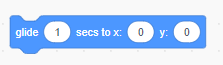
Which group of blocks include the "Glide" block?
Motion
Looks
Control
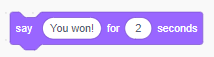
Which group of blocks include the "Say" block?
Sound
Looks
Control
What makes a program start
Motion Blocks
Event Blocks
Pen Blocks
Makey-Makey Blocks

What do you do in this part of Scratch?
Edit and create new backdrops.
Change the colours to sprites.
Edit and create new sprites.

What do we call the person who writes the instructions for the computer to complete a task?
Architect
Programmer
Scratch
Composer

What will happen with this block script coding?


Which tool is NOT found in the Scratch Paint Editor?


What are the 2 ways you can resize a Sprite using the Scratch Interface?
you can use a block in the Looks section
you can use the Sprite Pane below the stage to resize a Sprite
you can use the enlarger tool located in the motion blocks
you can click on the Sprite repeatedly to make it larger

In which section will you fine the timer block? (a)
sensing
looks
motion
variables

True or False: unchecking a variable's checkbox will make it appear on the stage.
true
false
Which coordinates will put a sprite in the center of the stage?
(240,-145)
(0,0)
(50, 240)
(0,50)

greater than

less than

equals

Which order are coordinates written in?
(x,y)
(y,x)
(x,x)
x,y
In the Scratch paint editor, we use...
Convert to Vector
Convert to Bitmap
Convert to Scratch
Convert to Mustangs
What color are the blocks in each of the sections.
Motion
Dark Blue
Operators
Green
Looks
Purple
Control
Orange
Sensing
Light Blue
You made a few different games. How do we copy a sprite without having to code each new sprite?
we use duplicate in the sprite pane
we click on the sprite on the stage and copy it
you can't copy anything, you will have to code it all again
Match the icon to the paint editor feature.

text tool

Fill Tool

Eraser Tool

Brush Tool
How much information does a variable hold? (a)
1
100
1000
infinite information
True or False: checking a variable's checkbox will make it appear on the stage.
true
false
Which coordinates will put a sprite in the center of the stage?
(240,-145)
(0,0)
(50, 240)
(0,50)
The tab that contains tools for modifying sounds in the project.
Costume Tab
Code Tab
Sound Tab
Backdrop Tab

when you create a game in scratch you can keep the score in
event
Variable
What are the characters of Scratch know as
(a)
Where does all the instruction blocks grouped together according to their function?
Is Scratch available offline? (Choose 2)
Yes
It is Scratch 2.0 (offline version)
no
no need to know

You can keep score in Scratch by creating a (a) .
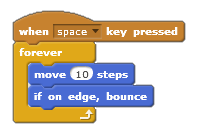
Which of these blocks can be identified as Iteration.
When Space key pressed
Forever
Move 10 Steps
If on edge, bounce
To change the appearance of a sprite we can give it a different
costume
look
style
stage
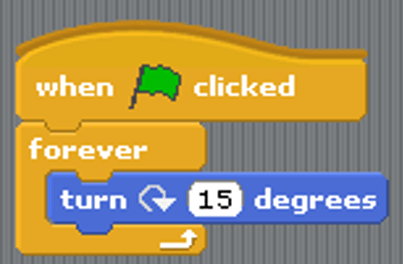
What will happen when the green flag is clicked?
Make the character spin
Make the ball bounce
Start the game
Add a sprite
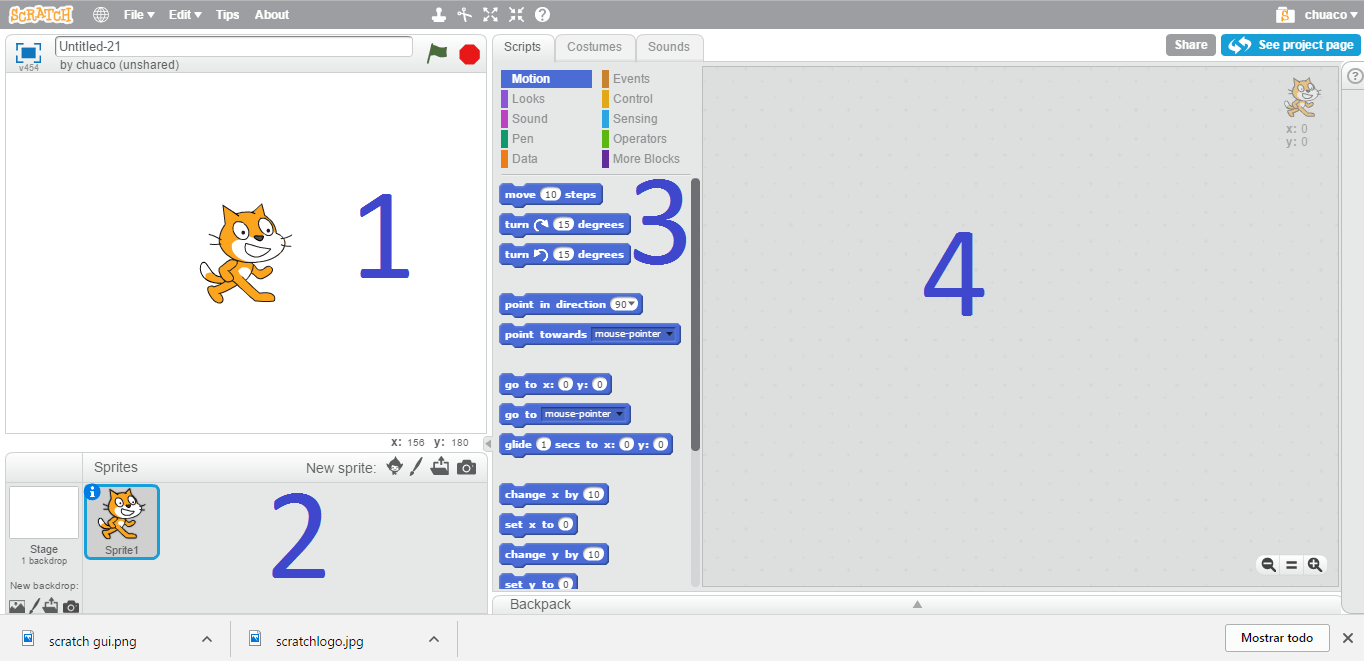
According to the image, the order of the elements in scratch are...
1.Stage 2.Sprites 3.Blocks 4.Scripts
1.Stage 2.Blocks 3.Sprites 4.Scripts
1.Scripts 2.Blocks 3.Sprites 4.Stage
1.Scripts 2.Blocks 3.Stage 4.Sprites

Will the sprite move from its position after this code?
Yes
No

This shows the script for a character in a game.
What happens to the score when the character touches the edge?
Score will remain the same
Score will increase by 1
Score will decrease by 1
Score will increase by 2

Repeating a statement more than once or until a condition is met is called a..?
Loop
Sequence
Repetition
Event
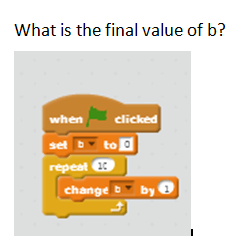
What is the final value of b?
0
9
10
11

Which categories does this command blocks belong to?
Looks
Sensing
Sound
Motion

What block will you use to have the sprite say something?
Looks
Sounds
Pen
Data

For an action to perform in scratch , it needs first....
An event block
A control block
A sound block
A data block

If Josh is 11 years old, what will this program print out?
It won't print out anything
You are old enough for Year 8
You are still in year 7
It will print out his age
Which is the main character of Scratch
(Hint- It is also the logo of Scratch)


This shows the script for a character in a game.
What happens to the score when the character touches the edge?
Score will remain the same
Score will increase by 1
Score will decrease by 1
Score will increase by 2

Looking at the script block below. What is the ghost's starting position?
(X:100, Y:50)
(X:50, Y:50)
(X:100, Y:100)
(X:0, Y:0)

What does this button do in Scratch?
Inserts a cat
Open the Sprite library
Inserts a picture
Changes the scene

What does this button do in Scratch?
Inserts a cat
Inserts a Sprite
Inserts a sound
Changes the scene

What will happen when you run this code?
Change color
Grow and shrink
Spin
Bounce

What will happen when you run this code?
Change color
Grow and shrink
Spin
Bounce

What will happen when you run this code?
Change color
Grow and shrink
Spin
Bounce

What will happen when you run this code?
Change color
Grow and shrink
Spin
Bounce

What will happen when you run this code?
Bounce everywhere
Add background music
Change scene
Play a beat
Say something

What will happen when you run this code?
Bounce everywhere
Add background music
Change scene
Play a beat
Say something

What will happen when you run this code?
Bounce everywhere
Add background music
Change scene
Play a beat
Say something
This code is an example of which of the following?
IF, THEN conditional
An algorithm
Debugging
A map

What is the variable in this code?
keep score
random position
edge

What does this code do?
It clicks the sprite forever
It allows you to draw shapes
It generates sprites forever


The area where you play a game or run a project. This area is where you see the actions of your coding.
Stage
Block
Sprite
Costume
The objects/characters that perform the action in a project.
Backdrop
Costume
Block
Sprite

In Scratch, where do you drag the coding blocks to CREATE lines of code?

Blocks Palette

Sprite Pane

Scripting Area

Stage
Which of the following is an example of a sprite?


Which of the following blocks would you use if you wanted your code to start as soon as the game starts?


Jimmy is coding a Pac-Man game in Scratch. He wants the player to be able to move the sprite with the arrow keys for as long as the game is running.
Which of the following blocks does he need to add to his existing code?

Forever block

Repeat block

Go to X Y block


Match the code block to its explanation, given this script of code blocks.

when the game starts

the code runs as long as the game runs

if the player presses the key

the sprite will face the direction

the sprite will move a number of steps

Jimmy is coding a Pac-Man game in Scratch. His game only has one sprite. He wants his sprite to look as if its mouth is opening and closing.
Which block would Jimmy need to do this?

Touching Color block

Switch Backdrop block

Switch Costume block

Move Steps block

Jimmy wants to add a scoring mechanic to his game.
Which block category would he need to create a Score block?

Motion block category

Events block category

Sensing block category

Variables block category

Jimmy is coding a Pac-Man game in Scratch. He wants to upload an image to use for the ghost sprite.
What would he select to add this image from his computer?

Choose a sprite

Paint a sprite

Upload a sprite

Upload a backdrop
Jimmy is coding a Pac-Man game in Scratch. He wants to upload an image to use for the maze.
What would he select to add this image from his computer?
Choose a sprite
Paint a sprite
Upload a sprite
Upload a backdrop

Jimmy is coding a Pac-Man game in Scratch. He wants his Pac-Man sprite to stop when it hits the wall.
Which block should go in the blank space after "if" to keep the sprite from passing through the wall?

Key Pressed block

Mouse Down block

Touching Color block

Color Touching Color block
Which tool is NOT found in the Scratch Paint Editor?
What are the 2 ways you can resize a Sprite using the Scratch Interface?
you can use a block in the Looks section
you can use the Sprite Pane below the stage to resize a Sprite
you can use the enlarger tool located in the motion blocks
you can click on the Sprite repeatedly to make it larger
In which section will you fine the timer block? (a)
True or False: unchecking a variable's checkbox will make it appear on the stage.
true
false
Which coordinates will put a sprite in the center of the stage?
(240,-145)
(0,0)
(50, 240)
(0,50)
greater than
less than
equals
Which order are coordinates written in?
(x,y)
(y,x)
(x,x)
x,y
In the Scratch paint editor, we use...
Convert to Vector
Convert to Bitmap
Convert to Scratch
Convert to Mustangs
What color are the blocks in each of the sections.
Motion
Dark Blue
Operators
Green
Looks
Purple
Control
Orange
Sensing
Light Blue
You made a few different games. How do we copy a sprite without having to code each new sprite?
we use duplicate in the sprite pane
we click on the sprite on the stage and copy it
you can't copy anything, you will have to code it all again
Match the icon to the paint editor feature.
text tool
Fill Tool
Eraser Tool
Brush Tool
How much information does a variable hold? (a)
True or False: checking a variable's checkbox will make it appear on the stage.
true
false
Which coordinates will put a sprite in the center of the stage?
(240,-145)
(0,0)
(50, 240)
(0,50)
The tab that contains tools for modifying sounds in the project.
Costume Tab
Code Tab
Sound Tab
Backdrop Tab
when you create a game in scratch you can keep the score in
event
Variable

0

180

-90

90

-45
Click all below that are sprites.


What is the difference between a bug in a program and debugging a program?
A bug in a program is a (a) in the code or script. When we debug a program, we (b) the code or script.

