
 Worksheets
TinkerCAD Functions & Design
Total questions: 26
Worksheet time: 52mins

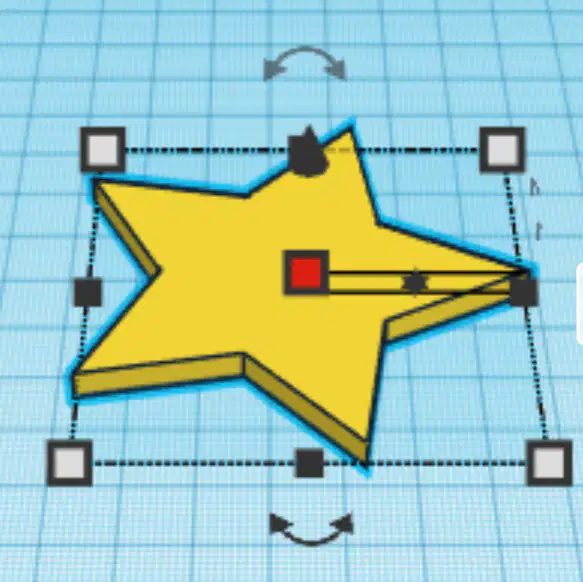
The curved arrows allow you to do what?
rotate the object
change the color of the object
change the size of the object
duplicate the object

Which one of the following would you use to move an object vertically (up/down) in TinkerCAD?
1
2
3
Which one of the following would you use to resize an object in TinkerCAD?
1
2
3
Which one of the following would you use to rotate an object in TinkerCAD?
1
2
3


In TinkerCAD the above image is for:
Group
Ungroup
Delete
Align

In TinkerCAD the above image is for:
Group
Crop
Redo
Ungroup
In TinkerCAD, how do you subtract material from a shape, or make a hole?
Use the subtract tool.
Group a solid shape with a hole shape.
Use the delete button.
Hold down the "H" button and left click.
How do you select more than one object?
Press the "3" key.
Hold down the "shift" key and select.
Press the "2" key.
Draw a box around multiple objects.

In TinkerCAD the above image is for:
Delete
Copy
Paste
Group
What is the keyboard shortcut for Copy?
Ctrl+Y
Ctrl+Z
Ctrl+V
Ctrl+C

In TinkerCAD the above image is for:
Copy
Paste
Ungroup
Duplicate
What tool would you use to center objects perfectly?
Group
Mirror
Align
Undo

In TinkerCAD the above image is for:
Undo
Redo
Move
Align
What is the keyboard shortcut for Paste?
Ctrl+Y
Ctrl+Z
Ctrl+V
Ctrl+C

What button can you use to dimension or resize a shape/object?


T or F? The only way to dimension a shape/object is by clicking and dragging the white boxes.
True
False
T or F? Common keyboard shortcuts that work in documents also work in Tinkercad.
True.
False.

What allows you to raise an object off of the workplane?


In TinkerCAD the above image is for:
Align
Paste
Copy
Mirror

What is the blue area called?
The graph.
The grid.
The space.
The workplane.

In TinkerCAD the above image is for:
Delete
Redo
Copy
Paste

In TinkerCAD the above keyboard command set is for:
Undo
Redo
Paste
Copy

In TinkerCAD the above keyboard command set is for:
Redo
Copy
Duplicate
Paste

In TinkerCAD the above keyboard command set is for:
Copy
Paste
Undo
Redo

