
 Worksheets
Geo Modeling Exam 2 :(
Total questions: 37
Worksheet time: 19mins
What is the main difference between dimensional constraints and geometric constraints?
Dimensional constraints define size and location while geometric constrains define shape relationships
Geometric constraints define size and location, while dimensional constraints define shape relationships
Both define shape relationships
Neither affects the model behavior
How can we confirm that a sketch is fully constrained?
By checking if all lines turn blue
By ensuring no additional constraints can be applied
By using the 'Show All Constraints' tool and verifying no degrees of freedom remain
By adding as many constraints as possible until the system no longer allows more
How do we distinguish between derived dimensions and regular dimensions on the screen?
Regular dimensions are displayed in bold.
Derived dimensions are colored differently.
Derived dimensions are shown in parentheses.
Regular dimensions are underlined.
Which menu option allows you to display and edit user-defined equations in Autodesk Inventor?
Parameters Command
Application Options
Constraint Settings
Auto Dimension Tool
Which of the following is NOT a type of geometric constraint available in Autodesk Inventor?
Coincident
Perpendicular
Colinear
Freeform
Does Autodesk Inventor allow partially constrained or unconstrained models?
Only in assembly mode.
No, all models must be fully constrained.
Yes, but they may behave unpredictably.
Yes, but only when using geometric constraints.
How can you display and examine the existing constraints applied to a sketch?
Enable 'Auto Dimension'.
Select 'Reset Constraints'.
Delete all dimensions and reapply them.
Use the 'Show All Constraints' tool.
What is the main advantage of using parametric equations in modeling?
They simplify the software interface.
They allow for automatic updates to design changes.
They prevent over-constraining a model.
They eliminate the need for constraints.
Can you delete an applied constraint? How?
No, constraints cannot be removed once applied.
Yes, but only if the model is fully constrained.
Yes, by right-clicking the constraint and selecting 'Delete'.
No, but you can hide constraints to ignore them.
What is the purpose of the Auto Dimension command?
To create a new sketch based on an existing model.
To automatically generate all necessary constraints and dimensions.
To remove redundant constraints from a model.
To replace manual dimensions with predefined values.
What is the purpose of the Trim and Extend commands?
To add dimensions to a sketch
To copy an existing sketch
To apply constraints to geometry
To shorten or lengthen an object to meet a boundary
What does the Profile Sketch refer to in Autodesk Inventor?
A closed region used to create features
A rough draft of a model
A sketch with no constraints
An assembly of multiple parts
How do you access the Edit Sketch option in Autodesk Inventor?
By selecting the Extrude command
By holding Shift and clicking the sketch
By using the Offset command
By double-clicking the sketch in the browser
What happens when you use the Auto Dimension command?
It automatically adds missing dimensions and constraints
It removes all constraints from the sketch
It deletes extra geometry
t converts 2D sketches into 3D models
The Offset Command is used to:
Extend a line to meet another line
Copy and move geometry at a set distance
Trim excess parts of a model
Remove constraints from a sketch
What should be avoided when creating a profile sketch?
Using multiple closed regions
Applying constraints
Creating self-intersecting curves
Adding dimensions
How do you align the sketch plane of a selected entity to the screen?
Use the Zoom All command
Use the Look At command
Press Shift while selecting the entity
Click Auto Dimension
What is the main advantage of using the Offset command instead of creating a separate sketch?
It requires fewer constraints
It automatically generates dimensions
It keeps the new geometry associated with the original
It prevents profile errors
What is the purpose of projected geometry in Autodesk Inventor?
To reference existing edges or features in a new sketch
To create a solid model
To convert a 3D object into a 2D sketch
To measure distances in a model
Which of the following sketch commands creates a smooth transition between two intersecting lines?
Trim
Extend
Offset
Fillet
What is the basic concept of the BORN technique?
Using a reference coordinate system as the first feature before creating solids.
Creating a base feature first and building other features from it.
Designing all features independently with no parent/child relationships.
Only using predefined templates for creating models.
What is the main advantage of using the BORN technique?
It forces all features to be created from a single base solid
It simplifies the user interface in Autodesk Inventor
It allows more flexibility in modifying parts without affecting dependent features.
It prevents any modifications after the model is created.
Why is it important to consider the parent/child relationships between features?
It helps organize the model but has no effect on modifications.
Parent features control child features
Child features control parent features
It only matters when working in assemblies.
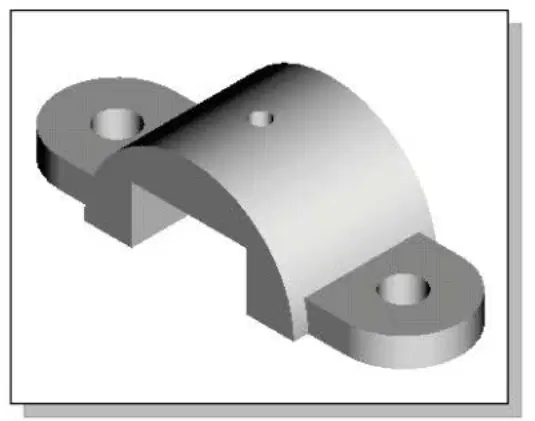
In the given figure, which feature would most likely be the parent feature?
The small hole on top because it was added last
One of the side supports since they are symmetrical
The entire part acts as a single feature with no dependencies.
The curved central feature since other features like holes and supports reference it.
What is the procedure to suppress a feature in Autodesk Inventor?
Right-click the feature in the browser and select Suppress.
Delete the feature from the browser.
Rename the feature and save the file.
Select Hide Feature from the visibility menu.
What happens to a feature when it is suppressed?
It is deleted permanently from the model.
It remains in the model but is hidden and does not affect other features
It loses all its parent/child relationships.
It automatically regenerates when a new feature is added.
How do you identify a suppressed feature in a model?
It has a red X next to it.
It is deleted from the browser.
It is shown in gray in the browser.
It is listed under Hidden Features.
Which command is used to retrieve feature dimensions in a drawing?
Retrieve Model Annotations
Base View
Edit Dimension
Leader Text
Which of the following is NOT a step in creating a 2D drawing in Inventor?
Drawing sheet formatting
Creating and positioning views
Exporting as a video file
Adding annotations
How can center marks be added to a circular feature in a drawing?
Using the Base View tool
By manually sketching a crosshair
By enabling it in the model browser
Using the Center Mark command in the Drawing Annotation panel
What is a key benefit of Model-Based Definition (MBD)?
It simplifies manual drafting procedures
It replaces the need for 2D engineering drawings
It reduces file size
It creates new geometric features in the model
Which command is used to reposition a dimension in a drawing?
Dragging the dimension text using the left mouse button
Deleting and re-creating the dimension
Selecting Auto Arrange
Using the Edit View command
How can you reset the Home view in Autodesk Inventor?
Use the Base View command
Delete the current Home view and recreate it
Right-click the ViewCube and select Reset Home
Use the Reposition View tool
How can you reset the Front view in Autodesk Inventor?
Right-click the ViewCube and select Set Current View as Front
Adjust the model manually and save the orientation
Use the Project View tool
Delete all views and start over
Which file format is commonly used for saving Autodesk Inventor part files?
.IAM
.IPT
.STEP
.STL
.IDW
Which file format is commonly used for saving Autodesk Inventor drawing files?
.IAM
.IPT
.STEP
.IDW
.STL
Which tab contains the 'Base View' command in the drawing environment?
Place Views
Sketch
3D Model
Annotate

