
Font size
 Worksheets
Topic 1 Hardware
Total questions: 100
Worksheet time: 58mins
Identify and describe the hardware and communication elements of contemporary computer systems and how they are connected.
Hardware elements include CPU, memory, storage devices, and input/output devices; communication elements include buses and network interfaces, all connected via system buses and network connections.
Hardware elements include only software programs; communication elements are not required in modern systems.
Only the CPU and monitor are considered hardware; communication elements are obsolete.
Hardware and communication elements are not connected in contemporary systems.
Identify and describe the main components of contemporary computer architecture, including Von Neumann architectures.
CPU, Memory, Input/Output devices, Control Unit, Arithmetic Logic Unit
Monitor, Keyboard, Mouse, Printer
Operating System, Application Software, Utility Programs
Hard Disk, CD-ROM, USB Drive, Floppy Disk
Different types of memory and caching include:
RAM, ROM, CPU cache, and disk cache
Only RAM and ROM
Only CPU cache and disk cache
Only hard disk memory
Describe and explain parallel processing.
Parallel processing is the simultaneous use of multiple processors to perform computational tasks faster.
Parallel processing is the use of a single processor to perform tasks sequentially.
Parallel processing is the process of storing data in multiple locations.
Parallel processing is the method of compressing data for storage.
The fetch-execute cycle describes how data can be read from RAM into registers. Which of the following best describes this process?
The CPU fetches an instruction from RAM, decodes it, and executes it, moving data into registers as needed.
Data is permanently stored in registers and never moves to or from RAM.
The fetch-execute cycle only involves the ALU and does not interact with RAM.
Registers fetch data directly from secondary storage without using RAM.
Describe the use of contemporary methods and their associated devices for input and output.
Contemporary methods use advanced devices for efficient data input and output.
Contemporary methods avoid using any devices for input and output.
Contemporary methods only use manual devices for input and output.
Contemporary methods are not related to input and output devices.
Explain the use of these methods and devices in contemporary computer systems and their suitability in different situations.
They are used for data processing and storage, and their suitability depends on the specific requirements of speed, capacity, and cost.
They are only used for gaming purposes in modern systems.
They are obsolete and not used in any current computer systems.
They are only suitable for mobile devices.
Compare the functional characteristics of contemporary secondary storage devices.
They differ in speed, capacity, durability, and cost.
They all have the same speed and capacity.
They are only used for temporary storage.
They are obsolete and rarely used.
Explain fragmentation and its consequences and describe the need for defragmentation.
Fragmentation leads to inefficient use of storage and slower system performance, and defragmentation is needed to reorganize data for optimal access.
Fragmentation improves storage efficiency and increases system speed, so defragmentation is not necessary.
Fragmentation has no impact on system performance, and defragmentation is only for aesthetics.
Fragmentation only affects network speed, and defragmentation is used to increase internet bandwidth.
Networks are systems that ______ to communicate with each other.
connect devices
store data
run applications
create graphics
The importance of networking standards is that they:
Ensure interoperability between devices
Increase network speed only
Eliminate the need for security
Are only used in wireless networks
Which of the following lists includes only contemporary protocols used for communication and data transfer in modern networks?
HTTP, FTP, SMTP, TCP/IP, IMAP, DHCP, UDP, and wireless communication protocols
HTML, CSS, JavaScript, XML, and JSON
Python, Java, C++, Ruby, and PHP
Ethernet, Token Ring, FDDI, ARCNET, and AppleTalk
The role of handshaking is to:
Establish a connection and synchronize communication between devices.
Encrypt data during transmission.
Increase the speed of data transfer.
Terminate the connection between devices.
The internet can be described as:
A local area network for a single building
A world-wide communications infrastructure
A private network for government use only
A network limited to one country
What does CPU stand for?
Central Processing Unit
Central Power Unit
Computer Processing Unit
Control Processing Unit
Who predicted in 1965 that the number of transistors on a processor would double approximately every two years?
Gordon Moore
Bill Gates
Steve Jobs
Alan Turing
What is the CPU responsible for in a computer system?
The CPU is responsible for executing instructions and performing calculations.
The CPU is responsible for storing data permanently.
The CPU is responsible for displaying images on the monitor.
The CPU is responsible for providing power to all components.
According to Moore's Law, how often does the number of transistors on a processor double?
Approximately every two years
Every six months
Every five years
Every ten years
Which of the following statements is TRUE about the CPU?
The CPU is the 'brain' of the computer and actually thinks.
The CPU carries out instructions given to it and processes data.
The CPU is only responsible for graphics processing.
The CPU does not affect the speed of the computer.
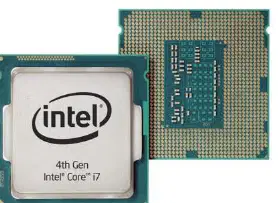
Refer to the image of the Intel processor. What is the main function of this component in a computer system?
The main function of the CPU (Intel processor) is to process all the data and instructions in a computer system.
It stores all the data permanently in a computer system.
It provides power supply to all the components in a computer system.
It is responsible for displaying images on the monitor.
What is the main function of the Graphics Processing Unit (GPU)?
To handle and accelerate the rendering of graphics and images, and perform complex computations in fields like machine learning and scientific simulations.
To manage the computer's memory and storage devices.
To control the input and output operations of the computer.
To execute and manage the operating system processes.
Which component provides audio capabilities, allowing the computer to process and output sound?
Sound Card
Graphics Card
Network Card
Power Supply
What does the Network Interface Card (NIC) enable a computer to do?
Connect to networks, including the internet.
Increase the computer's processing speed.
Store large amounts of data permanently.
Display images on the monitor.
For wireless connectivity, many computers include built-in Wi-Fi adapters or use external USB adapters. What is this component called?
Wireless Adapter
Graphics Card
Hard Drive
Power Supply
Which component allows for short-range wireless communication with other Bluetooth-enabled devices?
Bluetooth Module
Wi-Fi Adapter
Infrared Sensor
NFC Chip
Various input devices (e.g., keyboard, mouse, touchpad) and output devices (e.g., monitor, printer, speakers) connect to the computer system, typically through USB ports or other specialised connections. What are these devices collectively called?
Input/Output Devices
Storage Devices
Processing Devices
Networking Devices
What is the function of the internal bus in a computer system?
Which type of bus connects peripheral devices such as USB to the motherboard?
External Bus
Internal Bus
Address Bus
Data Bus
PCIe slots allow for the addition of which of the following components?
Hard drives
Dedicated GPUs
Monitors
Keyboards
What does the Power Supply Unit (PSU) do in a computer system?
The PSU converts AC power from the wall outlet into the appropriate DC voltages required by the computer's components.
The PSU stores data and programs for long-term use.
The PSU processes instructions and performs calculations.
The PSU displays images and videos on the monitor.
Which of the following is NOT typically part of a computer's cooling system?
A) Fans
B) Heat sinks
C) Liquid cooling
D) Hard drives
Why is the interconnection of hardware and communication elements important in contemporary computer systems?
It allows for seamless data processing, storage, and communication, enabling a wide range of tasks and applications.
It increases the physical size of computer systems, making them more difficult to manage.
It limits the ability of systems to communicate with each other, reducing efficiency.
It restricts the types of software that can be used on a system, making it less versatile.
What is a bit (Binary digIT)?
A bit is a 0 or a 1.
A bit is a group of 8 bytes.
A bit is a decimal number.
A bit is a type of software.
How many bits are there in a byte?
8
4
16
32
How many bytes are there in a kilobyte (K)?
1024
1000
512
2048
How many kilobytes are there in a megabyte (Mb)?
1024
1000
512
2048
How many megabytes are there in a gigabyte (Gb)?
1024
1000
512
2048
How many gigabytes are there in a terabyte (Tb)?
(a)
What is a word in computer memory?
If the switch is 'On' in a two-state device, what digit is it storing?
1
0
2
9
If the switch is 'Off' in a two-state device, what digit is it storing?
0
1
2
3
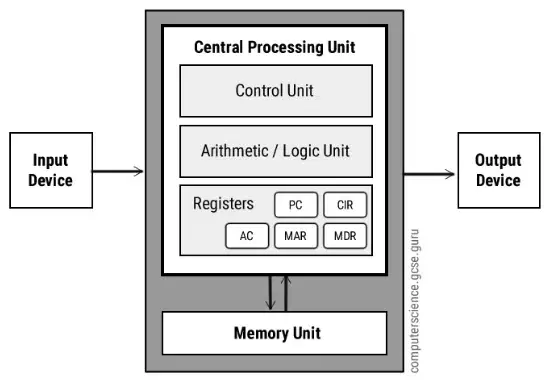
Identify and describe the main components of contemporary computer architecture, including Von Neumann architectures.
Control Unit, Arithmetic Logic Unit, Memory Unit, Input/Output Devices
Motherboard, Hard Disk, Monitor, Keyboard
Operating System, Application Software, User Interface, Network Card
Transistor, Capacitor, Resistor, Diode
What is the function of the Control Unit in a contemporary Von Neumann type CPU architecture?
Performs mathematical calculations
Directs the flow of instructions and/or data and coordinates the other parts of the CPU
Stores data permanently
Handles input and output devices
Fill in the blank: The Arithmetic Logic Unit (ALU) performs all the _______ calculations and _______ operations in the CPU, allowing a program to take decisions.
mathematical, logical
chemical, physical
graphical, statistical
mechanical, electrical
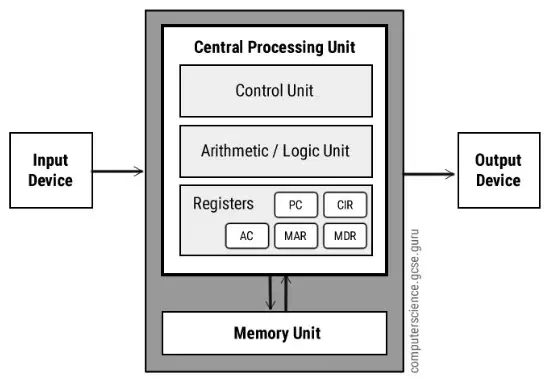
According to the diagram, which components are part of the Central Processing Unit (CPU) in the Von Neumann architecture?
Arithmetic Logic Unit (ALU) and Control Unit
Memory Unit and Input Unit
Output Unit and Memory Unit
Input Unit and Output Unit
What is a small amount of fast access temporary storage used to store frequently used data and instructions in a computer called?
Register
Hard Disk
Optical Drive
Printer
Which register contains the data to be stored in the computer storage (e.g., RAM), or the data after a fetch from the computer storage?
MDR (Memory Data Register)
MAR (Memory Address Register)
PC (Program Counter)
IR (Instruction Register)
Which register stores the memory address from which data will be fetched to the CPU or the address to which data will be sent and stored?
MAR (Memory Address Register)
MDR (Memory Data Register)
PC (Program Counter)
IR (Instruction Register)
What is the name of the register in which intermediate ALU results are stored?
Accumulator
Program Counter
Instruction Register
Stack Pointer
Which register holds the instruction that is currently being executed or decoded?
CIR (Current Instruction Register)
MAR (Memory Address Register)
PC (Program Counter)
ACC (Accumulator)
What does the Program Counter (PC) indicate in a computer?
Where a computer is in its program sequence.
The amount of memory available in the system.
The speed of the processor.
The type of operating system installed.
What type of memory is smaller, faster, and closer to a processor core, and stores copies of the data from frequently used main memory locations?
Cache memory
Virtual memory
Hard disk
Register
Cache memory can be accessed by a CPU more ______ than it can access regular RAM.
quickly
slowly
rarely
differently
Which of the following provides transportation for data to be processed?
Data bus
Address bus
Control bus
Power bus
An address bus is used to transfer data between devices. The address is stored in the form of (a) numbers to enable the data bus to access memory storage.
Which bus carries commands from the CPU and returns status signals from the devices?
Data bus
Address bus
Control bus
System bus
Buses connect all the internal components of a computer, such as CPU and memory, to the ______.
motherboard
hard disk
monitor
keyboard
What is the function of the Control Unit in a contemporary Von Neumann type CPU architecture?
The Control Unit directs the operation of the processor. It tells the computer's memory, ALU, and input and output devices how to respond to the instructions that have been sent to the processor.
The Control Unit performs all arithmetic and logical operations within the CPU.
The Control Unit is responsible for storing data and instructions permanently.
The Control Unit manages only the input and output devices, not the memory or ALU.
What is the function of the MDR (Memory Data Register) in a contemporary Von Neumann type CPU architecture?
The MDR holds the data that is being transferred to or from memory.
The MDR stores the address of the next instruction to be executed.
The MDR performs arithmetic and logic operations.
The MDR controls the flow of data between the CPU and input/output devices.
What is the function of the ALU (Arithmetic and Logic Unit) in a contemporary Von Neumann type CPU architecture?
The ALU performs arithmetic and logical operations.
The ALU manages memory access and storage.
The ALU controls input and output devices.
The ALU fetches instructions from memory.
What is the function of the MAR (Memory Address Register) in a contemporary Von Neumann type CPU architecture?
What is the function of the Program Counter / Processor Register in a contemporary Von Neumann type CPU architecture?
The Program Counter holds the address of the next instruction to be executed.
The Program Counter stores the result of arithmetic operations.
The Program Counter manages data transfer between memory and I/O devices.
The Program Counter controls the speed of the CPU clock.
Which CPU component is described as: 'A small amount of fast access storage. Normally used for a specific purpose where data or control information is temporarily stored.'?
Register
Cache
ALU
Control Unit
Which CPU component is described as: 'The means by which data is transmitted from one part of a computer to another, connecting all major internal components to the CPU and memory.'?
Bus
Register
ALU
Cache
Different types of memory and caching include:
RAM, ROM, CPU cache, and disk cache
Only RAM and ROM
Only CPU cache and disk cache
Only virtual memory
Which type of memory retains data when the power is removed?
RAM
ROM
Cache
Hard Drive
Fill in the blank: RAM stands for ________ Access Memory.
Random
Rapid
Remote
Read
What happens to the contents of RAM when you turn your computer off?
They are saved to the hard drive
They are lost
They are compressed
They are transferred to the CPU
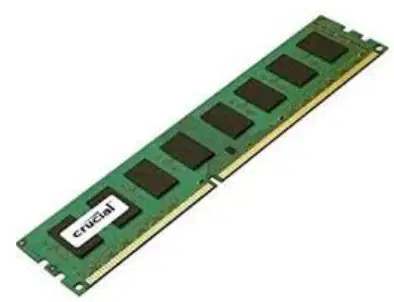
What type of memory does this image represent?
ROM
RAM
Cache
Hard Drive
What does ROM stand for?
Read Only Memory
Random Output Module
Run Over Mode
Read Over Method
Which of the following is NOT a characteristic of ROM?
A) It is non-volatile
B) The user can alter its contents
C) It stores instructions for the BIOS
D) It is read-only
True or False: The contents of ROM are lost when you switch off the computer.
True
False
What does BIOS stand for in the context of ROM?
Basic Input/Output System
Binary Input/Output System
Basic Integrated Operating System
Basic Internal Output System
Fill in the blank: In 2024, for basic everyday use such as web browsing and document creation, ______ or ______ of RAM is usually sufficient.
4GB or 8GB
2GB or 4GB
16GB or 32GB
64GB or 128GB
Which type of memory is made up of millions of addressable cells?
Addressable Memory
Cache Memory
Virtual Memory
Read-Only Memory
What is the job of the processor in relation to addressable memory?
To retrieve each instruction and data item and to carry out instructions in a sequential manner.
To store all data permanently in the memory.
To manage the power supply to the memory modules.
To increase the physical size of the memory.
Cache memory is similar to ______, except it resides on or close to the CPU/typically integrated directly with the CPU.
RAM
Hard Disk
ROM
Flash Drive
Which of the following is true about cache memory?
It is slower than RAM
It is faster than RAM and is also volatile
It is non-volatile
It is only used for permanent storage
Cache memory is used to store ______ used data from main memory.
frequently
rarely
never
randomly
Cache memory is used by the processor to avoid having to slow down to the speed of the RAM all the time.
True
False
As a CPU processes data, it looks in the ______ first to see if the instructions are there from a previous reading of data.
cache memory
hard disk
register
RAM
What problem does cache memory attempt to solve in computer architecture?
Power consumption
Von Neumann bottleneck
Data corruption
Overheating
Cache is small, extremely fast memory placed near or on the ______.
processor
hard disk
monitor
keyboard
Cache memory is usually quite low-capacity (a few megabytes), so ______ is still needed in order to avoid constantly accessing things from slow storage media.
RAM
CPU
SSD
GPU
Cache memory is less expensive compared to conventional RAM and is much larger than RAM.
True
False
What happens to the least used data/instructions when the cache is full?
They are permanently stored
They are overwritten
They are sent to RAM
They are deleted from the system
Cache memory is memory that a CPU can access more quickly than it can access regular _____. Fill in the blank.
RAM
ROM
Hard Disk
Flash Drive
What is the main advantage of cache memory in terms of software performance?
Cache memory ensures fast access to instructions, increasing the overall speed of the software program.
Cache memory increases the storage capacity of the computer significantly.
Cache memory is used to permanently store user data and files.
Cache memory is responsible for managing all input and output devices.
Computers with slower processors but larger caches tend to be faster than computers with faster processors but more limited cache space.
True
False
Level 1 (L1) cache is extremely fast but relatively _____. Fill in the blank.
small
expensive
slow
large
Where is Level 1 (L1) cache usually embedded?
In the CPU
On the motherboard
In the RAM
In the hard disk
Level 2 (L2) cache often has a higher capacity than L1 and may be located on the CPU or on a separate chip so that it is not slowed down by traffic on the main system _____. Fill in the blank.
bus
register
core
cache
Which level of cache is typically specialized memory that works to improve the performance of L1 and L2?
Level 3 (L3) cache
Level 1 (L1) cache
Level 2 (L2) cache
Main memory (RAM)
In multicore CPUs, each core may have its own dedicated L1 and L2 cache, but share a common _____ cache. Fill in the blank.
L3
L1
L2
RAM
What are the two main types of cache memory mentioned in the text?
RAM cache and Disk cache
Flash cache and Web cache
CPU cache and GPU cache
L1 cache and L2 cache
Fill in the blank: RAM cache is memory between the CPU and ________ where sections of recently or frequently used data and/or programs are stored.
main memory
hard disk
graphics card
network interface
Which type of cache is described as a section of main memory between the CPU and disc where data recently read from disc or about to be written to disc is temporarily stored?
RAM cache
Disk cache
Internet cache
Flash cache
Internet/Web cache allows users to view previously viewed pages faster because they are read from the disc instead of being downloaded again.
True
False
Which of the following is NOT an advantage of using Internet/Web cache?
A) Viewing previously viewed pages faster
B) Storing 'pre-fetched' pages for faster access
C) Increasing the size of the hard disk
D) Storing pages for offline viewing
Fill in the blank: Disk cache improves performance by storing recently accessed data from a disc in cache, so if it is needed again, it is ________ to access it from cache than from the disc.
faster
slower
harder
less efficient

