
 Worksheets
Scratch Basics
Total questions: 72
Worksheet time: 39mins
Displays the location of your X and Y positions.
stage
coordinates
volume
" if on edge, bounce " mean ... ?
Jump
Go back
Continue
_______________ is the art of writing instructions to tell a computer what to do.
Programming
Debugging
Variable
A set of instructions is called a ___________
Variable
Scratch
Program
the objects that perform actions in a project
Sprite
Script
Scratch
What is a loop?
Starting the program
Ending the program
Allows something to be repeated
The computational concept of running the same sequence multiple times.
Loops
Events
Broadcast
A message that is sent through the Scratch program, activating receiving scripts.
Parallelism
Events
Broadcast

The "forever" block is found in which of the following block types?
sound
data
control

Which would make a sprite move up?
Change X by 10
Change Y by -10
Change Y by 10
Change X by -10

If we want code to run for an entire game which block is used?
Repeat 10 times
Repeat until
Keep going
Forever

What block causes sprites make a speech bubble?
Sound
Speech bubble
Say
Think
It is the area where you place blocks together to write code.
Stage
Script Area
Blocks
None of the above
It is the area which has all the blocks that you can use to piece together on the code screen.
Block Palette
Script Area
Stage
Sprite
What is the definition of an Algorithm?
A set of instructions to perform a process.
The answer to a question.
A question to be answered
A list of instructions.

What loop is this?
Forever loop
Fixed loop

Which categories does this command blocks belong to?
Motion
Events
Looks
Control
Which block of code is used to make the character change costume?
Control
Looks
Motion
Sensing
What is another name for your background in Scratch?
Back
Background 1
Sprite
Backdrop
You can paint a new costume for a sprite in scratch?
Yes
No

A block that programs a sprite to hide or show; also used to change a sprite's costume is called what?
Looks
Event
Motion
Control
If I wanted to start a character at a particular place on the screen, which block would I use?


To change the appearance of a sprite we can give it a different...
Costume
Look
Style
Stage

Which of these would move the sprite down on the stage?
Change x by 10
Change x by -10
Change y by 10
Change y by -10

What name of block is this?
condition
move
custume
go to

To send a message between sprites or from the sprite to the stage, you need to use
Sequence
Send
Transmit
Broadcast
Thumbnails of sprites present on the stage is displayed in ____________.
Sprites Pane
Scripts Area
Block Palette
Which of the following block is present in Looks category
[When _____ key is pressed]
[say ____ for ____ secs]
[Repeat ___ ]
Category of blocks that is always present on the top of the script stack.
Control
Events
Looks
To change the costume of a sprite we use which block?
[ Next Costume]
[ Change Costume ]
[Show Costume ]

Create a program with the following algorithm?


Variables are used to hold data that cannot change.
True
False

If Jenny is 13, which message will be broadcast?
Message 1
Message 2
Message 3
Message 4

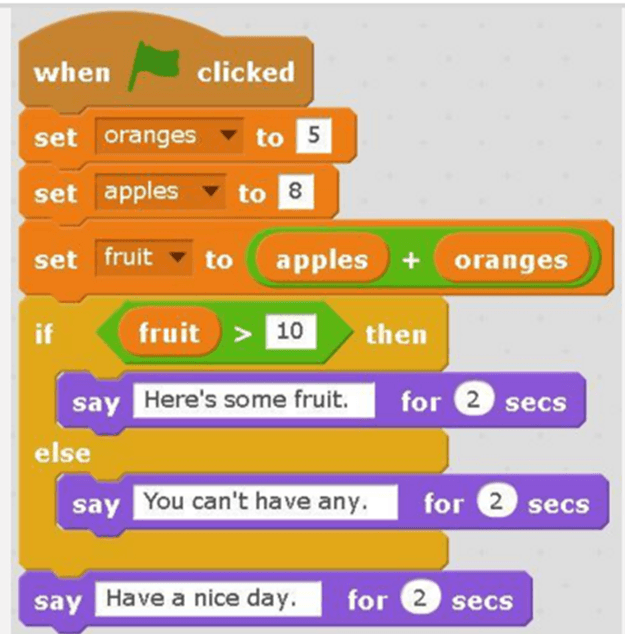
If Josh is 11 years old, what will this program print out?
It won't print out anything
You are old enough for Year 8
You are still in year 7
It will print out his age

This shows the script for a character in a game.
What happens to the score when the character touches the edge?
Score will remain the same
Score will increase by 1
Score will decrease by 1
Score will increase by 2

What will this program output when it is run?
We do not have enough space for all these rows
We should be able to fit all the chairs in the hall

What would the program output if the age entered was 16?
You can learn to drive
You are not old enough to drive yet

What is the value stored in totalMarbles?
25
325
425

What is the value stored in cost?
10.50
15.00
20.00

Looking at the script block below. What is the ghost's starting position?
(X:100, Y:50)
(X:50, Y:50)
(X:100, Y:100)
(X:0, Y:0)
What are Blocks?
Where your project is displayed when active.
The instructions that determines what happens on the stage.
Programming commands that you snap together to create a program in Scratch.
Displays the location of your X and Y positions.
What is the Stage?
Programming commands that you snap together to create a program in Scratch.
Background displayed on your Scratch stage.
Graphical bubble that displays a sprite thinking.
Where your project is displayed when active.
What are Scripts?
Programming commands that you snap together to create a program in Scratch.
The instructions that determines what happens on the stage.
Displays the location of your X and Y positions.
Graphical bubble that displays a sprite thinking.
What are Sprites?
The instructions that determines what happens on the stage.
Graphical bubble that displays a sprite thinking.
The objects on the Scratch stage that perform actions.
Programming commands that you snap together to create a program in Scratch.
What is the Backdrop?
Background displayed on your Scratch stage.
Where your project is displayed when active.
The objects on the Scratch stage that perform actions.
Programming commands that you snap together to create a program in Scratch.
What are Costumes?
The objects on the Scratch stage that perform actions.
Blocks that allows you to repeat scripts multiple times.
Graphical bubble that shows a sprite speaking.
Alternate appearances of your sprite.
What are Coordinates?
The instructions that determines what happens on the stage.
Displays the location of your X and Y positions.
Graphical bubble that shows a sprite speaking.
Programming commands that you snap together to create a program in Scratch.
What are Repeat Blocks?
Blocks that allows you to repeat scripts multiple times.
The objects on the Scratch stage that performs actions.
Programming commands that you snap together to create a program in Scratch.
Where your project is displayed when active.
What is a Speech Bubble?
Graphical bubble that displays a sprite thinking.
The objects on the Scratch stage that performs actions.
Graphical bubble that shows a sprite speaking.
Where your project is displayed when active.
What is a Thought Bubble?
Graphical bubble that shows a sprite speaking.
The objects on the Scratch stage that performs actions.
Graphical bubble that shows a sprite speaking.
Graphical bubble that displays a sprite thinking.

The Pen Down block tells ...
The Sprite to start drawing
The Sprite to erase a drawing
The Sprite to stop drawing
The Sprite to draw

What does this block tell?
Turn left 90 degrees
Move 90 steps
Repeat 90 times
Turn right 90 degrees

What happens to a sprite's script if this sprite was deleted?
The script will be saved if you decided to use this sprite later
You can't delete a sprite before deleting the script written in it.
The script will be deleted with the sprite

When is this used?
With the point in direction block.
With the move block.
When I want the game to end.
When I want to change costume
Sensing blocks are used to tell the sprite what to do when touching something on the stage.
True
False
Which of the four will make your sprite point left side?
Point in Direction 90
Point in Direction 180
Point in Direction -90
Point in Direction 0

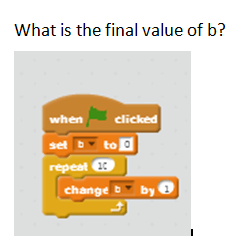
What will be the value of 'time' variable after repeat ends?
0
-35
nothing
35

Which of the following will have 'color picker' tool?
only 2
both 2 and 3
both 1 and 2
none

What does this button do in Scratch?
Inserts a cat
Open the Sprite library
Inserts a picture
Changes the scene

What does this button do in Scratch?
Inserts a cat
Inserts a Sprite
Inserts a sound
Changes the scene

What will happen when you run this code?
Change color
Grow and shrink
Spin
Bounce
The Y axis is
"Up" and "Down"
"Left and Right"
The X axis is
"Left" and "Right"
"Up and Down"

What is being created in the Scratch code shown here?
A loop
A function
A costume
An IF statement

What programming concept is being shown here?
SEQUENCING
SELECTION
ITERATION
Displays the location of your X and Y positions.
stage
coordinates
volume


