
Font size
 Worksheets
Lesson Objectives
Total questions: 92
Worksheet time: 46mins

According to the lesson objectives, which topic focuses on the purpose and operation of a device that directs network traffic between segments?
Switches
Routers
Access points
Firewalls

Which objectives explicitly involve wireless technologies used for short- and long-range device connectivity?
Wi-Fi uses
Bluetooth uses
Cloud computing advantages
Router operation

Which objective addresses identifying hardware components that make up a network?
Understand the purpose and operation of routers
Identify common network devices
Explain Wi-Fi uses
Understand cloud computing disadvantages

Which objective relates to evaluating pros and cons of hosting services and data on remote servers?
Explain Bluetooth pairing
Connect devices using Wi-Fi
Understand cloud computing, including its advantages and disadvantages
Configure a local router's firmware

Select all objectives that focus on connectivity methods rather than device identification.
Connect devices to networks using Wi-Fi and Bluetooth
Explain Wi-Fi and Bluetooth uses
Identify common network devices
Understand the purpose and operation of routers

The objective "Explain Wi-Fi and Bluetooth uses" most directly prepares students to do which of the following?
Describe typical scenarios where wireless connections are beneficial
Install fiber-optic cables for backbone networks
Write low-level drivers for wireless chipsets
Measure packet loss on wired Ethernet only

Which pair of objectives together emphasize both understanding and practical application of wireless networking?
Explain Wi-Fi and Bluetooth uses; Connect devices to networks using Wi-Fi and Bluetooth
Identify common network devices; Understand cloud computing
Understand router operation; Identify network devices
Explain Wi-Fi uses; Understand firewalls

Which objective most clearly targets a foundational control device that manages traffic between networks?
Identify common network devices
Understand the purpose and operation of routers
Explain Bluetooth uses
Understand cloud computing advantages

Choose the objectives that likely require comparing benefits and limitations to make informed decisions.
Understand cloud computing, including its advantages and disadvantages
Explain Wi-Fi uses
Identify network devices
Understand router operation

Which objective is best aligned with learning how to pair peripherals such as headphones to a phone without cables?
Understand router operation
Explain Bluetooth uses
Identify network devices
Understand cloud computing disadvantages

The lesson includes an objective to connect devices to networks using which wireless technologies?
NFC and Zigbee
Wi-Fi and Bluetooth
Infrared and Li-Fi
5G and Satellite

Which objective focuses on cataloging items such as switches, hubs, and access points?
Understand the purpose and operation of routers
Identify common network devices
Explain Wi-Fi uses
Evaluate cloud computing models

Select the objective that emphasizes understanding how a network’s directing device functions.
Explain Bluetooth security modes
Understand the purpose and operation of routers
Identify mobile operating systems
Connect devices using NFC

Which items in the objectives specifically mention two different wireless standards?
Wi-Fi and Bluetooth uses
Connect devices using Wi-Fi and Bluetooth
Understand cloud computing
Identify network devices
According to the definition provided, what is a computer network?
A single computer storing files locally
A collection of computers and devices connected together to share resources and information
A system that only connects printers to the internet
A group of apps installed on multiple computers
Which statement correctly distinguishes wired and wireless networks as described?
Wired uses cables; wireless uses technologies like Wi‑Fi and Bluetooth
Wired uses Wi‑Fi; wireless uses Ethernet cables
Wired requires routers; wireless does not use any hardware
Wired is only for home networks; wireless is only for business networks
Select the wireless technologies explicitly mentioned for networks.
Wi‑Fi
Bluetooth
Ethernet
Fiber optic
Which device’s primary purpose is to connect networks and devices to the internet?
Switch
Router
Hub
Bridge
Which pair best describes how a router operates based on the material?
Broadcasts every packet to all devices; ignores addresses
Stores computer addresses (IP addresses) and routes data packets to the correct device
Encrypts files on a computer; blocks network traffic
Duplicates packets to increase speed; removes IP addresses
In the example provided, what does a home Wi‑Fi router do?
Connects only printers together locally
Directs internet traffic to devices in the home
Stores user passwords for all apps
Converts wireless signals into power for devices
What is the role of a Network Interface Card (NIC) as defined in the material?
Allows a device to connect to a network
Filters malware from incoming emails
Provides backup storage for files
Generates Wi‑Fi signals for the entire building
Which statement about a hub is accurate according to the description?
Sends data only to the addressed device, making it highly efficient
Sends data to all devices on a network, which is less efficient
Connects two separate networks using IP routing
Stores MAC addresses to forward frames selectively
What is the function of a bridge in a network?
Connects two network segments
Provides internet access from an ISP
Assigns IP addresses to all devices
Acts as a central server for applications
How does a switch differ from a hub based on the material?
A switch connects to the internet while a hub does not
A switch directs data to the correct device and is more efficient than a hub
A switch stores files; a hub manages printers
A switch requires no power while a hub does
Choose all devices that primarily forward or direct data to destinations (as stated).
Hub
Switch
Router
NIC
Which statement aligns with the provided definition of a network and its connection types?
A network is any group of users; it can only be wireless
A network is devices connected to share resources and information; connections can be wired (cables) or wireless (Wi‑Fi, Bluetooth)
A network is a single router; connections must be wired
A network is a collection of websites hosted on the internet
Which statement best describes Wi‑Fi according to the lesson?
It connects devices directly to each other over short distances.
It connects devices to a network using radio waves.
It is mainly used to pair peripherals like keyboards.
It requires device pairing before any data can be shared.
In typical classroom use, which is a common purpose of Bluetooth?
Accessing the school’s internet through a router
Streaming video from a web server
Connecting wireless headphones or keyboards
Logging into the campus Wi‑Fi portal
Select all uses that match Wi‑Fi as presented in the material.
Internet access
File sharing
Pairing headphones
Short‑range peripheral connection
Which step is part of connecting to Wi‑Fi on a device?
Pair the device with another device
Accept a connection request from a peer
Search for available networks
Enable airplane mode
A phone tries to join a secured Wi‑Fi network. What should the user do next according to the process given?
Enter the network password if required
Turn on Bluetooth pairing
Accept a connection request
Disable radio waves to avoid interference
Which ordered sequence correctly outlines connecting with Bluetooth based on the steps provided?
Search networks → Enter password → Device connected
Pair devices → Accept connection request → Data can be shared
Enable airplane mode → Pair devices → Connect to router
Enter password → Accept request → Share data over the internet
Which technology is explicitly described as connecting devices over short distances?
Wi‑Fi
Bluetooth
Ethernet
NFC
When is pairing required in the workflows shown?
Before using Wi‑Fi for internet access
Before Bluetooth devices can connect
After entering a Wi‑Fi password
Only when sharing data over a wired connection
Refer to the table comparing Wi‑Fi and Bluetooth. Which technology typically offers a longer communication range?
Wi‑Fi
Bluetooth
Both have the same range
According to the comparison table, which statement about speed is accurate? Select all that apply.
Wi‑Fi is faster than Bluetooth.
Bluetooth is faster than Wi‑Fi.
Both have identical speeds.
Bluetooth is slower than Wi‑Fi.

In typical use cases shown in the table, which option best describes Bluetooth?
Connecting devices to the internet and local networks
High‑range wireless backbone for campuses
Device‑to‑device transfer between nearby gadgets
Securing enterprise networks with WPA2
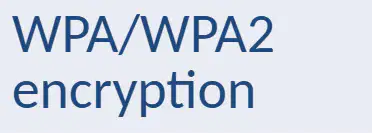
Based on the security row in the table, which pairing of technology with its security mechanism is correct?
Wi‑Fi — pairing code; Bluetooth — WPA/WPA2 encryption
Wi‑Fi — WPA/WPA2 encryption; Bluetooth — pairing code
Wi‑Fi — none; Bluetooth — SSL certificates
Wi‑Fi — device PIN only; Bluetooth — firewall rules
Which statement best defines cloud computing as presented in the section?
Running programs only on a local desktop without internet
Storing, managing, and sharing data over the internet instead of locally
Installing software from physical media like DVDs
Backing up files exclusively to external hard drives
Select the characteristics of cloud computing described in the section. (Choose all that apply.)
Accessible anywhere
Scalable
Requires internet
Limited to one device at a time
Which is a common use of cloud computing mentioned in the material?
Offline-only text editing
Local-only photo storage
File storage and collaboration through apps like Google Drive and OneDrive
Installing operating systems on bare-metal machines at home
In the context provided, where is data stored when using the cloud?
On the user’s local hard drive
On removable USB drives
On remote servers
Only in web browser cache
Who manages data stored in the cloud according to the section?
End users exclusively
Internet service providers (ISPs)
Cloud service providers
Device manufacturers
Which statements correctly describe how cloud-stored data can be accessed and shared? (Choose all that apply.)
Shared securely among users
Accessible from multiple devices
Only viewable on the device where it was uploaded
Requires no internet connectivity to access
Which option best explains why scalability is listed as a characteristic of cloud computing?
Cloud storage cannot change its capacity once set
Cloud resources can increase or decrease based on demand
Scalability refers to editing documents simultaneously
Scalability means files are encrypted automatically
Identify the example that fits the section’s description of cloud use.
Saving project files only to a laptop’s internal drive
Uploading a document to Google Drive to collaborate with classmates over the internet
Installing a local database server with no network connection
Transferring files using only Bluetooth between two phones
Which scenario best illustrates the cloud storage advantage of accessibility?
A student opens files only on the school lab computers during class hours.
A designer edits project files from home and a cafe using an internet-connected laptop.
A company can access archives only after an onsite IT technician mounts a backup drive.
A researcher must wait for a mailed USB stick to review shared data.
Select all true advantages of cloud storage based on the material.
Accessible anywhere with internet
Easy to share and collaborate
Scalable storage
Higher local hardware failure risk than external hard drives
Data backup and recovery
Which statement describes a disadvantage of cloud storage related to connectivity?
Data can be accessed offline on any device without prior syncing.
Requires an internet connection to access files stored in the cloud.
Cloud storage automatically removes the need for passwords.
Cloud services guarantee uninterrupted access during power outages.
A team needs to rapidly increase storage for a growing dataset without buying new physical servers. Which cloud storage feature addresses this need?
Scalable storage
Dependence on service provider
Data breaches
Subscription costs
Which option identifies a security risk mentioned for cloud storage?
Risk of data breaches
Guaranteed encryption eliminates all threats
Offline-only access prevents hacking
No authentication is required for shared folders
Select all drawbacks of cloud storage highlighted in the material.
Requires internet connection
Risk of data breaches
Possible subscription costs
Dependence on service provider
Automatic data backup and recovery
Which reason explains why cloud storage can support effective group projects?
Files are accessible only from a single office workstation.
Easy to share and collaborate helps multiple users work on the same files.
Subscription costs prevent simultaneous editing.
Dependence on service provider blocks real-time updates.
Which statement best defines a network environment as introduced in this section?
The physical location where computers are installed
The setup or type of network used for communication and data sharing
A specific brand of networking hardware
A government-regulated category of wireless frequencies
Which list correctly names the main types of network environments covered in this section?
LAN, WAN, MAN
Internet, Intranet, Extranet
Client, Server, Peer-to-peer
Fiber, Copper, Wireless
Select the statements that accurately describe the Internet as presented in this section. (Select all that apply.)
It is a global network of networks connecting millions of computers worldwide.
It is publicly accessible—anyone can connect.
It is limited to internal communication within a single company.
It is commonly used for communication, information sharing, and online services.
Which option best captures the definition of the Internet in this material?
A single centralized server hosting all websites
A global network of networks connecting computers worldwide
A private network restricted to authorized members
A peer-to-peer local network for home use
Which use case is NOT listed for the Internet in this section?
Email and social media communication
Sharing information via websites
Banking, cloud computing, and e-commerce
Internal-only employee collaboration restricted to authorized members
Which statement best defines an intranet according to this section?
A global public network connecting millions of computers
A private internal network used within an organization
A customer-facing e-commerce platform on the Internet
A community Wi‑Fi hotspot available to anyone
What is a key access characteristic of an intranet?
Access is open to the general public.
Access is restricted to authorized members only.
Access requires purchasing a monthly subscription from an ISP.
Access is limited to mobile devices.
Select the typical uses of an intranet as described in this section. (Select all that apply.)
Sharing internal documents and data
Internal communication such as company announcements
Collaboration among employees
Hosting public websites for anyone to browse
You are advising a company that wants to share internal documents and enable employee collaboration while keeping access limited to staff. Which network environment should they prioritize based on this section?
Internet
Intranet
Extranet
Metaverse
A supplier needs limited access to a company’s internal resources for order tracking and collaboration, while the general public must be kept out. Which network environment, defined alongside Internet and Intranet in this section, is most appropriate?
Internet
Intranet
Extranet
Home LAN
Which comparison between Internet and Intranet aligns with this section’s definitions?
Both are private internal networks restricted to employees.
Internet is publicly accessible, while Intranet restricts access to authorized members.
Internet is used only for internal communication; Intranet is used for e‑commerce.
Internet connects a small local group; Intranet connects millions worldwide.
According to the slide titled "The Extranet," which statement best defines an extranet?
A private network strictly limited to employees within an organization
An extension of an intranet that offers controlled access to selected external users
A global public network designed for open communication by anyone
A local network used only for internal document storage
Select the uses of an extranet highlighted in the "The Extranet" slide. Choose all that apply.
Sharing information securely with business partners
Allowing suppliers or customers to access limited company data
Broadcasting public announcements to all internet users
Hosting internal-only HR policies with no external access

Which feature combination describes an extranet as presented in the material?
Public access, global communication, lower security
Private internal access only, internal use, high security
Restricted external access, partner collaboration, moderate security
Open access, entertainment content, minimal security

In the comparison table, which environment is characterized by public access and lower security?
Internet
Intranet
Extranet
Private VPN
Based on the table, which environments are primarily intended for internal use or partner collaboration? Choose all that apply.
Internet
Intranet
Extranet
Peer-to-peer LAN
Which example aligns with an intranet in the comparison table?
Supplier login portal
Company HR portal
Google or YouTube
Public social media feed
A company wants to let key vendors see limited inventory data while keeping customer-facing content public. Which network arrangement matches the vendors’ access in the slides?
Internet, because it provides global public access
Intranet, because it is only for internal employees
Extranet, because it allows restricted external access for partners
Local area network, because it is confined to one office
Match each network environment to its typical access level as shown in the table.
Internet — Public
Intranet — Restricted external access
Extranet — Private (internal only)
Extranet — Restricted external access
Which criterion is used to classify networks in this lesson?
By device operating systems
By size and coverage area
By internet service provider
By cable brand used
Select the network types included in the classification by size and coverage area.
LAN (Local Area Network)
PAN (Personal Area Network)
WLAN (Wireless Local Area Network)
WAN (Wide Area Network)
A network that covers a small area, such as a single building or school, is best described as which type?
WAN
LAN
MAN
VPN
Which statement accurately describes device connections in a LAN?
Devices must connect only through fiber optics
Devices are connected by cables or Wi‑Fi
Devices can connect only via cellular networks
Devices require satellite links
In a typical LAN, who controls the network?
Multiple unrelated organizations
A single organization
Global internet authorities
Individual users with admin rights
Which are common uses of a LAN according to the material? Select all that apply.
File sharing
Cloud-based international routing
Printer access
Resource management
A WLAN is similar to a LAN but differs primarily in which aspect?
It always spans multiple cities
It uses wireless communication (Wi‑Fi)
It requires fiber backbone by design
It cannot connect phones
Which devices are explicitly mentioned as able to connect to a WLAN?
Laptops
Tablets
Desktop servers only
Phones
What are two advantages of WLAN highlighted in the lesson?
Lower latency than wired networks
Easier installation
Greater mobility
Unlimited coverage worldwide
What security measure may be required for a WLAN?
Physical locks on Ethernet ports
Password protection
Satellite dish alignment
Biometric authentication only
Which network type typically spans the largest geographical area?
LAN
WLAN
WAN
VLAN
Match each network type with its typical coverage scope.
LAN: within a single building or school
WLAN: wireless communication enabling device mobility
WAN: wide area across cities or regions
PAN: global coverage

Which statement best describes a Wide Area Network (WAN) as shown in the slide?
A network limited to a single building
A network covering large geographical areas and connecting multiple LANs
A wireless network used within a home only
A network that never connects to the Internet

In the context of network types, which option correctly identifies the largest WAN?
A university campus intranet
The Internet
A home Wi‑Fi network
A single office Ethernet

Which scenario most appropriately requires a WAN?
Linking computers on one floor of a building
Connecting smartphones to a home router
Linking offices of a multinational company across countries
Sharing files between two PCs in the same room

Select all characteristics that apply to a WAN.
Covers cities or countries
Connects multiple LANs
Limited to a single room
Primarily wired within a building

Which statement distinguishes LAN, WLAN, and WAN by geographical coverage?
LAN: building; WLAN: home; WAN: same room
LAN: small area like a building; WLAN: small area using wireless; WAN: large areas such as cities or countries
LAN: worldwide; WLAN: campus; WAN: single office
LAN: city-wide; WLAN: country-wide; WAN: room-sized
Which option correctly contrasts typical connection methods among LAN, WLAN, and WAN?
LAN uses wireless only; WLAN uses cables; WAN uses fiber exclusively
LAN commonly uses Ethernet cabling; WLAN uses wireless radio; WAN uses diverse long-distance links connecting multiple LANs
LAN always uses satellite; WLAN uses infrared; WAN uses Bluetooth
LAN and WLAN both use only fiber optics; WAN uses coaxial exclusively
Who commonly owns and manages a WAN compared with LAN/WLAN?
Individual households always own WANs
Single departments own WANs while service providers manage LANs
WANs often involve service providers or multiple organizations, whereas LAN/WLAN are typically owned by a single organization or home
All networks are always publicly owned
Which network type best fits each description? Match the description to LAN, WLAN, or WAN.
Covers a small area within one building
Uses wireless access within a limited area
Links multiple LANs across cities or countries
Typically owned by one home or organization

