
Font size
 Worksheets
Multimedia Blender
Total questions: 126
Worksheet time: 1hrs 3mins
In Blender, which hotkey is used to move or grab an object in the viewport?
G
S
R
N
You want to rotate a mesh exactly 90 degrees on the X axis. According to the instructions, which key should you press to open the Transform bar where you can type exact values?
Tab
N
G
R
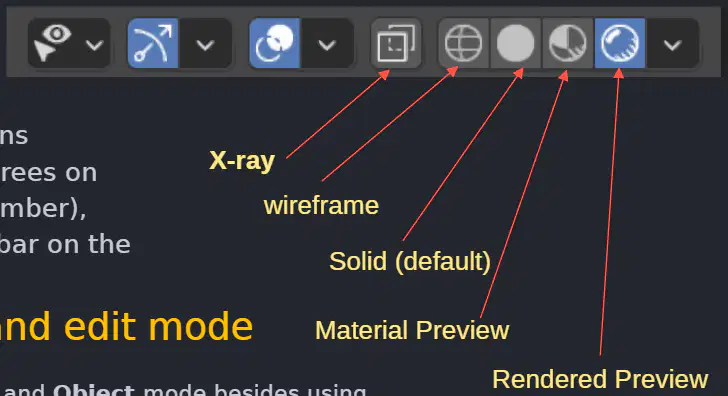
A student needs to see materials under scene lighting without a final render. Which viewport shading mode should they choose?
Wireframe
Solid (default)
Material Preview
Rendered Preview
Fill in the blank: To switch between Edit and Object modes quickly, press the (a) key.
You are about to add a new mesh to your scene but want to avoid it merging with an existing mesh. Based on the guidance, what should you ensure before creating the new mesh?
Be in Edit Mode so vertices stay separate
Be in Object Mode so the new mesh is not joined to another mesh
Enable X-ray to see through the object
Open the Tool Shelf to change quality first
In Blender, which key toggles between Object Mode and Edit Mode to begin mesh editing?
Tab
Ctrl
Spacebar
Shift
In Edit Mode, press 1, 2, or 3 to switch selection types. Which number corresponds to Edge Mode?
1
2
3
0
Fill in the blank: In Edit Mode you can work with the shape’s individual (a) to create the shape you want, including vertices, edges, and faces.
Which action allows you to select more than one vertex, edge, or face at once during mesh editing?
Hold SHIFT while selecting
Press Spacebar once
Enable Face Orientation
Use the Right Mouse Button without modifiers
What is the purpose of toggling X-Ray Viewport Shading during selection?
To render final lighting with shadows
To see and select components not only in front but also at the back
To lock the camera to view
To convert edges into curves
Three-point lighting is a standard setup that consists of which three lights?
Key Light, Fill Light, Rim Light
Ambient Light, Area Light, Point Light
Front Light, Side Light, Back Light
Primary Light, Secondary Light, Tertiary Light
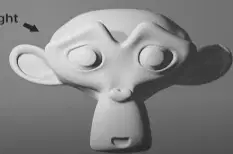
In a three-point lighting setup, which light is the primary source that defines the light in the scene and is often placed at the top left-hand corner?
Key Light
Fill Light
Rim Light
Ambient Light
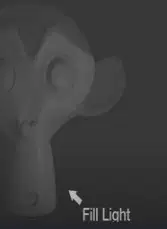
Which statement best describes the Fill Light in three-point lighting?
It is the brightest light and creates a rim on the subject’s edges.
It softens the shadows cast by the key light and is usually the least bright.
It replaces the key light and determines the scene’s direction.
It is placed directly behind the subject to create silhouettes.
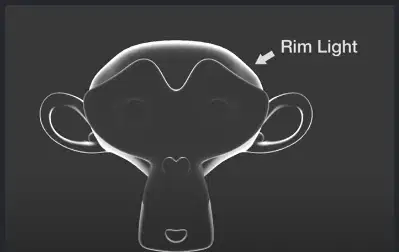
Which light is typically placed behind the subject to create a bright outline that helps the subject stand out from the background?
Key Light
Fill Light
Rim Light
Bounce Light
You need to quickly select only faces on a mesh and exclude vertices and edges. Which simple procedure should you use first?
Press 3 to enter Face Mode
Enable X-Ray and press Shift
Press 1 then 2 in sequence
Invert Selection before clicking
DoK 1. In Blender Edit Mode, which key deselects all currently selected vertices without leaving Edit Mode?
A
B
C
Esc
DoK 1. Which mouse/keyboard combination selects additional vertices one by one in Edit Mode?
Ctrl + Right Mouse Button
Shift + Left Mouse Button
Alt + Left Mouse Button
Shift + Right Mouse Button
DoK 1. Which selection tool is activated by pressing the B key in Edit Mode?
Circle selection
Lasso selection
Box (rectangle) selection
Paint selection
DoK 1. The C key in Edit Mode opens which selection method, allowing you to drag to pick multiple vertices?
Connected-select
Circle selection
Edge-loop select
Box selection
DoK 1. In Blender Edit Mode, what do the keys G, S, and R perform, respectively?
Grab/move, Scale, Rotate
Rotate, Scale, Grab/move
Scale, Grab/move, Rotate
Grab/move, Rotate, Scale
DoK 2. You are using the Circle selection tool and want to adjust the circle size without leaving the tool. Which control does the material specify you can use?
Scroll the center mouse wheel or use Plus/Minus on the numpad
Press Tab to toggle Edit Mode
Press Shift + S to scale the circle
Press G then drag to resize the circle
DoK 2. According to the material, which action exits the Circle selection tool back to normal editing?
Press A twice
Press Esc
Press Enter
Press Spacebar
DoK 2. After selecting vertices, edges, or faces, which interface element can also be used to translate, rotate, or scale the selection besides keyboard shortcuts?
Timeline scrubber
Outliner
Manipulation Widget
Shader Editor
DoK 2. Which statement best contrasts translating a vertex group with extruding it, based on the text?
Translating creates new vertices; extruding only moves them
Extruding creates new vertices; translating only moves them
Both translating and extruding only move existing vertices
Both translating and extruding create new vertices
DoK 3. You want to select a rectangular region of vertices quickly, then add a few more individual vertices to that selection. Which efficient sequence matches the described workflow?
Press C to circle-select the region, then hold Alt and click to add vertices
Press B to box-select the region, then hold Shift and Left-click additional vertices
Press A to select all, then press G to add vertices
Press R to rotate the view, then Ctrl-click to add vertices
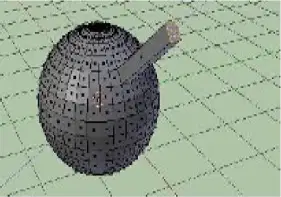
DoK 3. You have a sphere where a group of vertices has been pulled outward using translation. To turn that protrusion into new geometry extending outward along the face normal, what should you do next?
Scale the group with S
Extrude the group so new vertices form along the axis normal
Rotate the group with R
Deselect all with A

DoK 3. Refer to the images: one shows a vertex group moved outward from a sphere using the widget; another shows the group scaled and rotated after. If you need to replicate that result using only hotkeys, which ordered keys will you primarily use after the initial translation?
R then S
S then R
G then S
A then G
In Blender, the small dot that appears at the center of an object by default is called the object's (a) , and it usually sits at the center of geometry of the object.
Which statement best describes what happens to the center point when you move an object in Object Mode?
Only the vertices move while the center point stays fixed
The center point moves together with the object
The center point jumps to the world origin
The center point is deleted and recreated after the move
When vertices are moved in Edit Mode, how does the object's center point behave?
It moves with the edited vertices
It moves halfway toward the average of the selected vertices
It does not move when vertices are moved
It snaps to the nearest grid line
You need to relocate an object's center point to a new location. According to the procedure, what is the correct sequence of actions?
Set the 3D cursor, then choose Object > Transform > Origin to 3D Cursor; then choose Geometry to Origin
Enter Edit Mode and move vertices to the cursor; then choose Origin to Geometry
Set the 3D cursor, then choose Object > Snap > Origin to Center of Mass
Place the cursor and apply Randomize Transform to origin
What is the purpose of choosing Geometry to Origin after setting Origin to 3D Cursor?
It scales the object to fit the origin
It rotates the object to align with global axes
It moves the mesh’s vertices to the center point
It duplicates the object at the origin
Which method is identified as a more refined way of altering a mesh shape compared to simple Translate/Rotate/Scale?
Decimate
Extrusion
Boolean union
Subdivision surface
During extrusion in Edit Mode, what happens to the selected vertices?
They are deleted and replaced by faces
They are duplicated, and the duplicates are repositioned, scaled, or rotated while remaining attached to the original surface
They are converted into edges and detached
They are merged at the center point
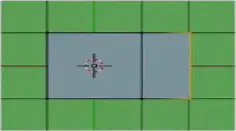
Refer to the top row of the image: Select Vertices, Extrude, Extrude and Scale. Which operation is illustrated between the second and third panels?
Loop cut
Scaling the newly extruded region
Snapping to grid
Applying mirror modifier
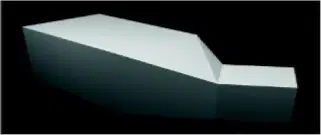
Refer to the second row of the image: Rotate and Extrude. What strategic choice would best achieve the final rendered shape shown?
Rotate first, then extrude a neighboring face to extend the form
Scale the original face uniformly and avoid extrusion
Extrude twice without rotation to keep symmetry
Delete the extruded part and add a new primitive

In an Extrude Region operation, which part of the selection is actually extruded while the inner area moves unchanged with the extrusion?
Only the inner region
Both inner region and border loop equally
Only the border loop
No part is moved; extrusion creates a separate object
In Blender’s Extrude Faces Along Normals, which setting ensures the new edges created during the extrusion maintain equal length regardless of face size?
Offset
Offset Even
Flip Normals
Proportional Editing
Which option in Extrude Faces Along Normals reverses the direction of the normals for the faces created by the extrusion?
Dissolve Orthogonal Edges
Flip Normals
Extrude Individual
Extrude Manifold
Fill in the blank: Dissolve Orthogonal Edges in Extrude Faces Along Normals removes and connects edges whose faces form a (a) surface and intersect new edges.
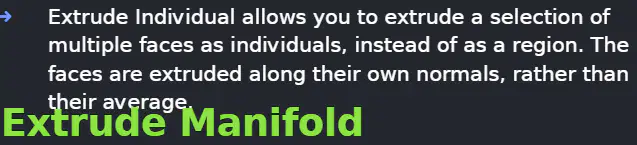
You select several noncontiguous top faces of a mesh and want each to extend outward along its own normal rather than as a unified region. Which tool best matches this goal?
Extrude Region
Extrude Individual
Extrude Faces Along Normals with Proportional Editing
Inset Faces
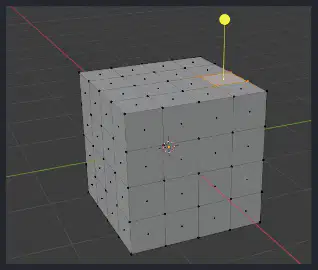
A cube is extruded inward on one face. You want Blender to automatically split and remove adjacent faces that would otherwise overlap during the inward extrusion. Which tool should you use, and what built-in behavior enables this?
Extrude Faces Along Normals; Flip Normals enabled by default
Extrude Manifold; Dissolve Orthogonal Edges enabled by default
Extrude Region; Proportional Editing enabled by default
Extrude Individual; Offsetting evenly by default
Which parameter directly controls how far geometry moves when using Extrude Faces Along Normals?
Offset
Offset Even
Average Normals
Edge Length Constraint
Which shortcut activates Extrude to Cursor in Blender to place new vertices at the mouse cursor position?
Shift+RMB
Ctrl+RMB
Alt+RMB
Ctrl+LMB
When using Extrude to Cursor repeatedly with the last vertex selected, what happens to new vertices placed at the cursor?
They are created but remain isolated without edges
They automatically connect to the last selected vertex with an edge and continue connecting subsequent vertices
They convert the selection to faces only
They merge into a single averaged vertex
Fill in the blank: In Proportional Vertex Editing, the white circle that appears around the selected element is called the (a) .
By default, which falloff type is active when Proportional Vertex Editing is turned on?
Sharp
Linear
Smooth
Inverse Square
Which action adjusts the diameter of the circle of influence during Proportional Vertex Editing?
Scrolling the mouse wheel
Pressing G repeatedly
Changing the manipulator orientation
Switching to Object Mode
According to the workflow described, which sequence correctly prepares a plane for Proportional Vertex Editing?
Add a Plane, scale it five times, enter Edit mode, Subdivide 25 times, deselect all, select a single vertex, turn on Proportional Vertex Editing
Add a Cube, scale it twice, enter Sculpt mode, Subdivide 5 times, select all vertices, enable Mirror
Add a Plane, apply a Subdivision Surface modifier, enter Edit mode, select edges, enable Snap to Cursor
Add a Grid, scale it five times, enter Object mode, Subdivide 25 times, select a face, enable Auto Merge
Which statement best describes the role of falloff types (Smooth, Sphere, Root, etc.) in Proportional Vertex Editing?
They determine whether vertices can be selected
They control how influence diminishes from the selected vertex across surrounding geometry
They set the global scene scale for editing
They limit editing to connected topology only
Recall: In Blender Edit Mode, which hotkey activates the Loop Cut tool to add an edge loop?
Alt + Click LMB
Ctrl + R
I key
Shift + R
Recall: To select an entire edge loop on a mesh, place the mouse cursor over a loop and then press and hold (a) while clicking LMB.
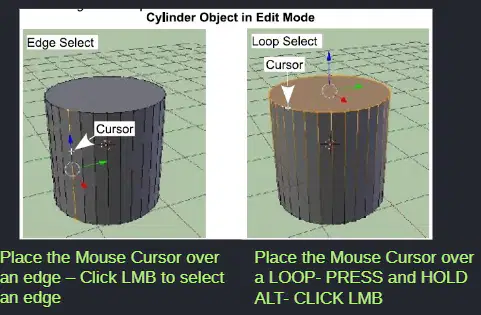
Recall: Which action selects a single edge (not a loop) in Edge Select mode?
Click LMB on the edge
Alt + Click LMB on the edge
Ctrl + R while over the edge
I key on the face
Skill/Concept: After confirming a Loop Cut with LMB, what is the immediate adjustment you are allowed to make before finalizing?
Scale the entire object globally
Slide the new loop cut along the face to better position it
Convert the loop into a face loop with the I key
Increase the mesh subdivision level across the object
Strategic Thinking: You need to insert several evenly spaced edge loops around a model. Which approach aligns with the described tools and why?
Use Ctrl + R, preview multiple loops by scrolling, confirm with LMB to create them in one step
Use Alt + Click LMB repeatedly to generate new loops along each edge
Use the I key to inset faces; this automatically produces edge loops
Use the active Loop Cut tool and scroll to increase cuts after confirming
Recall: What is a limitation of the active Loop Cut tool compared to using Ctrl + R as stated?
The active tool cannot create any cuts on quads
Scrolling with the active tool will not increase the number of cuts; it only creates one cut
Ctrl + R does not allow preview of cuts before confirming
The active tool cannot slide the loop after placement
Skill/Concept: When hovering over an edge to create a loop cut, what determines whether a previewed path will appear?
A path appears only on triangular faces; quads are ignored
A path appears if Blender can find a continuous face loop; it won't draw through an N-gon or incomplete loop
A path always appears regardless of topology
A path requires the object to be in Object Mode
In Blender, which mode must you enter before selecting vertices, edges, or faces to remove them from a mesh using the Delete key?
Object Mode
Edit Mode
Sculpt Mode
Vertex Paint Mode
Fill in the blank with the exact key combination: To place a new vertex at the mouse cursor location, deselect all vertices and press (a) while left-clicking (LMB).
Which action creates a face after you have shift-selected three or more vertices that outline the area?
Press G to Grab
Press E to Extrude
Press F to Face (fill)
Press S to Scale
You want to make a circular hole on the top of a UV sphere by removing the cap. What is the most appropriate sequence?
Enter Object Mode, select top faces, press F to fill, then press Delete
Enter Edit Mode, select top faces, press Delete key to remove them
Enter Sculpt Mode, select vertices, press Ctrl+LMB to erase them
Enter Edit Mode, select top edges, press F to face them
A cube is shown in Edit Mode. A user shift-selects three corner vertices that form a triangle on one side of the cube. What key should be pressed to fill that triangle with a face between the selected vertices?
E
F
X
Tab
You are adding detail to a mesh. Which step is necessary immediately before pressing Ctrl and clicking LMB to add a new vertex at a specific location?
Enable Sculpt Mode to allow dynamic topology
Deselect all vertices while in Edit Mode
Switch to Object Mode to avoid selection conflicts
Turn on snapping to grid for precise placement

Refer to the diagram of the Blender window. Which area is primarily used to interact with and transform objects in the scene (move, rotate, scale) within a grid view?
Outliner
Properties panel
3D Viewport
Timeline
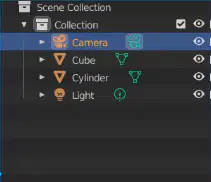
In the labeled Blender interface, which panel lists scene objects such as Camera, Cube, Cylinder, and Light, allowing you to select them by name?
Timeline
Workspace tabs
Outliner
Properties panel
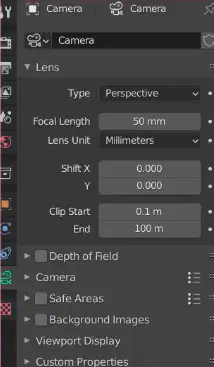
Which interface element is used to adjust settings for the selected object (e.g., Camera lens, clipping range) according to the diagram?
Outliner
Properties panel
3D Viewport
Workspace header
In the 3D View images, identify the three basic object types shown and labeled.
(a)
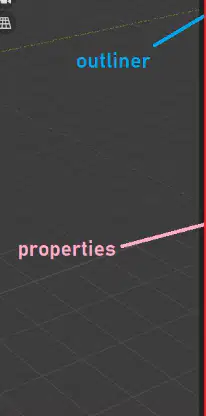
You need to inspect which objects exist in the scene and then change the Camera’s focal length to 50 mm. Based on the interface overview, in which panels would you perform these two actions, respectively?
Outliner, then Timeline
3D Viewport, then Outliner
Outliner, then Properties panel
Timeline, then 3D Viewport
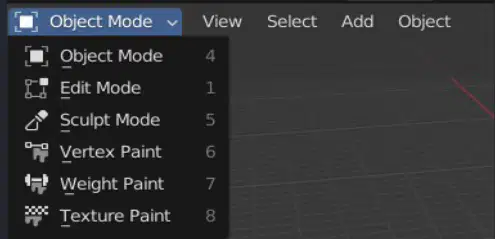
In Blender’s 3D Viewport, which menu in the header lets you switch between Object Mode, Edit Mode, Sculpt Mode, Vertex Paint, Weight Paint, and Texture Paint?
The orientation menu
The shading popover
The mode selector
The viewport overlays menu
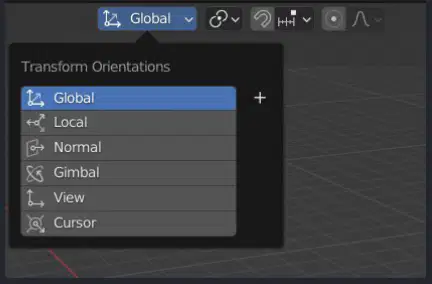
Which Transform Orientation should you choose to align gizmos with the world axes regardless of the object’s rotation?
Local
Normal
Global
Gimbal
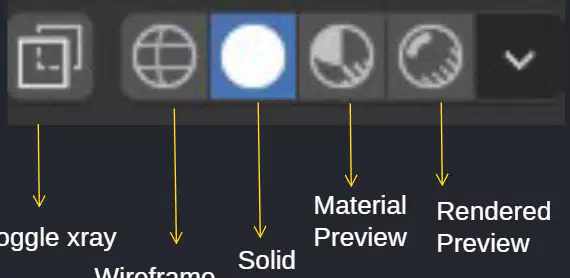
Complete the statement: In the Viewport Display mode buttons, Wireframe shows only edges, Solid shows basic shading, Material Preview shows materials with an HDRI, and (a) shows the final lighting and materials using the render engine.
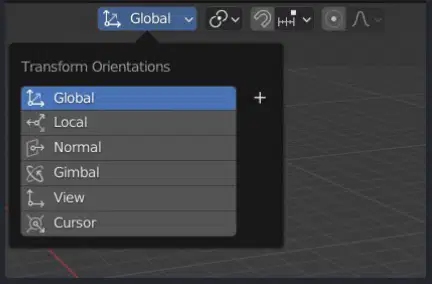
You want to move a vertex along the object’s own axes after the object has been rotated. Which Transform Orientation should you choose?
Global orientation to keep to world axes
Local orientation to follow the object axes
Normal orientation to align to the surface normal of a selection
Gimbal orientation to match Euler rotation axes
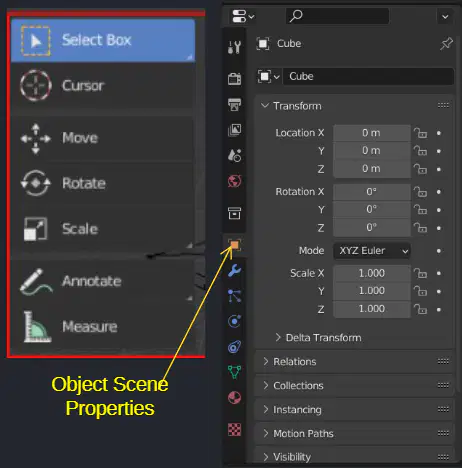
Which viewport control would you use to quickly show hidden internal geometry by making surfaces semi-transparent while staying in a shaded mode?
Toggle X-ray
Switch to Wireframe shading
Enable Text Info overlay
Turn on Statistics overlay
The Viewport Overlays popover contains options such as Grid, Floor, Axes, Scale, and Subdivisions under Guides. Which two overlay checkboxes would you enable to see textual heads-up display elements about the scene and viewport?
Annotations and Motion Paths
Text Info and Statistics
Relationship Lines and Outline Selected
Bones and Origins
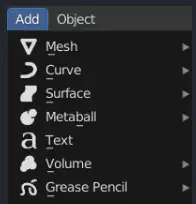
A modeler needs to add a new Armature object. Which header menu path in the 3D View Editor provides access to adding meshes, curves, text, armatures, and lights?
Select > Armature
Object > Create
View > Add
Add menu in the header
You are preparing to measure a model and annotate design feedback directly in the viewport. Which tools from the Tool Panel would be most appropriate to activate?
Scale and Rotate tools
Annotate and Measure tools
Move and Scale tools
Cursor and Select Box tools
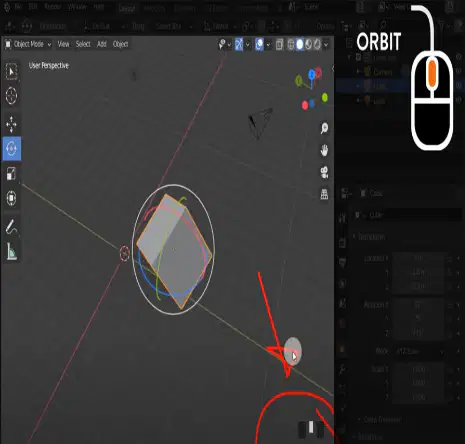
DoK 1 — Which mouse action or shortcut is used to orbit the view in Blender’s 3D viewport?
Middle Mouse Button (MMB) drag
Shift + Left Click drag
Ctrl + Right Click drag
Alt + Scroll Wheel
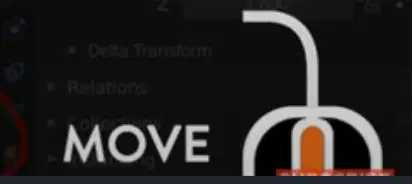
DoK 1 — What is the shortcut to pan (move the view without rotating) in the 3D viewport?
Ctrl + MMB
Shift + MMB
Alt + MMB
Shift + Left Click
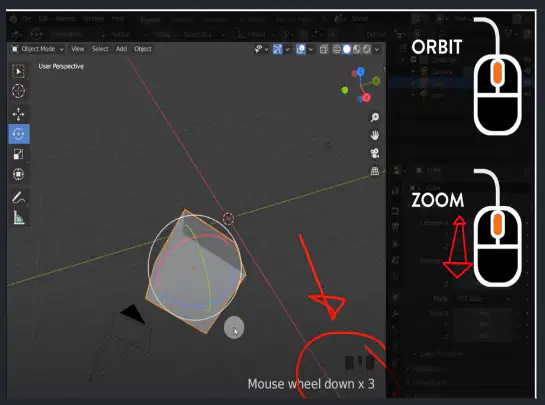
DoK 1 — According to the material, which actions zoom the view in and out?
Scroll Wheel or Ctrl + MMB
Alt + MMB or Shift + Scroll
Left Drag or Alt + Scroll
Shift + Right Click or Ctrl + Scroll
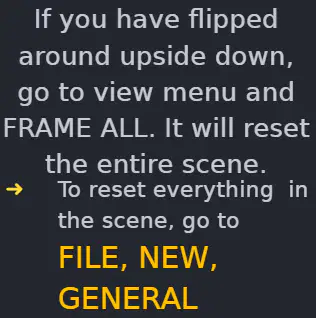
DoK 2 — You accidentally spun the scene upside down while navigating. What menu action resets the scene view to frame all objects?
View > Reset Camera
View > Frame All
Object > Clear > Location
File > Revert
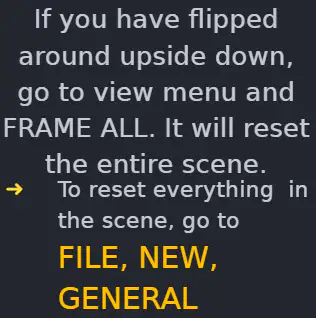
DoK 2 — Which path resets the entire scene to a fresh file according to the instructions?
File > New > General
Edit > Preferences > Reset
Object > Apply > All Transforms
Render > New Project

DoK 2 — Which numpad key toggles between perspective and orthographic views in the 3D viewport?
Numpad 1
Numpad 3
Numpad 5
Numpad 7

DoK 1 — Which numpad key focuses (frames) the selection according to the diagram?
Numpad . (period)
Numpad 0
Numpad / (slash)
Numpad 2

DoK 3 — You need a quick Right side view to align a new object. Which single numpad key provides that view based on the provided mapping?
Numpad 4
Numpad 6
Numpad 8
Numpad 9
DoK 2 — When adding a mesh via the top bar instead of the keyboard, which UI element do you click first?
Object
Add
Select
Layout
DoK 3 — You must populate a scene with primitives for blocking. Which sequence best aligns with the workflow taught: create, view, and adjust position without rotating the camera unintentionally?
Press Shift + A > Mesh to add an object, use Numpad views for precise angles, pan with Shift + MMB to reposition the view
Open File > New > General, orbit with Left Click drag, add objects from Object > New, zoom with Alt + Scroll
Toggle Persp/Ortho with Numpad 0, add primitives from Edit > Add Mesh, pan with Ctrl + MMB
Use View > Frame All to add meshes, zoom only with Shift + Scroll, rotate with Right Click drag
Recall: In Blender, what is a mesh?
A single 2D image used as a texture
A collection of vertices, edges, and faces describing a 3D object's shape
A script that automates modeling tasks
A camera object that renders scenes
Recall: What is the plural of vertex in mesh terminology?
(a)
Recall: Which mesh component is defined as a straight line segment connecting two vertices?
Face
Edge
Loop
Normal
Recall: Which description matches a face in a mesh?
A flat surface enclosed by edges
A single point in space
A curve created by modifiers
A collection of materials
Skill/Concept: You want a simple two-dimensional base to sculpt hilly terrain by subdividing and using proportional vertex editing. Which primitive is most suitable to start with?
Plane
Cube
Cylinder
UV Sphere
Skill/Concept: For a donut-shaped object, which Blender primitive should you add?
Circle
Torus
Icosphere
Cone
Skill/Concept: Which primitive is a basic 3D starting shape that can be formed into rectangles and other shapes?
Grid
Cube
Plane
Monkey
Skill/Concept: Which sphere type is generated with rings and segments similar to latitude and longitude lines?
Icosphere
UV Sphere
Circle
Cylinder
Skill/Concept: Which primitive won’t display as a 3D object until it is extruded and shaped?
Circle
Plane
Grid
Cone
Strategic Thinking: You need a closed can-like object with a top and bottom to quickly mock up packaging. Which primitive fits best and why?
Cone, because it is closed on both ends and tapers
Cylinder, because it is like a can and has closed top and bottom
UV Sphere, because rings and segments can simulate a can
Grid, because it can be extruded into a cylindrical shell
Strategic Thinking: To model a geodesic dome made of triangular panels, which sphere primitive provides the most appropriate topology?
UV Sphere, with rings and segments
Icosphere, generated with triangular shapes
Circle, extruded into triangles
Monkey, since it includes complex triangles
Recall: Which shortcut isolates the selected object locally in Blender?
Period (.) on the numpad
Slash (/) key
Tab key
Shift+A
Recall: Which shortcut frames the selected element in the viewport?
Slash (/) key
Period (.) on the numpad
F key
Spacebar
Skill/Concept: You plan to create a tiled terrain that can be extruded like a plane but starts with a subdivided layout. Which primitive should you choose?
Grid
Circle
Cylinder
Monkey
In Blender, what is the primary purpose of a camera within a scene?
To apply materials to objects
To define which portion of the scene is visible in the rendered image
To light objects during rendering
To simulate physics for mesh deformation
Which statement about cameras in Blender renders is accurate?
Cameras are visible and require texture maps
Cameras are invisible and have no material or texture settings
Cameras must have emission shaders to work
Cameras render only objects that share their parent
You want to lock a selected mesh to the camera’s view. According to the instructions provided, which sequence best describes the steps?
Select the mesh, press G, then choose Camera Constraint
Select the mesh, open Properties with N, go to View tab, and tick camera to view
Select the camera, press R twice, then enable Lock Track
Select the mesh, add a Subdivision modifier, then choose Lock Mesh
Which set lists the available camera Types in Blender’s Lens panel?
Perspective, Orthographic, Panoramic
Wide, Telephoto, Macro
Frontal, Isometric, Cylindrical
Static, Dynamic, Tracking
Focal Length in Blender most directly controls which aspect of the camera?
The sensor’s resolution
The amount of zoom and how much of the scene is visible
The color balance of the render
The motion blur intensity
Complete the statement: A shorter focal length will allow you to (a) of the scene.
What do the Clip Start and Clip End settings define?
The range of exposure values captured
The interval in which objects are directly visible
The duration of an animation render
The size of the camera’s sensor
Which description best explains Depth of Field as presented?
A post-processing effect that sharpens textures uniformly
A camera property where light is bent and focused so certain distances are in focus while areas in front and behind are blurred
A viewport-only display mode that hides distant objects
A mesh modifier that changes object geometry based on distance
For a Perspective camera, which visual characteristic is emphasized in the material?
Parallel lines remain perfectly parallel regardless of distance
Objects in the distance appear smaller, and parallel lines appear to converge as they get farther away
All objects retain the same apparent size regardless of distance
The camera captures a 360° equirectangular image
Strategic thinking: An object disappears when it’s very close to the camera. Which setting is most likely causing this and should be adjusted?
Depth of Field aperture
Clip Start
Focal Length
Camera scale
Skill/Concept: You need an image that matches real-world visual behavior, where distant objects look smaller and railroad rails seem to converge. Which camera type should you select?
Orthographic
Panoramic
Perspective
Isometric
Which rendering engine must be enabled for panoramic cameras to work in Blender?
Eevee
Workbench
Cycles
Grease Pencil
Blender supports three types of panoramic cameras. Which list correctly names them?
Orthographic, Perspective, Isometric
Equirectangular, Fisheye, Mirror Ball
Cylindrical, Spherical, Cubemap
Front, Side, Top
In orthographic view, parallel lines appear (a) and do not converge.
What is the defining characteristic of orthographic perspective regarding object size?
Objects appear smaller with distance
Objects always appear at their actual size regardless of distance
Objects get larger as they move away
Object size depends only on focal length
Select the most appropriate use-case description for an equirectangular panoramic camera in Blender.
Capturing a full 360x180 environment map for HDRIs
Simulating telephoto compression for distant objects
Creating an orthographic projection for CAD drawings
Restricting field of view to reduce distortion
Which hotkey lets you orbit the viewport in Blender?
Right Mouse Button
Middle Mouse Button
Shift + Right Mouse Button
Ctrl + Left Mouse Button
According to the cheat sheet, which input performs viewport panning?
Alt + Middle Mouse Button
Shift + Middle Mouse Button
Middle Mouse Scroll
Ctrl + Middle Mouse Button
What is the standard way to zoom the viewport?
Middle Mouse Scroll
Shift + Middle Mouse Button
Q key
Alt + Left Mouse Drag
Which combination provides an alternative way to zoom besides the scroll wheel?
Ctrl + Middle Mouse Button (hold and move)
Alt + Middle Mouse Button (tap)
Shift + Left Mouse Button (hold)
Ctrl + Right Mouse Button (click)
In Blender, which key is used to rotate a selected object?
R
S
G
E
Which hotkey scales a selection in Blender?
S
G
R
Q
Which key deletes selected elements?
X
D
Backspace
Del
Which hotkey toggles between Object Mode and Edit Mode?
Tab
Enter
Spacebar
Ctrl + E
In Edit Mode, which keys switch the selection filter to Vertex, Edge, and Face respectively?
1, 2, 3
V, E, F
Ctrl+1, Ctrl+2, Ctrl+3
Alt+1, Alt+2, Alt+3
What is the hotkey to select all elements, and what is the hotkey to deselect all according to the cheat sheet?
A to select all; AA to deselect all
Ctrl+A to select all; A to deselect all
A to select all; Alt+A to deselect all
Alt+A to select all; A to deselect all

