
 Worksheets
Web tech
Total questions: 100
Worksheet time: 50mins
101. A formal styling language for describing the appearance of a document written using a markup language:
CSS (Cascading Style Sheets)
HTML
PHP
Axure
Color Scheme Designer

102. CSS. There is a description of the style: Show selector:
color
background
class
blue
body

103. CSS. There is a description of the style: Show style property:
background
body
blue
color
class

104. CSS. There is a description of the style: Show the meaning (значение) of the style:
color
body
blue
background
class

105. Method of connecting (type) for this (type) style CSS
Внутренний стиль (embedded style)
Внешний (связанный) стиль (external style)
Импортированный стиль (@import)
Стили браузера (browser style)
Встроенный стиль (inline style)
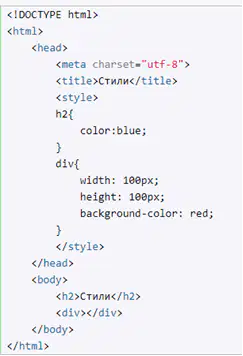
106. Method of connecting (type) for this (type) style CSS
Встроенный стиль (inline style)
Стили браузера (browser style)
Импортированный стиль (@import)
Внешний (связанный) стиль (external style)
Внутренний стиль (embedded style)

107. Method of connecting (type) of CSS styles specified in the code of the html page :
Внутренний стиль (embedded style)
Встроенный стиль (inline style)
Внешний (связанный) стиль (external style)
Импортированный стиль (@import)
Стили браузера (browser style)
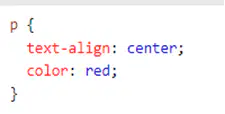
108. Specify the selector type in CSS style
Селектор идентификаторов (простой селектор)
Селектор элементов на основе имени (простой селектор)
Селектор классов (простой селектор)
Селектор потомков (Контекстный селектор)
Селектор дочерних элементов
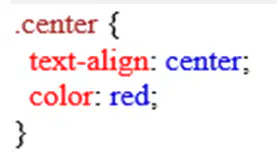
109. Specify (укажите) the selector type in CSS style
Селектор элементов на основе имени (простой селектор)
Селектор классов (простой селектор)
Селектор идентификаторов (простой селектор)
Селектор потомков (Контекстный селектор)
Селектор дочерних элементов
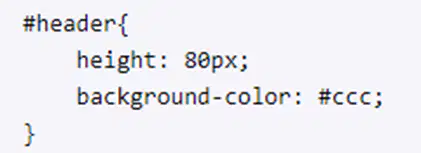
110. Specify (укажите) the selector type in CSS style
Селектор классов (простой селектор)
Селектор элементов на основе имени (простой селектор)
Селектор потомков (Контекстный селектор)
Селектор идентификаторов (простой селектор)
Селектор дочерних элементов
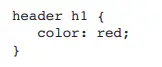
111. Specify (укажите) the selector type in CSS style
Селектор идентификаторов (простой селектор)
Селектор классов (простой селектор)
Селектор потомков (Контекстный селектор)
Селектор элементов на основе имени (простой селектор)
Селектор дочерних элементов
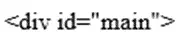
112. The name of the CSS ID selector for the element:
.main
#main
<main>
$main
main
113. A CSS pseudo-class that is used to modify to change the color of visited links:
::first-line
:link
:active
:visited
:hover
114. The situation when a pseudo class is executed :focus
При выделении текста в поле формы
При потере фокуса
При получении фокуса
При изменении значения элемента формы
При наведении указателя мыши
115. How to install a set of sans-serif fonts in CSS:
{fonts: Arial, Verdana, sans-serif;}
{font-family: Arial, Verdana, sans-serif;}
{font-face: Arial, Verdana, sans-serif;}
@font {Arial, Verdana, sans-serif}
@font-face {Arial, Verdana, sans-serif}
116. CSS. Set the Times New Roman font style for the h1 header:
h1 { font-size: "Times New Roman"; }
h1 { font-weight: "Times New Roman"; }
h1 { font-family: "Times New Roman"; }
h1 { font-face: "Times New Roman"; }
h1 { font-color: "Times New Roman"; }
117. CSS. Set the italics font style for the h1 header:
h1 { font-family: "Times New Roman"; }
h1 { font-size: 12px; }
h1 { font-style: italic; }
h1 { font-weight: normal; }
h1 { font-face: "Times New Roman"; }
118 CSS. Set the font size for the h1 header:
h1 { font-style: italic; }
p { font-size: 24px; }
h1 { font-size: 12px; }
h1 { font-face: "Times New Roman"; }
h1 { font-weight: normal; }
119. A CSS property that sets the height of a line of text:
text-align
height
line-space
line-height
word-space
120. CSS Style defines line-height:150%:
Задать line-height как 150% от высоты блока
Задать line-height как 150% от значения по умолчанию
Задать line-height как 150% от размера шрифта
Задать line-height как 150% от ширины блока текста
Задать line-height как 100% от высоты шрифта

121. CSS. What line height will be set in code
24px
36px
38px
150%
16px
122. A CSS property that adds indentation to the first line of text:
line-height
text-indent
text-align
height
padding
123. A CSS property that aligns text relative to one side of the page:
text-indent
line-height
text-align
height
padding
124. A CSS property that aligns the text inside each line vertically:
text-align
vertical-align
text-indent
line-height
padding
125. A CSS property that adds a shadow to the text:
vertical-align
text-align
text-shadow
text-indent
line-height
126. A CSS property that sets the character spacing (kerning) in the text:
word-spacing
letter-spacing
text-decoration
text-indent
line-height
127. A CSS property that sets the type of marker or number in the list:
list-style-type
list-style-position
text-decoration
list-style-image
list-style
128. A CSS property that allows you to insert a graphic image as a list marker:
list-style-type
list-style-image
list-style-position
text-decoration
list-style

129. The CSS style sets :
В качестве фона устанавливает изображение http://dubi.png
Позицию фонового изображения
В качестве фона устанавливает изображение dubi.png
Режим повторения фонового изображения по всей поверхности элемента
Градиент фона

130. The CSS style sets :
Позицию фонового изображения – правый верхний угол
Позицию фонового изображения – правый нижний угол
Размер фонового изображения
Режим повторения фонового изображения по всей поверхности элемента
Устанавливает градиент фона

131. The CSS style sets :
Градиент фона: линейный градиент перемещается по диагонали от левого угла, переход из черного цвета в белый
Градиент фона: линейный градиент перемещается от левого края, переход из черного цвета в белый
Градиент фона: радиальный градиент перемещается из центра до самой дальней стороны элемента
Цвет фонового изображения
Режим повторения фонового изображения по всей поверхности элемента

132. Specify the purpose of the fourth component in the color assignment in the RGB color model
Насыщенность (Saturation)
Прозрачность (Alpha)
Красный (Red)
Зеленый (Green)
Синий (Blue)

133. The color model used
HSL
RGB
HSLA
RGBA
TrueColor

134. CSS. The style fragment sets :
Размеры и Цвет текста
Размеры и цвет фона элемента div
Цвет фона всего документа
Размеры и Насыщенность цвета
Стиль фонового изображения
135. A selector that defines the style of any element with the block class (стиль любого элемента с классом block):
.block
div.block
.btn
#block
inline-block
136. A CSS block property that sets the internal indentation:
border
margin
padding
content
style
137. A CSS block property that sets the outer indentation (устанавливает внешний отступ):
padding
border
margin
content
style
138. A CSS block property that sets the style of the block border (стиль границы блока):
border
margin
padding
content
style

139. The CSS style sets for the block
Значения внешнего отступа: сверху 10px, справа/слева – 20px, снизу – 30px
Значения внешнего отступа: поле в 10px сверху/снизу и 20px справа/слева
Значения внутреннего отступа: сверху 10px, справа/слева – 20px
Значения внутреннего отступа: все поля по 10px
Значения определяют ширину и высоту согласно содержимому
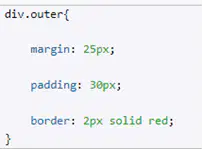
140. The CSS style sets for all div blocks of the outer class (устанавливает для всех блоков div класса outer):
Значения внешнего отступа: сверху 10px, справа/слева – 20px
Значения внутреннего отступа: все поля по 30px
Толщину контура
Размеры блока
Цвет фона блока
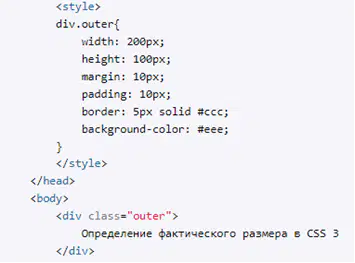
141. Specify the real block size of the div element of the outer class (реальный размер блока элемента div класса outer):
250px
230px
220px
210px
200px
142. A CSS property that adds a shadow to a block:
text-shadow
border-box
box-shadow
border-radius
display:inline
143. A CSS property that allows you to round (скруглить) the borders of a block:
box-shadow
border-radius
display: block
border-box
display: inline
144. A CSS property that turns an element into a block (превращает элемент в блочный):
block
display: block
flex
border-box
display: inline
145. A CSS property that moves a block as far left or right as possible, allowing the content below to flow around it (floating block):
overfow
clear
float
position
z-index
146. A CSS property that sets the order (порядок) in which positioned elements are displayed by layer (по слоям):
float
z-index
overfow
clear
position
147. A CSS property that allows you to place an element in a specific place on the page (поместить элемент в определенное место на странице):
z-index
float
position
overfow
clear
148. A CSS property that allows you to prevent wrapping of elements following a floating block (запретить обтекание элементам, следующим после плавающего блока):
position
clear
z-index
float
overfow
149. A CSS property that allows you to customize the behavior of the block and add scrollbars (позволяет настроить поведение блока и добавить полосы прокрутки):
overfow
clear
position
z-index
float
150. A CSS property that specifies the address of the background image:
background-position
background-image
background-color
background-size
background-repeat
151. A CSS property that allows you to remove the border of the block on the left (убрать границу блока слева):
border-right: none
border-bottom: left
border-color
border-left: none
border-style
152. A CSS property that sets the style of the block border (задает стиль границы блока):
border-left-style
border-style
border-right: none
border-bottom: left
border-color
153. The value of the position property, which allows you to fixed the title block to one place on the screen (позволяет закрепить блок заголовка на одном месте экрана):
relative
absolute
fixed
static
none
154. The value of the CSS position property, which allows you to shift an element relative to its original position (позволяет сдвигать элемент относительно его исходного положения):
fixed
absolute
relative
static
none

155. У Specify the location of the text relative to the <section> with the following CSS style (укажите место расположения текста относительно <section> )
Снизу
Сверху
Справа
Слева
none
156. Specify the CSS style code to place the aside block on the right edge and for the rest of the text to flow around the side (разместить блок врезки aside по правому краю, чтобы остальной текст обтекал aside):
aside {position: absolute; right: 0;}
aside {float: left;}
aside {float: right;}
aside {position: relative; right: 0;}
aside {position: fixed;}
157. Specify the CSS style code for placing the items of the list horizontally (код для расположения пунктов списка горизонтально):
ul { float: left; }
li { clear: left; }
li { float: left; }
ul { clear: left;
ol { float: left; }
158. A two-column layout was created using float. Then the footer column is added below. But there was a problem: footer was displayed on the side of one of the columns, not from the bottom. Specify the style you want to add so that the footer is displayed below the columns (Создан двухколоночный макет с помощью float. Затем добавлена ниже колонка footer. Но возникла проблема: footer отобразился сбоку одной из колонок, а не снизу. Укажите стиль, который нужно добавить, чтобы footer выводился ниже колонок):
footer { overflow: hidden; }
footer { width: 100%; }
footer { clear: both; }
footer { float: right; }
footer { float: left; }
159. The process of website development. The stage of determining the purpose, goals, target audience and functionality of the project:
Исследование, предпроектный анализ (Research, Pre-Project Analysis)
Проектирование (Planning)
Поддержка (Support)
Верстка и разработка (Layout and development)
Тестирование и запуск (Testing and launch)
160. The process of website development. The stage at which page layouts and visual design of the site are created:
Исследование и планирование (Research, Pre-Project Analysis)
Проектирование (Planning)
Поддержка (Support)
Верстка и разработка сайта (Layout and development)
Тестирование и запуск (Testing and launch)
161. The process of website development. The stage at which the layout and programming of the site is performed:
Проектирование (Planning)
Исследование и планирование Research, Pre-Project Analysis)
Верстка и разработка сайта (Layout and development)
Поддержка (Support)
Тестирование и запуск (Testing and launch)
162. The process of website development. The stage at which the project is tested:
Проектирование (Planning)
Исследование и планирование (Research, Pre-Project Analysis)
Тестирование и запуск (Testing and launch)
Поддержка (Support)
Верстка и разработка сайта (Layout and development)
163. The process of website development. The stage at which the analysis of competitors' websites is performed:
Исследование, предпроектный анализ (Research, Pre-Project Analysis)
Проектирование (Planning)
Поддержка (Support)
Верстка и разработка (Layout and development)
Тестирование и запуск (Testing and launch)
164. The process of website development. Groups of Internet users who are targeted by the content of the site:
Схемы просмотра страницы
Макет (Layout)
Целевая аудитория (Target Audience)
Информационная архитектура (логическая структура) сайта
SEO-оптимизация
165. The process of website development. The effectiveness (Эффективность) of the content, the (usefulness) of the sections and the relevance (востребованность) of the site from future visitors:
Целевая аудитория (Target Audience)
Функционал веб-проекта
Макет (Layout)
Информационная архитектура (логическая структура) сайта
SEO-оптимизация
166. The process of website development. The scheme of the mutual arrangement of the site pages according to a clear logical scheme:
Информационная логическая структура сайта
Целевая аудитория (Target Audience)
Макет (Layout)
Навигационная панель
SEO-оптимизация
167 The process of website development. Graphic drawing of the internal logical structure of the site:
Целевая аудитория (Target Audience)
Макет (Layout)
Flexible-макет
SEO-оптимизация
Карта сайта (Sitemap)
168. Type of information logical structure of the site, which has a clearly defined main page associated with all main sections of the site:
Линейная структура - Linear structure
Линейная структура с ответвлениями - Linear structure with branches
Блочная или хаотичная («паутина») - Blocky or chaotic (“web”)
Иерархическая (древовидная) структура - Hierarchical (tree) structure
«Кольцо» - "Ring"
169. A type of information logical structure of the site in which the pages of the site are connected to each other sequentially (последовательно), as if in a chain:
Иерархическая (древовидная) структура - Hierarchical (tree) structure
Линейная структура с ответвлениями - Linear structure with branches
Линейная структура - Linear structure
Блочная или хаотичная («паутина») - Blocky or chaotic (“web”)
«Кольцо» - "Ring"
170. A type of information logical structure of the site in which each page can be connected to any other, including the main one:
Иерархическая (древовидная) структура - Hierarchical (tree) structure
Линейная структура - Linear structure
Линейная структура с ответвлениями - Linear structure with branches
Блочная или хаотичная («паутина») - Blocky or chaotic (“web”)
«Кольцо» - "Ring"
171. The process of website development. The structure of the site that users can visually see:
Внешняя структура - Макет (Layout)
Навигационная панель – Navigation panel
Целевая аудитория (Target Audience)
Информационная архитектура (логическая структура) сайта
SEO-оптимизация
172. A navigation element that opens the menu categories when hovering over a special icon in the form of 3 horizontal bars:
«Гамбургер»
Breadcrumbs («Хлебные крошки»)
Пагинация
Вкладки (tab)
Вертикальное Меню
173. A site navigation element representing the user's path to the current site page:
<variant> «Гамбургер»
«Гамбургер»
Breadcrumbs («Хлебные крошки»)
Пагинация
Вкладки (tab)
Вертикальное Меню
174. Макет Web-страницы, в котором размеры элементов страницы фиксированы, заданы с помощью единиц измерения пиксели (px), и остаются неизменными, независимо от величины окна браузера или размера шрифта текста:
Гибкий макет - fluid layout (Относительные, жидкие, текучие или резиновые)
Эластичный макет (elastic layout)
Фиксированный макет (fixed layout)
Рисованный макет
Гибридный макет
175. Макет Web-страницы, который меняет свой размер элементов в соответствии с окном браузера, размеры элементов страницы заданы в процентах от доступной ширины экрана:
Гибкий макет - fluid layout (Относительные, жидкие, текучие или резиновые)
Фиксированный макет (fixed layout)
Эластичный макет (elastic layout)
Рисованный макет
Гибридный макет
176. Макет Web-страницы, который пропорционально меняют свой размер в зависимости от размера шрифта отображаемого текста, все измерения выражаются в единицах em и основаны на размере шрифта по умолчанию, используемом на странице:
Гибкий макет - fluid layout (Относительные, жидкие, текучие или резиновые)
Фиксированный макет (fixed layout)
Эластичный макет (elastic layout)
Рисованный макет
Гибридный макет
177. The process of website development. Web Page Layout Development Tools:
CSS
Javascript/ Javascript frameworks
Gomockingbird, Axure, Balsamiq Mockups
Color Scheme Designer
Adobe Color CC
178. The process of website development. Tools for selecting and compiling a palette of colors:
Цветовой круг, Color Scheme Designer, Adobe Color CC
Gomockingbird, Axure, Balsamiq Mockups
CSS
Javascript/ Javascript frameworks
Figma
179. The process of website development. Interactive design principle (Call to Action) for a call to action on a promo site:
Z-view scheme
F- view scheme
AIDA (Attraction/Привлечение внимания - Interest/Интерес – Desire/Желание – Action/ Действие)
Визуальные направляющие - Visual guides
SEO optimization
180 The process of website development. Visual elements for switching attention (focus) to the necessary modules of the web page:
AIDA (Attraction/Привлечение внимания - Interest/Интерес – Desire/Желание – Action/ Действие)
Визуальные направляющие - Visual guides
Z-view scheme
F- view scheme
SEO optimization
181. The process of website development. A scheme for viewing minimalistic website pages along the contour of the letter “Z”:
Z-view scheme
Визуальные направляющие - Visual guides
AIDA (Attraction/Привлечение внимания - Interest/Интерес – Desire/Желание – Action/ Действие)
F- view scheme
SEO optimization
182. The process of website development. The scheme of viewing pages of sites with text content placed on a monotonous grid, along the contour of the letter “F”:
F- view scheme
Z-view scheme
Визуальные направляющие - Visual guides
AIDA (Attraction/Привлечение внимания - Interest/Интерес – Desire/Желание – Action/ Действие)
SEO optimization
183. Website layout technology that adjusts the site to any screen size (one layout is being developed for all devices - разрабатывается один макет для всех устройств):
Адаптивный дизайн Adaptive Web Design
Отзывчивый дизайн - Responsive Web Design
CSS Flexbox
CSS Grid
CSS Block (box)
184. Website layout technology that allows you to view websites on different devices regardless of their resolution (several fixed layouts are being developed for each type of device - разрабатывается несколько фиксированных макетов для каждого вида устройства):
Отзывчивый дизайн - Responsive Web Design
CSS Flexbox
Адаптивный дизайн Adaptive Web Design
CSS Grid
CSS Block (box)
185. Website layout technology, which uses the concept of a flexible container layout, is a way of arranging elements based on the idea of an axis:
Адаптивный дизайн Adaptive Web Design
Отзывчивый дизайн - Responsive Web Design
CSS Grid
CSS Flexbox (Flexible Box Layout Module)
CSS Block (box)
186. Website layout technology that uses a special CSS3 module to position page elements in a grid or table:
Адаптивный дизайн Adaptive Web Design
Отзывчивый дизайн - Responsive Web Design
CSS Grid Layout
CSS Flexbox (Flexible Box Layout Module)
CSS Block (box)
187. Principles of Web design. Text, images and symbols should be understandable (понятны) to all users (Clear site structure and navigation, Simplicity and clarity of content, navigation, search):
Convenience (Ease) of perception - Удобство восприятия
Consistency - Согласованность
Using fonts - Использование шрифтов
Simplicity - Простота
Structuring - Структура
188. Principles of Web design. All elements should be combined with each other in such a way that the site is designed in a single style (Unified visual style - Единая визуальная стилистика):
Convenience (Ease) of perception - Удобство восприятия
Using fonts - Использование шрифтов
Consistency - Согласованность
Simplicity - Простота
Structuring - Структура
189. The process of improving the position of a website in search engines (улучшения позиций Web-сайта в поисковых системах), comprehensive development and promotion of the site to reach the top positions in search engine results:
SEO (Search Engine Optimization)
CSS (Cascading Style Sheets)
HTML
Breadcrumbs
Usability
190. The term SEO, meaning the site's entry into the search engine database (попадание сайта в базу поисковиков) or the total number of site pages that are displayed during the search:
Индексация сайта (site indexing)
Cемантические ядра (semantic cores)
Зеркало сайта (site mirror)
Сниппет (snippet)
Апдейт (update)
191. The term SEO, which means for a specific site compiled lists of keywords and phrases (keys) by which users search for a site in search engines (составленные списки ключевых слов и фраз (ключей), по которым пользователи ищут сайт в поисковиках):
Cемантические ядра (semantic cores)
Индексация сайта (site indexing)
Зеркало сайта (site mirror)
Сниппет (snippet)
Апдейт (update)
192. The term SEO, meaning the part of the text written in the meta tags TITLE and DESCRIPTION, which are visible to search engines:
Сниппет (snippet)
Cемантические ядра (semantic cores)
Индексация сайта (site indexing)
Зеркало сайта (site mirror)
Апдейт (update)
193. Работа с внутренней SEO оптимизацией сайта, когда выполняется анализ ключевых слов и исследование семантического ядра, чтобы определить наиболее релевантные запросы, которые пользователи могут использовать для поиска вашего контента:
Исследование ключевых слов - Keyword Research
Оптимизация заголовков и мета-тегов - Optimizing headers and meta tags
Репутация и брендинг - Reputation and branding
Качественный контент - High-quality content
Оптимизация изображений - Image Optimization
194. Работа с внутренней SEO оптимизацией сайта, которая включает оптимизацию имени файла изображения, использование атрибутов alt и title, а также сжатие и оптимизацию размеров изображений, чтобы улучшить скорость загрузки страницы:
Оптимизация изображений - Image Optimization
Исследование ключевых слов - Keyword Research
Оптимизация заголовков и мета-тегов - Optimizing headers and meta tags
Репутация и брендинг - Reputation and branding
Качественный контент - High-quality content
195. Работа с внешней SEO оптимизацией сайта, которая заключается в создании уникального и запоминающегося бренда, который будет привлекать внимание и доверие пользователей (имидж фирмы):
Репутация и брендинг - Reputation and branding
Исследование ключевых слов - Keyword Research
Оптимизация заголовков и мета-тегов - Optimizing headers and meta tags
Качественный контент - High-quality content
Оптимизация изображений - Image Optimization
196. Qualitative assessment of the simplicity and comfort of working with the site, an indicator of the quality of the site (показатель качества сайта):
Usability
SEO (Search Engine Optimization)
CSS (Cascading Style Sheets)
HTML
Breadcrumbs
197. The usability criterion, which evaluates the speed at which a visitor gets used to navigating on the site, whether he will be able to understand the interface faster when visiting again (Критерий юзабилити, который оценивает с какой скоростью посетитель привыкает к навигации на сайте, сможет ли он быстрее разобраться в интерфейсе при повторном посещении):
Запоминаемость - Memorability
Эффективность - Effectiveness
Легкость в изучении/ Ориентация/ Простота навигации
Ошибки - Mistakes, errors
Удовлетворенность/ Лояльность - Satisfaction/ Loyalty
198. A usability criterion that evaluates how quickly a user can navigate the site and perform the necessary actions (Критерий юзабилити, который оценивает насколько быстро пользователь может ориентироваться на сайте и совершать необходимые ему действия):
Эффективность - Effectiveness
Запоминаемость - Memorability
Легкость в изучении/ Ориентация/ Простота навигации
Ошибки - Mistakes, errors
Удовлетворенность/ Лояльность -- Satisfaction/ Loyalty
199. The type of usability testing performed by a QA or UX specialist (Вид юзабилити тестирования, которое проводит специалист QA или UX):
Модерируемое тестирование
Немодерируемое тестирование
Пользовательское тестирование с участием фокус-групп пользователей
Эксплораторное (тестирование концепции)
Сравнительное тестирование
200. A type of usability testing that compares a site with its older versions or competitive interfaces (Вид юзабилити тестирования, при котором сравнивается сайт с его старыми версиями или конкурентными интерфейсами):
Сравнительное тестирование
Инструментальное тестирование при помощи online-сервисы Google Analytics, Яндекс.Метрика
Модерируемое тестирование

