

Network Security Domain 2: Lesson 1

Presentation
•
Instructional Technology
•
10th Grade
•
Practice Problem
•
Medium

Charles Carr
Used 10+ times
FREE Resource
24 Slides • 30 Questions
1
Network Security: Domain 2 Lesson 1 Operating System Security: Client and Server Protection
2
The main function of Active Directory is to enable administrators to manage permissions and control access to network resources. It provides:
Centralized resources and security administration.
Single logon for access to global resources.
Simplified resource location.
What can it do?
Active Directory (AD) is a database and set of services that connect users with the network resources they need to get their work done.
In Active Directory, data is stored as objects, which include users, groups, applications, and devices, and these objects are categorized according to their name and attributes.
What is AD?
Active Directory (AD)
3
Domain Controller
What is it?
A domain controller (DC) is a server that manages security requests for a network and identity. It authenticates users and ensures that only authorized users can access network resources
4


5
A Domain controller should have what is needed to run the domain controller (AD, DNS, etc)
Other services such as routing, mail, etc should be installed on separate servers
Only the mail server should have SMTP (Port 25) accessible
Examples
Reduces the likelihood that a server compromised by malicious actors will pose a security risk to other servers
thereby reducing the attack surface
If one server goes down you don't lose the whole infrastructure
Installing multiple services across multiple services
Separation of Services
6
Remove or disable unnecessary accounts
Unplug peripherals when not in use
Uninstall apps not in use
Disable services not in use
Remove unnecessary accounts
Move servers to their own subnet.
Remove Unsecure Protocols
Close Unused Ports
strengthening the security of a network component by reducing its attack surface (total of all potential vulnerabilities on a device)
Hardening
Server Hardening
Device Hardening
7
Multiple Choice
Which answer describes the concept of Separation of Services?
Only have access to what you need to do your job
Having multiple layers of security in case one layer fails
Different services are used to run different services
Using a combination of what you have, what you are, and what you know to verify identify before granting access
8
Multiple Select
How does Separation of Services reduce the attack surface of a network? Choose all that apply.
Provides encryption to servers that protects data from access by unauthorized users
Reduces the necessary protocols, open ports, and applications for each server
Ensure multi-factor authorization prior to gaining access to network resources
Reduces risk to remaining infrastructure in case a server is compromised by an attack or malfunction
9
Multiple Choice
Which server should be the only on to have port 25 open?
DNS Server
DHCP Server
Mail Server
File Server
Web Server
10
Multiple Choice
You should unplug peripherals when not in use.
True
False
11
Fill in the Blanks
12
Fill in the Blanks
13
Open Ended
What are two thing you could do to reduce the attack surface on your smartphone?
14
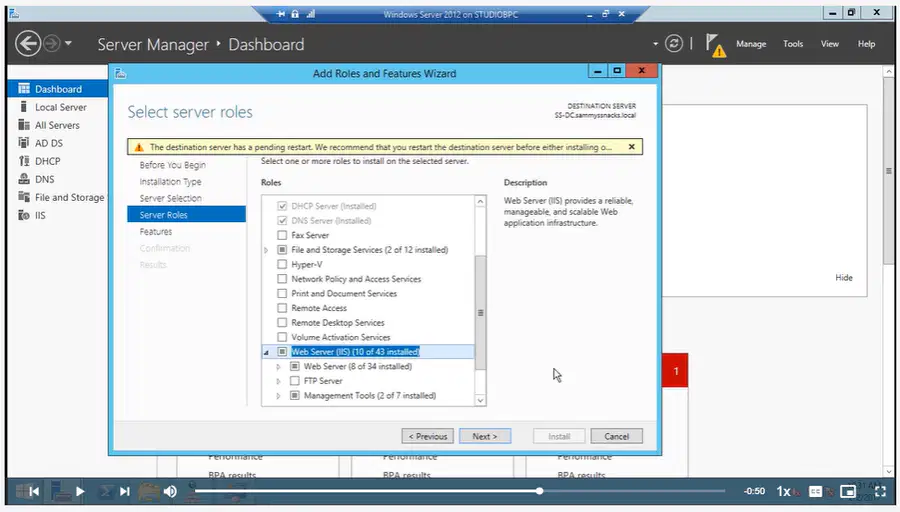
go to Server Manager ---> Manage --> Add Roles and Features --> click next until you get to Server Roles --> make sure that none of the unsecure protocols are selected.
Secure the Server
FTP - File Transfer (use SFTP instead)
Telnet (use SSH instead)
PAP - Password Authentication Protocol
Unsecure Protocols
Unsecure Protocols
Unencrypted protocols which transmit in plain text
15
16
Multiple Choice
Why are most protocols considered unsecure?
They encrypt data before sending it
They send communications in plain text
They have malicious code embedded in them
They can be spoofed by skilled attackers
17
Multiple Select
Which protocols are unsecure? Choose all that apply.
FTP
Telnet
PAP
SFTP
SSH
18
Multiple Select
Which protocols are secure protocols? Choose all that apply
SSH
FTP
SMTP
SFTP
HTTPS
19
Updating Devices
Security update - used to patch app vulnerabilities
Critical update - patches OS vulnerabilities
Hotfix - quick fix for a severe problem
Update apps, malware (especially definitions), OS
Making sure a device or app always has the latest patches.
Patch Management
Types of Patches
Windows update - tool used to manage updates automatically or manually on a Windows device
WSUS - Windows Server Update Service can be used to push out updates (corporate environment)
SCCM - System Center Configuration Manager can push out updates (corporate)
20

21

22
Fill in the Blanks
23
Multiple Select
Which two tools can be used to push out updates in a corporate environment? (Choose 2)
WSUS
ASUS
SSCM
RODC
MCUS
24
Multiple Choice
Which answer describes an attack that is successful because the software/app developer is unaware of the vulnerability and therefore has not created a fix for it.
Zero Day
First Day Out
Brand New
Ninja Strike
25
Fill in the Blanks
26
Server Manager --> DNS --> right click Domain --> Properties --> General tab --> Dynamic updates: Secure only
Now in order to write records to the DNS server domain you must be a member of the AD domain.
Securing in Windows Server
The DNS server resolves domain names (i.e. google.com) to IP address (i.e. 8.8.8.8)
Ensure that those outside the domain cannot update DNS records. (DNS poisoning/spoofing)
Domain Name Server
Securing the DNS Server
27


28
Multiple Choice
What does the DNS Server do?
Resolve website domain names to the correct IP addresses
Encrypts network traffic over Wi-Fi connections
Dynamically assigns IP addresses to devices
Sends and receives email messages
29
Fill in the Blanks
30
Multiple Choice
When you choose "Secure Only" changes cannot be made to the DNS server unless you are a member of the ___________
server
domain
network
staff
31
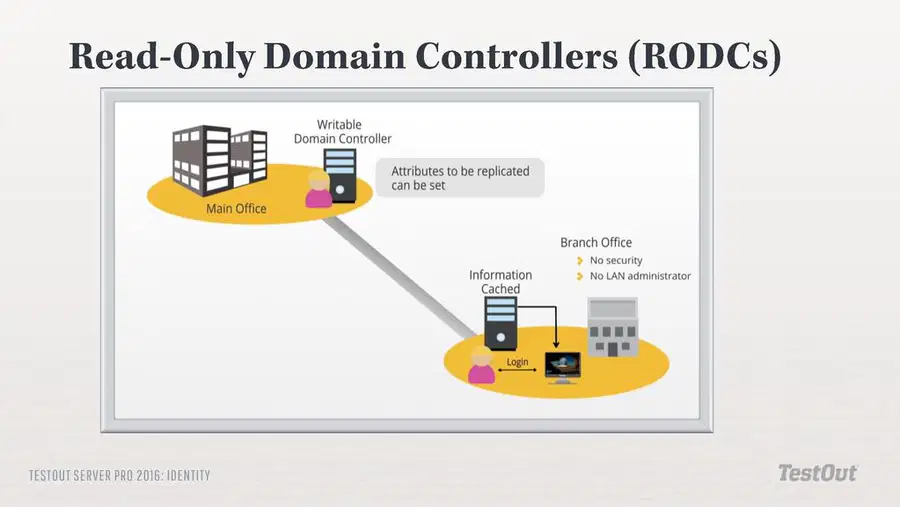
Uses less bandwidth.
Prevents unwanted or unauthorized changes to the Active Directory (AD) database.
Benefits
Domain controllers with read-only copies of Active Directory
Updates are controlled and pushed down from a full domain conroller
What is a RODC?
RODC: Read-Only Domain Controller
32
33
Multiple Select
What are 2 benefits of a RODC?
Increases integrity of communications sent between locations
Uses less bandwidth
Prevents unwanted changes from being made to Active Directory
Provides more authorization procedures to secure devices
34
Fill in the Blanks
35
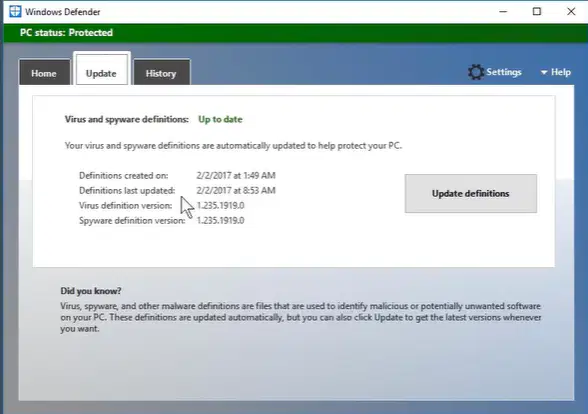
Antivirus program included with Windows
Update can me updated automatically or manually.
Provides history of updates
Windows Defender
Make sure to keep definitions updated
Definitions are files that have latest information on the latest malware.
Update Definitions
Antivirus/Antimalware/Antispyware
36
37
Multiple Choice
What is the name of the antimalware app that comes with the Windows OS?
System Update
Windows Defender
Windows Firewall
Norton Antivirus
38
Fill in the Blanks
39
Multiple Choice
You can choose to update antimalware definitions automatically or manually.
True
False
40
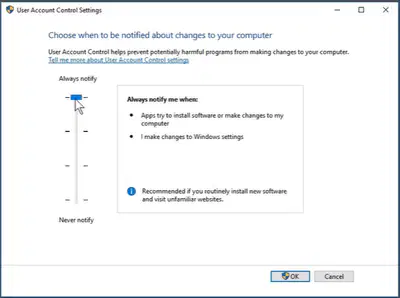
UAC is a Windows tool that helps prevent potentially harmful programs from a making changes to your computer.
Control Panel --> User Accounts --> Change UAC settings
User Account Control (UAC)
Group Policy - Software Restriction policy
Device Guard - application whitelisting (allowed)
Third-party restriction software
3 ways to Protect
Unwanted Installation Protection
Protect against unwanted software installation
41
User Account Control (UAC)

42
Multiple Select
What are three ways to prevent installation of unwanted software?
Group policy
Windows Defender
Device Locker
3rd party restriction software
Device Guard
43
Multiple Choice
Another more accurate name for whitelisting is ______________.
allow listing
deny listing
admin listing
graylisting
44
Fill in the Blanks
45
Control Panel --> Sync Center --> Manage Offline Files --> Encryption tab ---> Encrypt
So we can encrypt offline files using Sync Center and online files using EFS
How to manage
Allows you to connect to a network and retrieve copies of files from a network drive you can use and work with offline
Files automatically synchronize when you reconnect to the network
Offline Files
Managing Offline Files
Encrypt files when working away from the network
46

47
Multiple Choice
You can encrypt online files using __________
Applocker
Power Lock
EFS
Sync Center
48
Multiple Choice
We can encrypt offline files using _________
Windows Defender
Sync Center
Group Policy
EFS
49
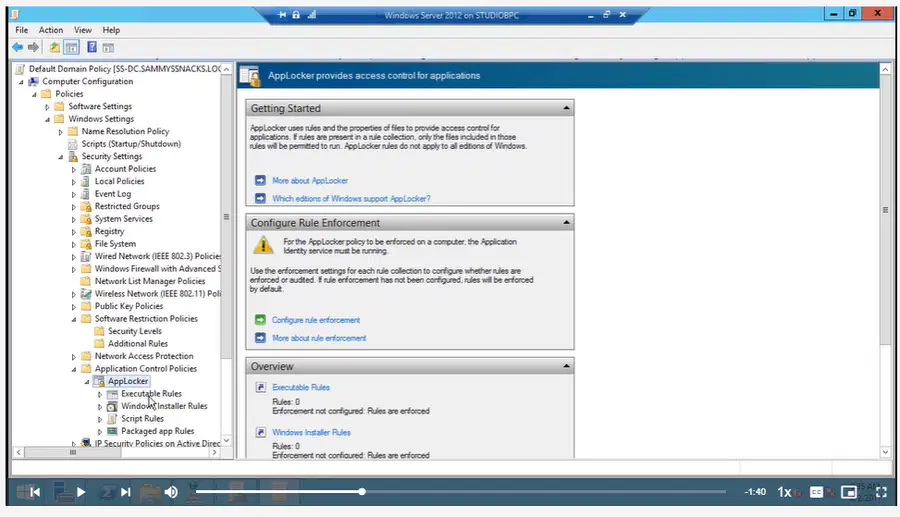
Applocker sets more specific rules for what can be or cannot be installed.
Computer Configuration --> Policies --> Windows Settings --> Security Settings --> Application Control Policies --> Applocker
Using Applocker
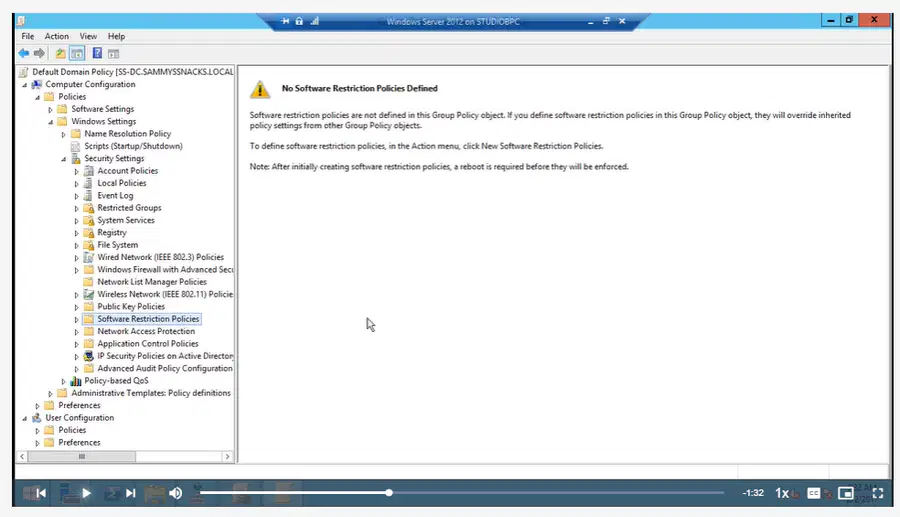
Windows Server Dashboard --> Group Policy Management --> right click Default Domain Policy --> Computer Configuration --> Policies --> Windows Settings --> Security Settings --> Software Restriction Policies --> Action ---> New Software Restriction Policies
By default no software restriction policies are defined
Using Group Policy
Software Restriction Policies
50
51
52
Multiple Choice
Group Policy can be used to restrict what software users can install on a device.
True
False
53
Multiple Choice
By default no software restriction policies are defined in Group Policy
True
False
54
Multiple Choice
Applocker sets more general rules for what can be or cannot be installed than using Group Policy.
True
False
Network Security: Domain 2 Lesson 1 Operating System Security: Client and Server Protection
Show answer
Auto Play
Slide 1 / 54
SLIDE
Similar Resources on Wayground

49 questions
LESSON 6.3: DISTRIBUTION& TRANSMISSION OF ELECTRICAL ENERGY
Presentation
•
9th Grade
51 questions
4.9 SD WRITE & SOLVE SYSTEMS
Presentation
•
10th Grade
49 questions
Python - powtórzenie
Presentation
•
9th Grade
51 questions
Characteristics of Rational Functions
Presentation
•
11th Grade
46 questions
Y10CT1W11L1 Group 7: The Halogens
Presentation
•
10th Grade
46 questions
Parts of an Equation & Reaction Types
Presentation
•
10th Grade
48 questions
Phys. Final Review
Presentation
•
9th Grade
49 questions
Kesetimbangan Kimia XI
Presentation
•
11th Grade
Popular Resources on Wayground
20 questions
Math Review

Quiz
•
3rd Grade
15 questions
Fast food
Quiz
•
7th Grade
20 questions
Context Clues
Quiz
•
6th Grade
20 questions
Inferences
Quiz
•
4th Grade
19 questions
Classifying Quadrilaterals
Quiz
•
3rd Grade
20 questions
Figurative Language Review
Quiz
•
6th Grade
20 questions
Equivalent Fractions
Quiz
•
3rd Grade
10 questions
Identify Fractions, Mixed Numbers & Improper Fractions
Quiz
•
3rd - 4th Grade
Discover more resources for Instructional Technology
10 questions
Fact Check Ice Breaker: Two truths and a lie
Quiz
•
5th - 12th Grade
10 questions
Video Games
Quiz
•
6th - 12th Grade
10 questions
Test Your Knowledge with 15 Fun Trivia Questions

Interactive video
•
6th - 10th Grade
15 questions
Memorial Day Trivia
Quiz
•
KG - 12th Grade
12 questions
Name that Candy
Quiz
•
KG - 12th Grade
20 questions
Guess The App
Quiz
•
KG - Professional Dev...
30 questions
K/H Final Review Part 1
Quiz
•
9th - 12th Grade
40 questions
NCFE Earth and Environmental Science Released Test
Quiz
•
9th - 12th Grade