

🎯Problem Solving and Computing Lesson 6

Presentation
•
Computers
•
6th - 8th Grade
•
Practice Problem
•
Easy

Donnel Smith
Used 3+ times
FREE Resource
17 Slides • 9 Questions
1


Teacher Resources
For Teachers!
Lesson Overview
This lesson introduces the concept of processing within computational problem-solving. While this
lesson focuses on four common types of processing - if/then (conditionals), finding a match
(searching), counting, and comparing - students should understand that processing is whatever a
computer does to turn inputs into outputs. Students are first introduced to the types of processing
through several sample apps. They then investigate more apps to determine what sorts of
processing each uses. They then think of their own app and decide what types of processing it would
need to work. Finally, they brainstorm other types of processing that may be useful but were not
included in the main lesson.
More guidance and resources for this lesson are available in the Lesson Plan:
●https://studio.code.org/s/csd1-2023/lessons/6
2
Problem Solving and Computing
Lesson 6
Processing
3

4

How do you know?
What do they think about?
Where do they get the information to think about this stuff?
Are computers thinking?
5
Open Ended

Are computers thinking?
How do you know?
What do they think about?
Where do they get the information to think about this stuff?
6


Prompt:
Go on Code Studio to try out the birthday app. It has three possible outputs. Try to find each one.
1. What is the input to the app?
2. What is the output?
3. How do you think the app decides which output to give to the user?
Problem Solving and Computing Lesson 6 - Warm Up
7
Multiple Select

What is the inputs to the app?
Month of your Birthday
Day of your Birth
Favorite color
Shoe size
Favorite candy
8
Multiple Select
What is the output?
It's not your birthday year yet.
It was already your birthday this year.
It's your birthday!
Tomorrow is good for you.
Your birthday is coming soon!
9
Open Ended
How do you think the app decides which output to give to the user? What is it doing?
10

Key Vocabulary:
Processing - the thinking work computers do to turn input into output.
Problem Solving and Computing Lesson 6 - Warm Up
11

Question of the Day
What are the different ways computers can process information?
Problem Solving and Computing Lesson 6 - Warm Up
12

13

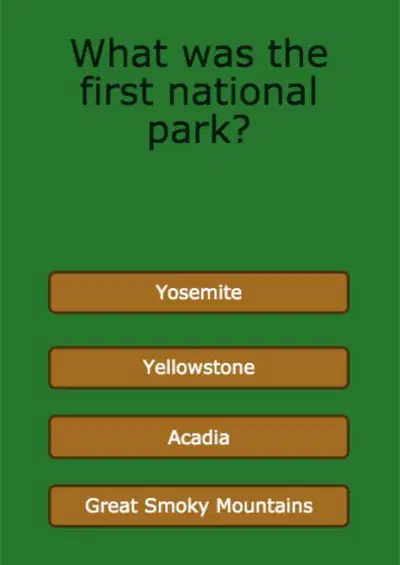
Problem Solving and Computing Lesson 6 - Activity
National Park Quiz
Try out this quiz about America's national parks.
How does this app use comparing and if/then to turn the input into output?
14


Problem Solving and Computing Lesson 6 - Activity
How Many Countries...
This app tells you some fun facts different countries.
What new kinds of processing
might it use to turn input to output?
15

Problem Solving and Computing Lesson 6 - Activity
Four Kinds of Processing
● If/Then - If something is true, do something else.
● Comparing - Check whether things are the same, or one is bigger than the other.
● Finding a Match - Search a list or group of things for a match.
● Counting - Keep track of how many of something there are.
16
Dropdown
17
Dropdown
18



Problem Solving and Computing Lesson 6 - Activity
App and Processing
For each app, choose one type of processing it uses and explain how it is used.
19
Open Ended
App and Processing
For each app, choose one type of processing it uses and explain how it is used.
20

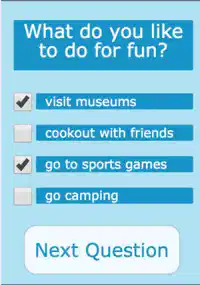
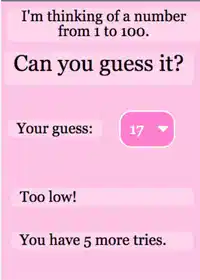
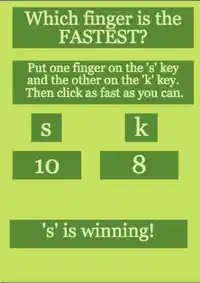
Problem Solving and Computing Lesson 6 - Activity
More Processing
For each app, choose two types of processing it uses and explain how they are used.
21
Match
MATCH THE PROCESSING FOR EACH APP
COUNTING
FINDING A MATCH
COMPARING
COUNTING
MATCHING
COMPARING
IF/THEN
COUNTING
COMPARING
COUNTING
FINDING A MATCH
COMPARING
COUNTING
MATCHING
COMPARING
IF/THEN
COUNTING
COMPARING
22

23

Problem Solving and Computing Lesson 6 - Wrap Up
Prompt:
We saw four different types of processing today, but there are many more?
● What’s another type of processing that you think would be useful?
● What kind of app might use it?
24

Problem Solving and Computing Lesson 6 - Wrap Up
Key Vocabulary:
Processing - the thinking work computers do to
turn input into output
25

Problem Solving and Computing Lesson 6 - Wrap Up
Question of the Day
What are the different ways computers can process information?
26
Open Ended
What are the different ways computers can process information?
Teacher Resources
For Teachers!
Lesson Overview
This lesson introduces the concept of processing within computational problem-solving. While this
lesson focuses on four common types of processing - if/then (conditionals), finding a match
(searching), counting, and comparing - students should understand that processing is whatever a
computer does to turn inputs into outputs. Students are first introduced to the types of processing
through several sample apps. They then investigate more apps to determine what sorts of
processing each uses. They then think of their own app and decide what types of processing it would
need to work. Finally, they brainstorm other types of processing that may be useful but were not
included in the main lesson.
More guidance and resources for this lesson are available in the Lesson Plan:
●https://studio.code.org/s/csd1-2023/lessons/6
Show answer
Auto Play
Slide 1 / 26
SLIDE
Similar Resources on Wayground

20 questions
Friction and Frictional Forces
Presentation
•
6th - 8th Grade
20 questions
U01L01_1 Motion in Scratch
Presentation
•
6th - 8th Grade
18 questions
Plants and Animal Cells
Presentation
•
6th - 8th Grade
18 questions
Simplifying Expressions
Presentation
•
6th - 8th Grade
21 questions
TECHNOBOT AI: 8 Artificial Intelligence and Smart Lockers
Presentation
•
6th - 8th Grade
20 questions
La hora
Presentation
•
6th - 7th Grade
19 questions
G6 - Don't Feed the Phish
Presentation
•
6th - 8th Grade
21 questions
SC.8.E.5.9 - Eclipses Lesson
Presentation
•
6th - 8th Grade
Popular Resources on Wayground
20 questions
Math Review

Quiz
•
3rd Grade
15 questions
Fast food
Quiz
•
7th Grade
20 questions
Context Clues
Quiz
•
6th Grade
20 questions
Inferences
Quiz
•
4th Grade
19 questions
Classifying Quadrilaterals
Quiz
•
3rd Grade
20 questions
Figurative Language Review
Quiz
•
6th Grade
20 questions
Equivalent Fractions
Quiz
•
3rd Grade
10 questions
Identify Fractions, Mixed Numbers & Improper Fractions
Quiz
•
3rd - 4th Grade
Discover more resources for Computers
15 questions
Fast food
Quiz
•
7th Grade
20 questions
Context Clues
Quiz
•
6th Grade
20 questions
Figurative Language Review
Quiz
•
6th Grade
17 questions
guess the logo
Quiz
•
8th Grade
10 questions
Candy
Quiz
•
4th - 8th Grade
10 questions
Fact Check Ice Breaker: Two truths and a lie
Quiz
•
5th - 12th Grade
22 questions
Dot Plots and Histograms
Quiz
•
6th Grade
10 questions
Memorial Day History and Traditions

Interactive video
•
5th - 8th Grade