Untitled Presentation
Presentation
•
Computers
•
1st Grade
•
Practice Problem
•
Hard
Hoàng Nguyễn Minh
FREE Resource
22 Slides • 31 Questions
1
2
Multiple Choice
What is the main topic of the lesson presented in the image?
Input Devices
Output Devices
Input and Output Devices
Computer Hardware
3
4
Multiple Choice
What are the objectives listed in the image?
Identify input and output devices
Understand the functions of input and output devices
Operate safely with computer devices
All of the above
5
Multiple Choice
Một con chuột là một thiết bị __________
đầu vào
đầu ra
6
Multiple Choice
Định nghĩa của đầu ra là gì?
Cho phép người dùng thấy/nghe dữ liệu từ máy tính
Thiết bị đầu vào
Thiết bị đầu ra
7
8
Multiple Choice
What are the two main topics mentioned in the image?
Input-Output Devices
Safety Equipment
Data Processing
User Interface
9
10
Multiple Choice
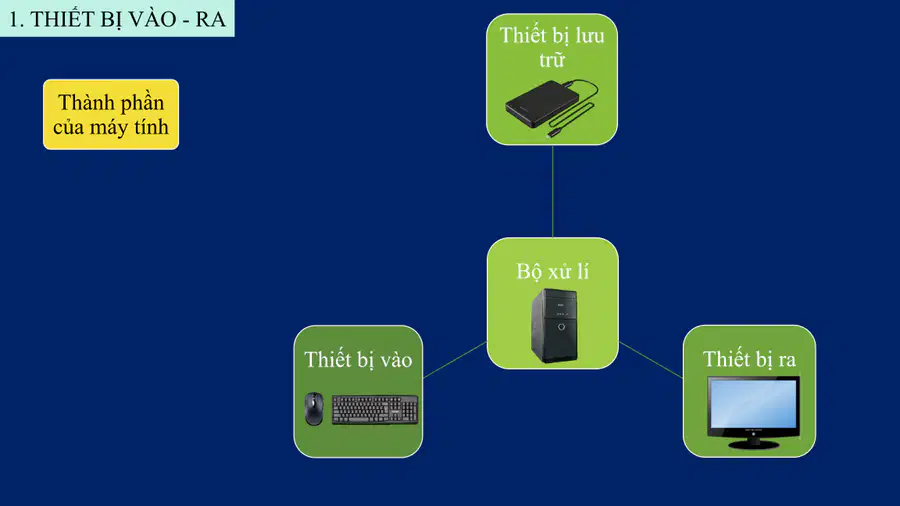
What are the main components of a computer as shown in the diagram?
Input devices
Output devices
Storage devices
Processing unit
11
12
13
Multiple Choice
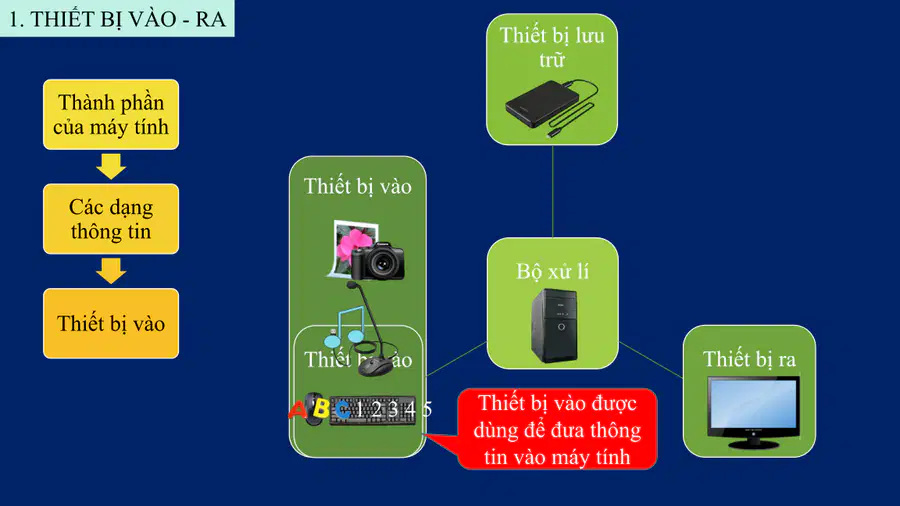
What are the different types of information represented in the image?
Textual information
Audio information
Image information
All of the above
14
Multiple Choice
Sắp xếp các nội dung theo dạng từ gốc đến các cành gọi là
Sơ đồ hình cây
sơ đồ bàn cờ
sơ đồ song song
Sơ đồ hình nón
15
16
Multiple Choice
Thiết bị vào được dùng để đưa thông tin vào máy tính. What are some examples of input devices?
Camera
Monitor
Printer
Speaker
17
18
Multiple Choice
What are the components of a computer as shown in the diagram?
Input devices
Output devices
Storage devices
Processing unit
19
20
Multiple Choice
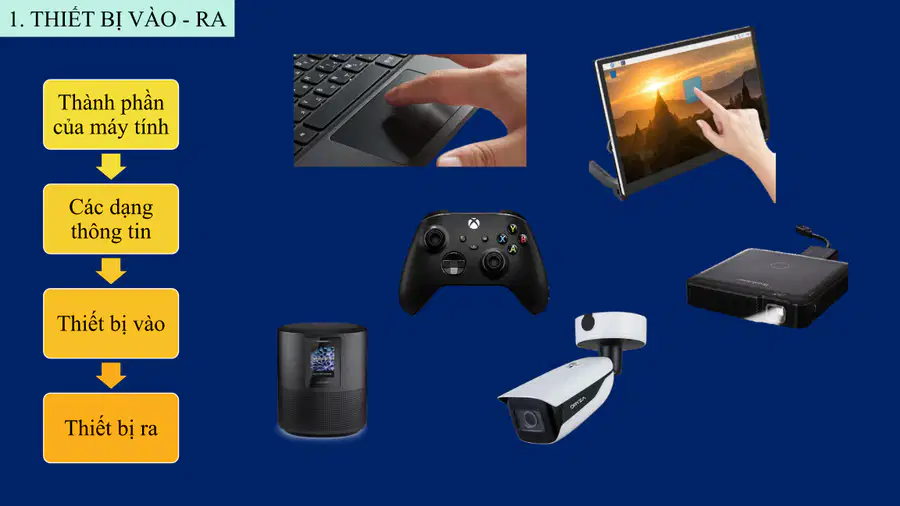
What are the different types of input and output devices shown in the image?
Keyboard
Monitor
Speaker
Camera
21
22
Multiple Choice
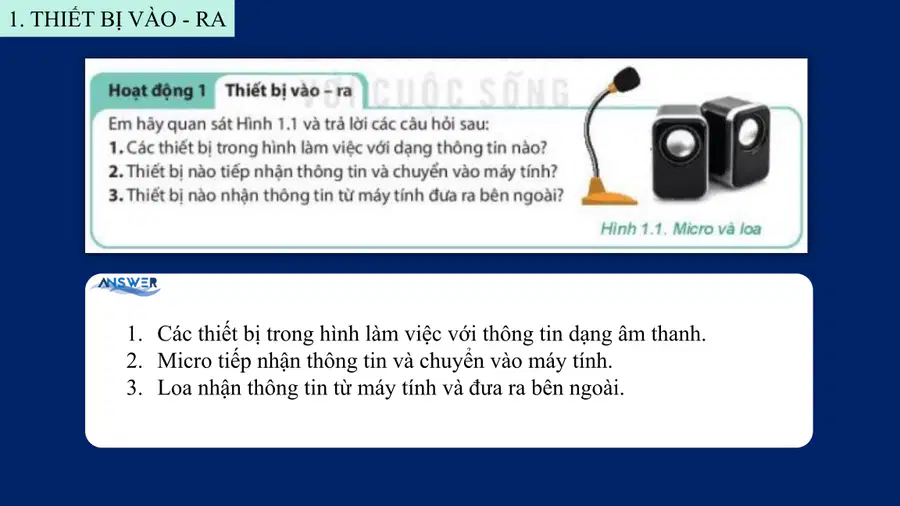
Em hãy quan sát Hình 1.1 và trả lời các câu hỏi sau: 1. Các thiết bị trong hình làm việc với dạng thông tin nào? 2. Thiết bị nào tiếp nhận thông tin và chuyển vào máy tính? 3. Thiết bị nào nhận thông tin từ máy tính và đưa ra bên ngoài?
Dạng âm thanh
Dạng hình ảnh
Dạng văn bản
Dạng video
23
Multiple Choice
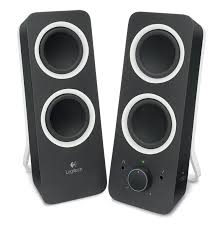
Thiết bị này là Đầu vào hay Đầu ra?
Loa
Đầu vào
Đầu ra
24
Multiple Choice
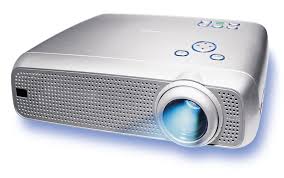
Thiết bị này là Thiết bị đầu vào hay Thiết bị đầu ra?
Máy chiếu
Thiết bị đầu vào
Thiết bị đầu ra
25
Multiple Choice
Bộ phận nào của máy tính là nơi hiển thị kết quả làm việc của máy tính?
Màn hình
Thân máy
Bàn phím
Chuột
26
27
Multiple Choice
Mỗi thiết bị vào - ra trong Hình 1.2 làm việc với dạng thông tin nào? Thiết bị nào có cả hai chức năng vào và ra?
Thông tin dạng văn bản
Thông tin dạng hình ảnh
Thông tin dạng âm thanh
Thiết bị có cả hai chức năng vào và ra
28
29
Multiple Choice
Thiết bị nào chuyển dữ liệu âm thanh từ máy tính ra ngoài?
Máy ảnh
Micro
Màn hình
Loa
30
Multiple Choice
Em hãy cho biết máy ảnh nhập dữ liệu dạng nào vào máy tính?
Con số
Văn bản
Hình ảnh
Âm thanh
31
32
Multiple Choice
What are the two main categories mentioned in the image?
Input-Output Devices
Safety Equipment
Input Devices
Output Devices
33
34
Open Ended
Why is it necessary to provide power to the computer after connecting the devices?
35
Multiple Choice
What is the correct way to connect the devices as shown in the image?
a-7, b-6, c-7, d-3, e-4, f-8
a-1, b-2, c-3, d-4, e-5, f-6
a-2, b-3, c-4, d-5, e-6, f-7
a-5, b-4, c-3, d-2, e-1, f-0
36
Multiple Choice
Đây là bộ phận nào của máy tính để bàn?
Loa máy tính
Màn hình máy tính
Bàn phím
Thân máy
37
38
Multiple Choice
What should you do before using a device according to the safety guidelines?
Read the instructions
Ignore the instructions
Use the device immediately
Ask someone else
39
40
Multiple Choice
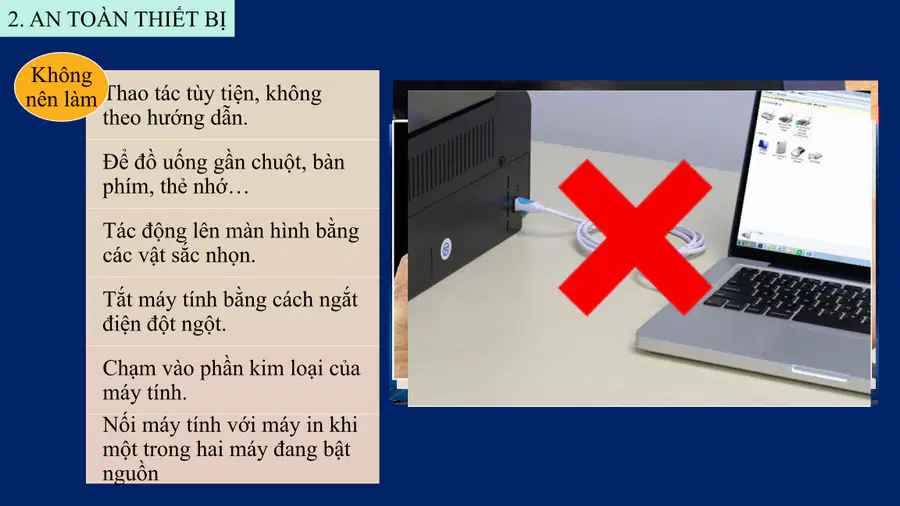
What should you avoid doing when using computer equipment?
Using the equipment without following instructions
Drinking near the keyboard
Touching the screen with bright objects
Turning off the computer abruptly
41
42
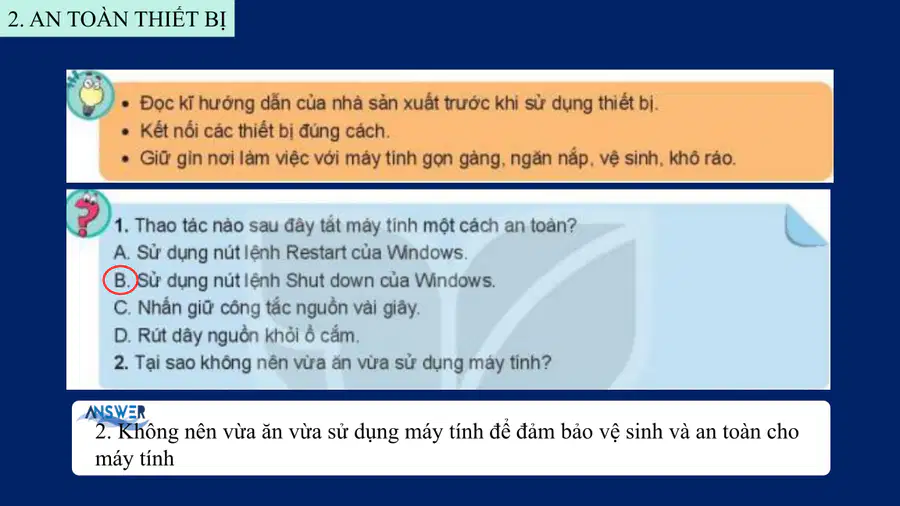
Multiple Choice
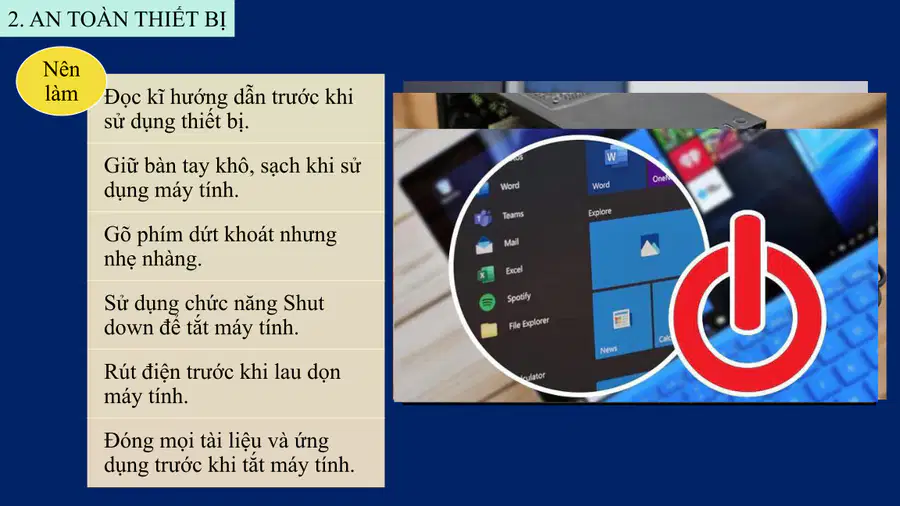
Thao tác nào sau đây tắt máy tính một cách an toàn?
Sử dụng nút lệnh Restart của Windows.
Sử dụng nút lệnh Shut down của Windows.
Nhấn giữ công tắc nguồn vài giây.
Rút dây nguồn khỏi ổ cắm.
43
44
Multiple Choice
What does 'LUYỆN TẬP' mean in English?
Practice
Learn
Test
Review
45
46
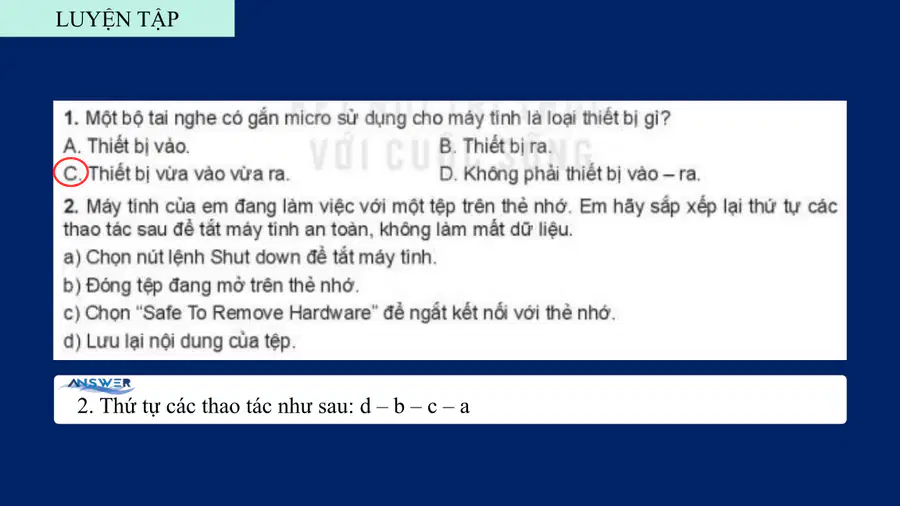
Multiple Select
Máy tính của em đang làm việc với một tệp trên thẻ nhớ. Em hãy sắp xếp lại thứ tự các thao tác sau để tắt máy tính an toàn, không làm mất dữ liệu.
Chọn lệnh Shut down để tắt máy tính.
Đóng tệp đang mở trên thẻ nhớ.
Chọn "Safe To Remove Hardware" để ngắt kết nối với thẻ nhớ.
Lưu lại nội dung của tệp.
47
48
Multiple Choice
What does the term "VẬN DỤNG" refer to in the context of this lesson?
Application
Theory
Analysis
Evaluation
49
50
Open Ended
Em hãy đề xuất một số quy tắc để giúp các bạn sử dụng phòng máy tính an toàn và hiệu quả.
51
Multiple Choice
Trên màn hình theo dõi, em thấy một người đứng trước camera an ninh. Người đó có biết em đang theo dõi không? Tại sao?
Có, vì họ nhìn thấy em
Không, vì họ không có mặt tại đó
Có, vì camera ghi lại hình ảnh
Không, vì camera không hoạt động
52
53
Multiple Choice
What is the significance of expressing gratitude in communication?
It shows politeness
It is unnecessary
It can be ignored
It makes conversations longer
Show answer
Auto Play
Slide 1 / 53
SLIDE

Similar Resources on Wayground
40 questions
2.1 Dividing Fractions
Presentation
•
KG
45 questions
Lớp 4. CĐ 5. Bài 1. Bước đầu làm quen với Logo (tiết 1)
Presentation
•
1st Grade
50 questions
CÔNG NGHỆ AI
Presentation
•
KG
42 questions
BG TH11 KNTT T1-2 B1
Presentation
•
1st Grade
43 questions
Bài 6 Thư mục
Presentation
•
2nd Grade
53 questions
Tổ chức hoạt động vui chơi cho trẻ
Presentation
•
KG
48 questions
Day 3
Presentation
•
KG
51 questions
12_Lesson5.cdf
Presentation
•
1st Grade
Popular Resources on Wayground
16 questions
Grade 3 Simulation Assessment 2
Quiz
•
3rd Grade
19 questions
HCS Grade 5 Simulation Assessment_1 2526sy
Quiz
•
5th Grade
10 questions
Cinco de Mayo Trivia Questions
Interactive video
•
3rd - 5th Grade
17 questions
HCS Grade 4 Simulation Assessment_2 2526sy
Quiz
•
4th Grade
24 questions
HCS Grade 5 Simulation Assessment_2 2526sy
Quiz
•
5th Grade
13 questions
Cinco de mayo
Interactive video
•
6th - 8th Grade
20 questions
Math Review
Quiz
•
3rd Grade
30 questions
GVMS House Trivia 2026
Quiz
•
6th - 8th Grade
Discover more resources for Computers
20 questions
Telling Time to the Hour and Half hour
Quiz
•
1st Grade
16 questions
Counting Coins counting money
Quiz
•
1st - 2nd Grade
20 questions
Halves and Fourths
Quiz
•
1st Grade
22 questions
2D & 3D Shapes & Attributes
Quiz
•
1st Grade
13 questions
Money
Quiz
•
1st Grade
20 questions
Addition and Subtraction facts
Quiz
•
1st - 3rd Grade
15 questions
Place Value tens and ones
Quiz
•
1st Grade
78 questions
SC Ready Reading Assessment Vocabulary
Quiz
•
1st - 5th Grade