
 Worksheets
Photoshop Basics & Layer Styles
Total questions: 19
Worksheet time: 10mins
Name
Class
Date
1.
Save documents in PSD format when working to ensure that your project is:
a)
Compatible with printers (such as Wal-mart)
b)
A JPG file
c)
Using the proper color mode
d)
Not flattened and remains editable in layers
2.
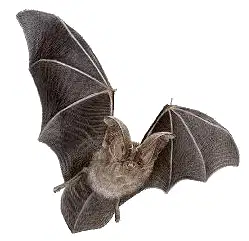
This image is a GIF image. What is the likely color mode?
a)
RGB
b)
PSD
c)
Index
d)
JPG
3.
Rachel wants to add a gradient overlay to her text that goes from pink to red to purple. What indicates each color in a gradient?
a)
tint
b)
stops
c)
windows
d)
picker
4.
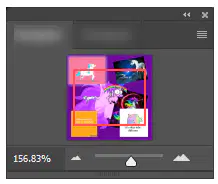
Identify this panel:
a)
History
b)
Zoom
c)
Layers
d)
Navigator
5.
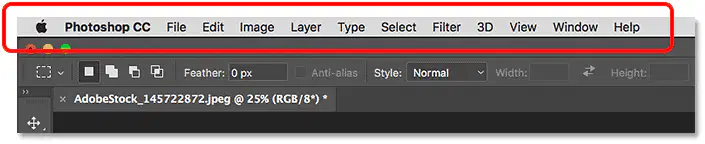
Carmen is working on a collage. She cannot find the Layers panel. Which of the menus should she use?
a)
View
b)
File
c)
Window
d)
Image
6.
All of the following below are examples of types of TRANSFORMATIONS except one. Which one is NOT?
a)
Perspective
b)
Resize
c)
Warp
d)
Stroke
7.
When zoomed in really close, which keystroke will put your screen where you can view the entire document?
a)
CTRL + 0
b)
Spacebar
c)
CTRL + Plus Sign
d)
CTRL + 2
8.
The keyboard shortcut to access the MOVE tool is:
a)
Backspace
b)
V
c)
M
d)
Spacebar
9.
This tool is used to SELECT a specific color from an image to use elsewhere in an image.
a)
Stroke
b)
Navigator
c)
Eyedropper
d)
Swatches
10.
When zoomed in really close, which tool can be used to allow you to pan around the image to view different parts close up?
a)
Move
b)
Zoom
c)
Hand
d)
Pan
11.
One of the following statements is false. Which one?
a)
Saving in JPG format will flatten an image
b)
To mirror something, you flip it horizontally
c)
The canvas is a work area behind the original image
d)
An inside stroke will appear pointy around the corners
12.
When finished creating a text box, what do you press to accept/commit the text to complete it?
a)
Press Spacebar
b)
Press Checkmark
c)
Double click it
d)
Press Enter
13.
When working with a Photoshop document, you can drag multiple images in and they will each create their own
a)
styles
b)
layers
c)
panels
14.
If the image you pulled in has a solid white background, you can accurately remove it using the
a)
color picker
b)
eyedropper
c)
canvas
d)
magic eraser
15.
However, if you Place (embed) the image instead of dragging it in or pasting it, your image will come in as a ______________, which you will have to ______________ to be able to edit or erase.
a)
smart object, rasterize
b)
transformation, export
c)
PNG, shift
16.
Once you remove the background, if you want copies, you can simply hold the _______________ key as long as your are clicked on the move tool and drag for a duplicate.
a)
spacebar
b)
shift
c)
alt
17.
Once you have multiple copies, it might be a good idea to move them into a Group or Folder on the _____________ panel to make it easier to work with.
a)
Layers
b)
Navigator
c)
History
18.
If you wanted to undo several actions, instead of pressing ctrl + z, a better option would be to go to the ______ panel.
a)
Layers
b)
Navigator
c)
History
19.

Which of the following is NOT a layer style added to the image below?
a)
Stroke
b)
Gradiently Overlay
c)
Drop Shadow
d)
Inner Glow
100 %
![QUIZ 3 : TOPIC 11 [INCOMPLETE RECORDS & SINGLE ENTRY]](https://cf.quizizz.com/image/image-loader.svg)
