
 Worksheets
Slide Into Muscles
Total questions: 37
Worksheet time: 19mins
Name
Class
Date
1.
How many muscles are in the human body?
a)
100
b)
206
c)
500+
d)
600+
2.
Select the example of Smooth Muscle
a)
Biceps Femoris
b)
Heart Muscle
c)
Calf
d)
Small Intestine
e)
Hands
3.
Where would I find Cardiac Muscle?
a)
In the brain
b)
In the heart
c)
In the stomach
d)
Attached to bones
4.
Select an example of a "upper body muscle"
a)
Quadriceps
b)
Tibalis Anterior
c)
Deltoid
d)
Small Intestine
e)
Adductors
5.
What is the definition of voluntary?
a)
"Acting on ones own free will"
b)
"Done WITHOUT consious control"
6.
What is the definition of involuntary?
a)
"Acting on ones own free will"
b)
"Done WITHOUT conscious control"
7.
Which item would be an example of an involuntary action?
a)
Running
b)
Clapping your hands
c)
Intentionally Blinking
d)
Breathing
8.
Which item would be an example of a voluntary action?
a)
Running
b)
Your heart beating
c)
Breathing
d)
Your food digesting
9.

What is this called?
a)
Tool bar
b)
Menu bar
c)
Format
d)
Google Chrome
10.

What is this called?
a)
Tool bar
b)
Menu bar
c)
Format
d)
Google Chrome
11.

Which icon will Center align my cursor?
a)
A
b)
B
c)
C
d)
D
12.
What is the shortcut for Duplicate?
a)
Ctrl + K
b)
Ctrl + C
c)
Ctrl + V
d)
Ctrl + D
13.
What is the shortcut for Link?
a)
Ctrl + K
b)
Ctrl + C
c)
Ctrl + P
d)
Ctrl + V
14.
If I want a quick way to add an image, what do I do?
a)
Save it to my drive
b)
Drag and Drop
c)
Download it
15.
If there is a document I cannot write on, what do I have to do?
a)
File: Make a copy
b)
File: Save as
c)
X out of the document
d)
Do nothing.
16.
What is the shortcut for underline?
a)
ctrl + B
b)
Ctrl + I
c)
Ctrl + U
d)
Ctrl + T
17.
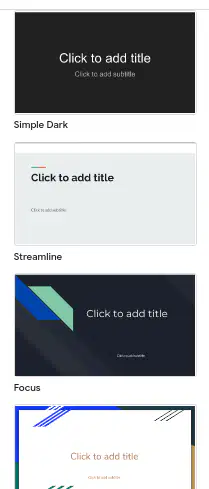
What do you have to do if you want to change the background design for the slides in a presentation?
a)
Change the background
b)
Change the transitions
c)
Change the Theme
d)
Change the layout
18.
What controls how the presentation changes from one slide to the next?
a)
Transitions
b)
Animation
c)
Layout
d)
WordArt
19.

A font that makes your words into cool shapes and sizes.
a)
Shapes
b)
Font Style
c)
Text
d)
WordArt
20.

This indicates where text and pictures can be added on a slide.
a)
Transitions
b)
Layout
c)
Animation
d)
Design
21.
This affect allows an image or shape to appear, disappear, or move on a slide.
a)
Transitions
b)
Layout
c)
Animation
d)
Design
22.
A short message at the bottom of the slide that is only visible to yourself while presenting.
a)
Speaker notes
b)
Comments
c)
WordArt
d)
Shapes
23.
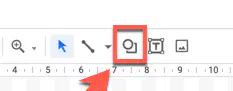
Figures or objects that can make your presentation more interesting and engaging are called?
a)
Designs
b)
Text Box
c)
Line tool
d)
Shapes
24.
Which is the logo for Google Slides?
a)
Option 1
b)
Option 2
c)
Option 3
d)
Option 4
25.

Match #1- Anterior. What muscle is the arrow pointing to
a)
Deltoid
b)
Rectus Abdominis
c)
Biceps Brachii
d)
Quadriceps
e)
Gastronemius
26.

Match #2- Anterior. What is muscle #2?
a)
Biceps Brachii
b)
Rectus Abdominis
c)
Quadriceps
d)
Gastronemius
e)
Deltoid
27.

Match #3
a)
Pectoralis major
b)
Rectus Abdominis
c)
Biceps Brachii
d)
Quadriceps
e)
Gastronemius
28.

Match #5
a)
Rectus Abdominis
b)
Biceps Brachii
c)
Quadriceps
d)
Gastronemius
e)
Deltoid
29.

Match #4
a)
Rectus Abdominis
b)
External Oblique
c)
Biceps Brachii
d)
Quadriceps
e)
Gastronemius
30.

Match #6
a)
Quadriceps
b)
Rectus Abdominis
c)
Biceps Brachii
d)
Gastronemius
e)
Deltoid
31.

Match #7
a)
Adductors
b)
Rectus Abdominis
c)
Biceps Brachii
d)
Quadriceps
e)
Gastronemius
32.
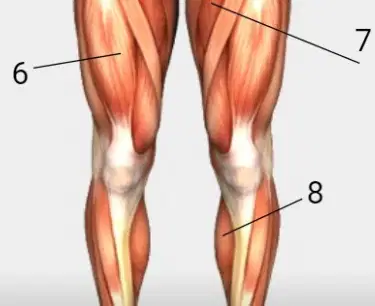
Match #8
a)
Gastronemius
b)
Rectus Abdominis
c)
Biceps Brachii
d)
Quadriceps
e)
Deltoid
33.

Name #2
a)
Trapezius
b)
Latissimus Dorsi
c)
Triceps Brachii
d)
Hamstrings
e)
Gluteus Maximus
34.
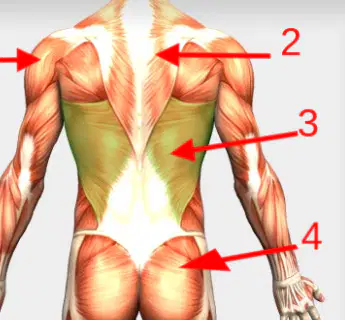
Name #4
a)
Gluteus Maximus
b)
Latissimus Dorsi
c)
Deltoid
d)
Triceps Brachii
e)
Hamstrings
35.

Name #5
a)
Hamstrings
b)
Gluteus Maximus
c)
Latissimus Dorsi
d)
Trapezius
e)
Deltoid
36.

Name #6
a)
Gastronemius
b)
Deltoid
c)
Latissimus Dorsi
d)
Trapezius
e)
Hamstrings
37.
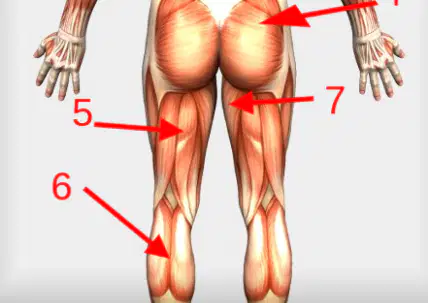
Name #7
a)
Adductors
b)
Latissimus Dorsi
c)
Trapezius
d)
Deltoid
e)
Gastronemius
100 %

