
 Worksheets
Web Design Test
Total questions: 151
Worksheet time: 3hrs 31mins
What does HTML stand for?
Hyperlink Markup Language
Hypertext Markup Language
Hyperlink Text Markup Language
Hypertext Makeup Language
What does web design refer to?
Developing mobile apps
Designing and creating websites
Writing computer code
Creating software applications
What is a tag in HTML?
A keyword enclosed in square brackets
A keyword enclosed in curly brackets
A keyword enclosed in angled brackets
A keyword enclosed in parentheses
What is an element in HTML?
An image displayed on a web page
A group of content enclosed within a pair of tags
A single line of text
A hyperlink to another webpage
What does CSS stand for?
Cascading Script Sheets
Creative Style Sheets
Computer Style Sheets
Cascading Style Sheets
What is a hyperlink in HTML?
A block of text separated from other elements
A clickable element that directs the user to another location
A visual representation displayed on a web page
A set of links that helps users navigate through different sections
What is a navigation menu in web design?
A section of a web page that contains the website's logo
A set of links that helps users navigate through different sections
A language used to describe the presentation and formatting of a document
An approach to web design that aims to create websites that adapt and adjust their layout
What is a paragraph in HTML?
A clickable element that directs the user to another location
A set of links that helps users navigate through different sections
A block of text separated from other elements
A visual representation displayed on a web page
What is a layout in web design?
A section of a web page that contains the website's logo
The language used to describe the presentation and formatting of a document
The arrangement and organization of elements on a web page
An approach to web design that aims to create websites that adapt and adjust their layout
What is a responsive design in web design?
A section of a web page that contains the website's logo
The arrangement and organization of elements on a web page
A language used to describe the presentation and formatting of a document
An approach to web design that aims to create websites that adapt and adjust their layout
What is an attribute in HTML?
A keyword enclosed in square brackets
A keyword enclosed in curly brackets
A keyword enclosed in angled brackets
Provides additional information about an HTML element
What is a header in web design?
A set of links that helps users navigate through different sections
A block of text separated from other elements
A section of a web page that contains the website's logo
A section of a web page that typically contains the website's logo
What is an image in web design?
A section of a web page that contains the website's logo
A visual representation or graphic element displayed on a web page
A set of links that helps users navigate through different sections
A block of text separated from other elements
What is a markup language?
A language used to describe the presentation and formatting of a document
An approach to web design that aims to create websites that adapt and adjust their layout
A section of a web page that typically contains the website's logo
A section of a web page that contains the website's logo
What is a web page?
A section of a web page that contains the website's logo
A block of text separated from other elements
A single page on the World Wide Web that can contain text, images, videos, and other multimedia content
A set of links that helps users navigate through different sections
What is a footer in web design?
A section of a web page that contains the website's logo
A set of links that helps users navigate through different sections
A block of text separated from other elements
A section of a web page that typically contains contact information, copyright notices, and links to privacy statements
What is JavaScript used for in web design?
It is used to add interactivity and dynamic features to websites
It is used to create the structure of a webpage
It is used to style the webpage
It is used to create the content of a webpage
What is a CSS selector?
A keyword enclosed in square brackets
A keyword enclosed in curly brackets
A keyword enclosed in angled brackets
A pattern used to select the element(s) you want to style
What is a class in CSS?
A keyword enclosed in square brackets
A selector that specifies a group of elements
A keyword enclosed in angled brackets
A keyword enclosed in curly brackets
What is a div in HTML?
A block of text separated from other elements
A keyword enclosed in square brackets
A container for other HTML elements
A keyword enclosed in curly brackets
What is a form in web design?
A section of a web page that contains the website's logo
A set of input fields where users can submit data
A language used to describe the presentation and formatting of a document
An approach to web design that aims to create websites that adapt and adjust their layout
A language used to create the structure and content of webpages.
A language used to describe the look and formatting of a document written in HTML.
A programming language used to add interactivity and dynamic features to webpages.
The process of creating and designing websites, including the layout, visuals, and user experience.
A clickable element that redirects users to another webpage or a specific location within the same webpage.
The act of writing and creating instructions for a computer to follow, usually in a programming language.
Coding
The visual elements and controls that users interact with on a webpage or application.
The arrangement of elements (text, images, buttons, etc.) on a webpage to create a visually appealing and organized design.
The unique name or address that identifies a website on the internet.

This part of the website helps you move to other pages in the website.
Navigation menu
Refresh button
Footer
Address bar

What does this button do?
Makes your window full screen
Closes your window
Scrolls down to the bottom
Takes you to the homepage

What is the area at the bottom of the website that has more information about who created that website?
back arrow
header
minimize button
footer

What does this button do?
Takes you back to the webpage you were on before
Reloads the page
Hides the window that you are using in the task bar
Makes the window full screen

What do we call the narrow column right next to your website's content?
Sidebar
Footer
Content
Navigation menu

What does the refresh button do?
It closes your window.
It hides your window.
It reloads your page.
It takes you back to the page you were on before.

This space at the top of the page contains the URL, or web address, for the website.
Address bar
Header
Navigation menu
Content

What does this button do?
It reloads the page.
It takes you back to the page you were on before.
It makes your window full screen.
It closes your window.
What do we call the main important information that the website provides?
sidebar
content
homepage
footer

What does this button do?
Hides your window in the task bar
Reloads your page
Closes your window
Makes your window fill up the screen

What do we call the main page of the website?
homepage
header
navigation menu
content

At the top of the website, this part usually includes the website's title, logo, and navigation menu.
content
sidebar
header
footer
What is the common URL ending for U.S. government-related websites?
(a)
.com
.org
.net
What type of information can generally be trusted on U.S. government-related websites?
Opinions and editorials
Credible statistical information and articles on many different topics
Entertainment and celebrity gossip
Product advertisements and sales
What is the domain ending commonly used by organizations?
.com
.net
.org
.gov
What type of organizations typically use the ".org" domain?
(a)
Commercial businesses
Government agencies
Personal blogs
What can be inferred about the credibility of information provided by websites with a ".org" domain, as per the image?
They always provide credible information.
They never provide credible information.
They sometimes provide credible information.
The image does not comment on credibility.
Which type of websites may not always be completely unbiased because they are trying to promote their institutions?
(a)
Websites ending in .gov
Websites ending in .org
Websites ending in .com, .biz, and .net
What website does what?
What type of websites are typically associated with colleges and universities?
.edu
Websites associated with companies and trying to sell products
.biz or .com
Website that provides statistical information, articles, and government news
.gov
Which domain name is often used by non-profit organizations?
.org
Match the terms to their definitions.
_ : The article provided credible information from reliable sources.
credible
_ : not favoring one side over another; fair and impartial
unbiased
_ : to publicly support or recommend a particular cause or policy
advocate
_ : relating to or using statistics
statistical
_ : the buying and selling of goods and services over the internet
ecommerce
Have you ever encountered a website that seemed credible but turned out to be unreliable? Describe your experience and what you learned from it.

The URL and the web address are one in the same.
True
False


The purpose of a website can be almost anything. What are some examples? Choose ALL the examples that apply.
a news platform
forum for sharing pictures
an educational site
advertisement
Online library
True or False: Even wireless connections like Wi-Fi and 3G/4G rely on these physical cables to access the Internet.
True
False
True or False. When you visit a website, your computer sends a request over these wires to a server.
True
False
What's the code or language that web browsers use to display web pages?
HTML
LAN
URL
World Wide Web
Which of the following is part of a Web site address on the World Wide Web?
Domain name
Browser window
Direction
ZIP code
What does HTTP stand for?
Hyper text true part
Hyper test transfer property
Hyper text transfer protocol
Hype text telling parts
What does HTML stand for?
Hyper text markup language
Hyper text transfer protocol
Hyper text machine language
Hyper text matrix language
What does ISP stand for?
Intranet system protocol
Internet Service provider
Internet system provider
In-service system party
What does URL stand for?
Uniform reference list
Universal rate language
Uniform Resource Locator
Universal reform locator
What does WWW stand for?
Wide Wan Work
Website World Work
Web wide wworld
World wide web
What is a browser?
An application used to access websites.
world wide web
internet service provider
a hangout
What is an IP address
an application
internet service provider
House address
a unique string of numbers that identifies each computer device
What does download mean?
downplay music
internet connectivity
copy data from one computer system to another over the internet
firestick
What is a website?
a set of related web pages located under a single domain name.
browser
search engine
What is email?
letters
notes
electronic mail
social media
True or False. One of the first steps in creating a website is defining the purpsoe of the website.
True
False
Which of the following are examples of how you can identify your target audience?
Age
Gender
Shoe size
The last thing you ate
Location
_________________________is the part of the internet URL selected and registered by an individual, bsuiness, or organization to represent their web presence.
Snapchat name
Domain name
Party name
Legal name
What possible fees can you incur when maintaining a website?
web hosting fees
domain registration
social media surcharge
URL fee
What does SEO stand for?
Standard email optimization
State engine organization
Search engine optimization
Starter ergonomics optimization
Wix.com is an example of __________________
Photoediting software
Text editor
Social media builder
A website builder
Advantages of using an online website builder include:
Time consuming
Very expensive
Low cost
Easy to learn
Disadvantages of using free hosting include:
advertising banners
free suppport
limited features
allows domain naming
no domain hosting

what is this social media app
insagram
snapchat
tiktok

what is this social media app
foot locker
amazon
nike

what is this social media app
snapchat
tiktok

what is this social media app
nike
instgram
amazon

which is not on this app
clothes
bags
sun glasses
food

what is this app
snapchat
amazon
none

what is this app
foot locker
nike
under armor
all

which one of these is not on this app
pictures
following people
looking at people story
emojis

what is this app
shein
snapchat
sendit
foot locker
Social Media has had a large impact on our day to day lives.
True
False
Social Media started with email back in the 70s.
True
False
Which social media site exploded in popularity in the 2000s and the 2010s and was invented by a college student?
MySpace
Youtube
Which social media site uses video as it primary means of engaging the audience?
Youtube
Yelp!
Which social media site is often used by professonals?
LinkdIn
Whatsup
MySpace
Which social media sites have had issues in the past with security?
MySpace
Youtube
There can be consequences if social media is misused.
True
False
what is the most commonly used social media?


Which picture is the Skype?


Google Plus
Orkut

Skype
Telegram

Picassa

Info Jobs

Youtube
Vimeo
Hd Videos

Messenger
Snapchat

thumbr
meebo

spotify
google music
sondfast

Tik-Tok
What is digital etiquette?
Making the most of your time online
Learning new technological skills
Being thoughtful and clear online
When should you use etiquette?
When you are interacting with other people.
Just whenever you feel like it
You should put your cell phone away in which of these situations?
In a theater watching a movie
When you are hanging out at home
When someone is speaking to or with you
When you want to text someone a grumpy insult
When texting, posting or writing email, using ALL CAPS means
Whatever you're writing is very important.
You are shouting rudely.
You are not a very good keyboarder.
Which three of these is good practice when writing email
Be concise
Abbreviate and scatter emojis everywhere
Use best grammar and punctuation
Include a subject line
There are people, called trolls, whose intention online is to
Promote poor hygiene
Start arguments and create negative atmospheres
When you post a photo online, you should consider which two things
How others in the photo will fell about having their photo go public
Whether or not it's a good-hair day
How you are presenting yourself to others, both now and in the future
Future colleges and employers can, and probably will, look at your digital history.
Yes, so remember to present yourself in a positive way.
Who cares? Why should they care if I've exhibited very poor judgement in the past.
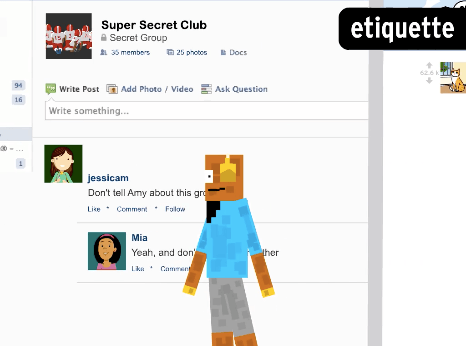
Posting something on social media is most like:
Passing a note to a classmate.
Giving a public speech.
Writing in a diary.
Calling a friend.

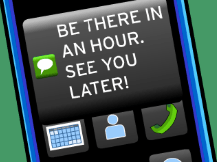
What's the best way to text your mom to tell her you'll be an hour late for dinner?
A
B
C
D

What should Moby do before posting a photo of Tim online?
Tag Tim in the photo
Send the photo to Tim
Share the photo with Tim's friends
Ask Tim for permission

What is one difference between online and face-to-face communication?
People tend to be more honest online
Miscommunications happen more frequently face to face
Online, you can't tell tone of voice
Body language is more important in online communication
What's the best text to tell your parent that you'll be an hour late for dinner?



A _________ is a type of Software that allows you to access the internet
Operating System
Network
Video File
Web Browser
Most of the time, you will move through the internet by clicking on...
Links
Folders
Tabs
Keywords
How do you open a link in a new tab or window?
Left Click on Link
Right Click on Link
Select New Tab Button
Double Click on the Link
A URL is like a...
Phone number
Address
Website
Binary Number
Scheme
The first part of a URL. Such as HTTP:
Domain Name
The internet address for your website. Such as Google
File Path
Refers to the exact location of a page, post, file, or other asset
Top Level Domain
to the last segment of a domain name, or the part that follows immediately after the "dot" symbol.
What do you want to be when you grow up?
I have no idea.
Something medical (think nurse, doctor, EMS, CNA, psychologist, etc.).
Something working with my hands (think automotive, electrical, welding, HVAC, etc.).
Something working in an office (think business, accounting, lawyer, engineering, computers, etc.).
Something not listed here.
How sure do you feel about your future career option?


Match the following outcomes with the program.
College Transfer Pathway
Credits that transfer to a 4-Year institution
Career and Technical Education
Credential, certificate or diploma that lead into our 2- year programs
Workforce Continuing Education
Certificates that make you eligible to begin work right out of high school
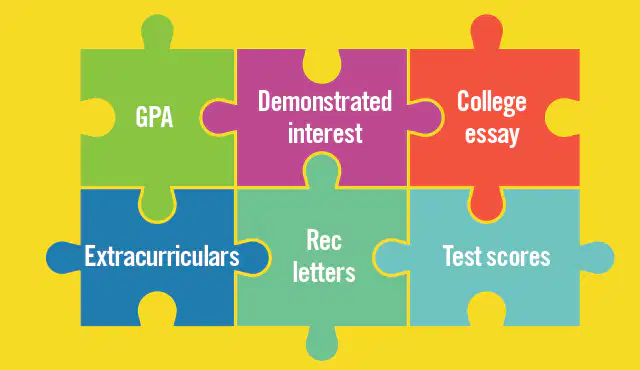
What is a strategic approach to selecting colleges to apply to?
Applying to every college in your state
Researching colleges that align with your academic and career goals
Choosing colleges based solely on their extracurricular programs
Put the following in order from LEAST expensive to MOST expensive, assuming you have NO financial aid awarded:
Community College (ex. Harper or Elgin Community College)
In-state public university (ex. Illinois State University or University of Illinois Chicago-UIC)
Out-of-state public university ( ex. Western Michigan University or Iowa State)
A private university (ex. Northwestern or Columbia)

