
 Worksheets
MS Word Basics Quiz
Total questions: 33
Worksheet time: 1hrs 29mins
The (a) option of the file tab helps you save a file in a different name.
(a) is the large white space to type text.
To open a document, select the (a) option from the file tab.
To save a document, select the (a) option from the file tab.
To close a document, select the (a) option from the file tab.
To print a document, select the print option from the (a) tab.
To open an existing document. ___________________________
ctrl + c
ctrl + n
ctrl + s
ctrl + o
To save a document. ___________________________
ctrl + c
ctrl + n
ctrl + s
ctrl + o
To copy a part of document. ___________________________
ctrl + c
ctrl + n
ctrl + s
ctrl + o
To create a new document. ___________________________
ctrl + c
ctrl + n
ctrl + s
ctrl + o
To select the entire document. ___________________________
ctrl + c
ctrl + a
ctrl + s
ctrl + p
To print a document. ___________________________
ctrl + c
ctrl + a
ctrl + s
ctrl + p
To print a document. ___________________________
ctrl + c
ctrl + a
ctrl + s
ctrl + w
Where we can save the document
quick access
status bar
Where do you see the page number
quick access
status bar
Where do you see the name of document
title bar
status bar
What is found in quick access bar
save
open
undo
redo
What is in the upper left corner
File tab
title bar
status bar
Where is the Close button
top right corner
top left corner
Where is the title bar
top middle
bottom middle
Where do you type text in MS WORD
(a)
The small blinking line on the document area.
(a)
Where do you find tabs and group
(a)
What are the different parts of the ribbon?_________ and _______
(a)
MS word is a word processor
true
false
MS paint is a word processor
true
false
(a) helps you to type text on a computer
what are the word processors from the following
MS Paint
MS word
OpenOffice Writer
OfficeOpen Writer
Wordpad

what is this
maximize
open
minimize
close
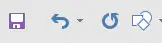
what is this
quick access
status bar
title bar
close

what is this
open
save
how to make margins in document
(a)

what is this symbol for
Maximize
Minimize

