
 Worksheets
How to Create a Timeline in Microsoft Project
Total questions: 72
Worksheet time: 1hrs 12mins
In Microsoft Project 2016, what is the first step to build a basic project timeline when no template is provided?
Create a Task List by entering tasks under Task Name
Turn on the built-in Timeline template in Project Options
Enable automatic task generation from Outlook
Import a schedule from Excel before adding tasks
According to the tutorial, which version feature makes Microsoft Project 2016 more robust compared with earlier releases?
A built-in Timeline template for all projects
A handy search tool called Tell Me for finding features
Automatic vendor contact management
Exclusive file format incompatible with 2010/2013
When creating the task list, what guidance is given about ordering tasks?
Enter tasks alphabetically for easier lookup
Prioritize tasks in the order they need to be completed
Sort tasks by responsible resource first
Group tasks by duration length

Which action adds a new task name to your project when starting from a blank file?
Open Microsoft Project, click Blank Project, and type in a cell under Task Name
Create a new calendar and assign it to a resource
Switch to the Report tab and insert a chart
Right‑click the Gantt chart bars and choose New Task
What is the correct procedure to enter start and finish dates for a task so that duration is calculated automatically?
Type dates into Notes and let Project infer duration
Click the Start cell to select a date, then tab to the Finish cell and enter the end date
Enter duration first and Project fills Start/Finish with today's date
Use the Predecessors column only; dates are not entered manually
What appears when you click the down arrow in a Start or Finish cell while entering dates?
A resource allocation dialog
A calendar you can use to select a date
A predecessor linking wizard
A baseline variance report
As you add Start and Finish dates, what visual change occurs in the right‑hand pane?
Milestone diamonds are hidden
Bar charts are added to the timeline
Critical path turns red automatically
Resource histogram displays by default
Which tab must you click before adding tasks to the Timeline bar above the task list?
Task tab
View tab
Project tab
Format tab
After switching to the required tab, how do you add a task to the Timeline?
Drag the task bar into the Timeline pane
Right‑click a Task cell and choose Add to Timeline
Enable Timeline template and tasks populate automatically
Enter the task name directly into the Timeline bar
Which column shows the automatically calculated amount of time after Start and Finish dates are entered?
Predecessors
Duration
Task Mode
Resource Names
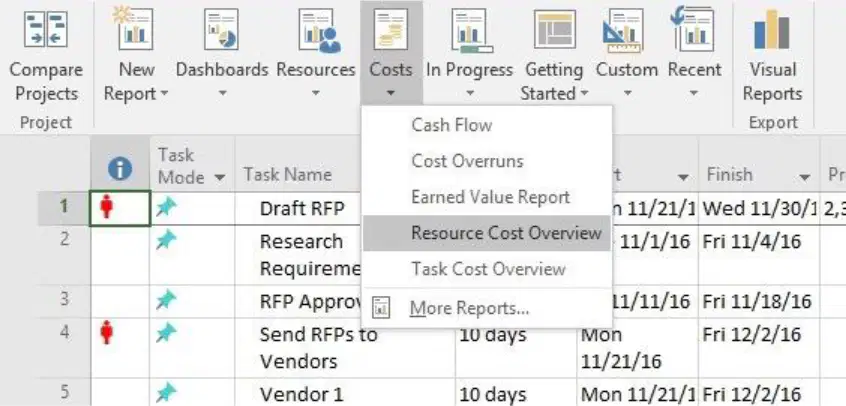
Within the Report tab, how do you run the Resource Cost Overview specifically?
Click Visual Reports and choose Cash Flow
Click Costs dropdown and select Resource Cost Overview
Click In Progress and choose Earned Value Report
Click Dashboards and select Task Cost Overview

If the scheduling options set Auto scheduled tasks scheduled on: Manually Scheduled, what is the practical implication for newly auto scheduled tasks?
They will respect calendar defaults but not constraints
They will be converted to fixed units automatically
They will honor manual dates rather than recalculating automatically
They will be split into in-progress segments by default
According to the instructions, what is the primary purpose of tracking tasks in Microsoft Project?
To determine if tasks are on time or behind schedule
To automatically assign resources to tasks
To export the Gantt chart to Excel
To lock the project so no changes can be made
Which tab should you click to see task options and mark a task as on track?
Resource tab
Task tab
View tab
Report tab
Where is the Mark on Track button located when updating a task’s status?
In the Quick Access Toolbar
In the ribbon after selecting the Task tab
Inside the Update Tasks dialog box
In the Gantt chart’s right-click menu
Which predetermined percentages can be used to denote task progress directly from the ribbon?
10%, 30%, 60%, 90%
0%, 25%, 50%, 75%, 100%
5%, 20%, 40%, 80%, 100%
0%, 20%, 40%, 60%, 80%
What immediate visual change appears on the Gantt chart when a predetermined percentage is applied to a task?
The task bar color changes to red
A line is drawn through the corresponding task bar indicating completion amount
The task bar disappears until refreshed
A pop-up notes are added to the task

Which action should you take to update a task that has fallen behind or finished early?
Delete and recreate the task
Open Project Options
Click the down arrow next to Mark on Track and choose Update Tasks
Switch to the Report tab and print the status

When using Update Tasks, what types of changes can you make in the dialog box?
Only change resource assignments
Update status and change start and end dates
Export the task to CSV
Enable baseline tracking only
In the Update Tasks dialog, which field directly indicates progress as a fraction of completion?
Actual work
% Complete
Remaining duration
Predecessors

If you want to quickly mark the selected tasks as half complete, which ribbon control should you use?
Respect Links
50% Complete button among predetermined percentages
Inactivate
Manage Tasks pane
Why is keeping task status updated throughout the project important?
It enables accurate monitoring of schedule performance
It automatically increases standard rates
It disables manual scheduling
It merges multiple projects into one
Which view is the default view in MS-Project 2016 and divides the window into a task table and a time scale?
Network Diagram view
Calendar view
Gantt Chart view
Task Usage view
In MS-Project 2016, what does the task table (left area) primarily list according to the description?
Project tasks with their accompanying information
Only resource names and costs
Milestones without dates
Baseline snapshots only
What do the task bars in the time scale area of the Gantt Chart view show?
Actual costs by resource
Duration from planned start to planned finish dates
Team communication history
Risk severity levels
Which UI elements are highlighted as part of MS-Project 2016’s interface making it familiar to MS-Office users?
Command Line and Macros pane
Ribbon, Quick Access toolbar, Backstage view, and context-sensitive menus
Only classic menus without toolbars
Touch-only navigation with gesture controls

According to Figure C.1, which control lets you quickly switch between views at the bottom of the window?
Zoom Slider
View Shortcut
Timeline Toggle
Calendar Picker
When starting MS-Project 2016 to create a new project, which action opens a blank project from the Start screen?
Select Import Existing Plan
Click Blank Project in the right pane
Choose New from the Help menu
Open Calendar and add a task
By default, what start date does MS-Project 2016 use for a new project before you change it?
The earliest task’s start date
The current system date
The first day of the fiscal year
No date until tasks are entered
Which sequence correctly navigates to set the project start date to 1st of August 2018?
File tab > Options > Schedule > Start Date
Project tab > Project Information > Start Date field and calendar pick > OK
Resource tab > Change Working Time > Start Date field > Apply
View tab > Tables > Entry > Start Date column > Save
What primary purpose does MS-Project 2016 serve according to the introduction?
Graphic design for marketing campaigns
Assisting managers to effectively manage projects by simplifying tasks like linking, assigning, and scheduling
Financial accounting and tax filing
Customer relationship management and ticketing
In the Gantt Chart view, what happens when you move the separator bar between the time scale and task table?
It deletes tasks from the table
It zooms the timeline automatically
It displays more of either the time scale or the task table area
It opens the Project Information dialog
In MS-Project 2016, what visual icon indicates a manually scheduled task in the Task Mode field?
A push pin icon
A calendar icon
A stopwatch icon
A chain link icon
Which units can be used to enter task duration when manually scheduling in MS-Project 2016? Select the best answer.
Only days (d)
Months (mo), weeks (w), days (d), hours (h), or minutes (m)
Only hours (h) and minutes (m)
Weeks (w) and days (d) only
By default, how are new tasks initially scheduled when you start a project in MS-Project 2016?
Automatically scheduled with fixed dates
Manually scheduled, allowing full control of duration and dates
Unscheduled until constraints are added
Auto-scheduled with a 3-day estimate

When you change the project Start date in the Project Information dialog box, where is this change reflected?
Only in the Resource Sheet
In the Network Diagram view
In the time scale of the Gantt Chart view
Only in the Task Usage view
While creating a manually scheduled task, you enter Start as 1st Aug 2018 and Duration as 1w. What will MS-Project 2016 do next?
Leave Finish blank until you enter it manually
Automatically fill the Finish field and draw a task bar for the timeframe
Convert the task to auto-scheduled
Prompt to add resource assignments before calculating dates
Which statement best describes automatically scheduled tasks in MS-Project 2016?
Dates and durations are fixed by the user and never recalculated
Project automatically calculates dates and durations and marks them with a Gantt-bar icon in Task Mode
Auto-scheduled tasks cannot be linked
Auto-scheduled tasks always use a 3-day default
When you switch a task’s Task Mode to Auto Scheduled, what default duration does MS-Project 2016 assign before you confirm the data?
0 days
1 day (with “?” indicating an estimate)
3 days
1 week
After setting a task to Auto Scheduled, you change the Duration to 1d. What happens to the dates?
Start and Finish must be retyped; no recalculation occurs
Project recalculates the Finish date and updates the Finish field
Only the Start date updates; Finish remains the same
The task converts to manual scheduling
According to the instructions, which sequence of task names includes auto-scheduled tasks followed by a manual task?
Install Cabinet; Finish Electrical; Install Appliance
Carpentry Pick Up; Install Appliance; Finish Electrical (manual)
Finish Tub, Wall; Install Cabinet; Carpentry Pick Up
Install Appliance; Carpentry Pick Up; Install Cabinet
What is the default task relationship created by MS-Project 2016 when linking tasks?
Start-to-start: both tasks begin together
Finish-to-start: the first task must finish before the second starts
Finish-to-finish: both tasks finish at the same time
Start-to-finish: the second task finishes when the first starts
Which action allows you to change a task from manual scheduling to automatic scheduling (or vice versa) at any point during a project?
Open Project Information and edit the Calendar
Change the Task Mode field for the task
Modify the Resource Sheet to trigger recalculation
Insert a constraint in the Predecessors column
A project begins with limited information and macro-level planning. Which scheduling approach can be handy at that time?
Automatic scheduling to enforce calculated dates
Manual scheduling to control duration and set tentative dates
Resource leveling to adjust assignments
Critical path compression to reduce duration
In MS-Project 2016, what is the primary purpose of inserting a summary task when organizing project work?
To automatically link all tasks with finish-to-start relationships
To group related tasks under a bold, outdented heading with subtasks indented beneath
To convert manually scheduled tasks into automatically scheduled tasks
To lock task dates so they cannot be adjusted by dependencies
Which ribbon path contains the command used to insert a summary task in MS-Project 2016?
Task tab > Insert group > Insert Summary Task
Project tab > Schedule group > Link Selected Tasks
Resource tab > Properties group > Task Information
View tab > Gantt Chart group > Add to Timeline
When you insert a summary task with existing tasks selected, what immediate change happens to those tasks according to the instructions?
They are deleted from the plan
They become milestones under the summary task
They turn into subtasks beneath the newly created summary task
They are set to 100% complete
After inserting a new summary task, which placeholder text initially populates its Task Name field before you rename it?
According to the update procedure, what numeric range can be entered in the Percent complete box to indicate task progress?
1% to 99%
0% to 50%
0% to 100%
25% to 100%
Which action opens the Task Information dialog box to update percent complete for a specific activity (e.g., Finish Tub, Wall)?
Right-click the task and choose Notes
Double-click the task name in the Task Name column
Select the task and press Ctrl+I
Click the Milestone button on the Task tab
Where is the Percent complete field located when updating a task’s progress through the Task Information dialog?
On the Predecessors tab
On the General tab
On the Resources tab
On the Advanced tab
What visual indicator appears in the time scale after entering a percent complete value and clicking OK?
A blue milestone diamond replaces the task bar
A progress bar is added within the task bar to show completion
The task bar turns red to indicate risk
A calendar icon appears next to the task name
Which quick-update buttons are available on the ribbon for setting task completion without opening the Task Information dialog?
0%, 25%, 50%, 75%, and 100% complete
10%, 20%, 40%, 60%, and 80% complete
10%, 30%, 60%, and 90% complete
5%, 25%, 50%, and 95% complete
When organizing tasks under a summary task, how are the summary and its subtasks visually formatted by default?
Summary tasks are italicized and subtasks are bold
Summary tasks are bold and outdented; subtasks are indented beneath them
Both summary and subtasks are underlined
Subtasks are outdented while summary tasks are indented
In MS Project 2016, which resource type best represents people or machinery assigned to tasks that incur an hourly cost?
Material resource
Work resource
Cost resource
Generic resource
You are adding a resource named Graham in the Resource Sheet. Which field must be set to ensure he is treated as a person whose time can be scheduled?
Type set to Work
Material set to Steel
Cost Accrual set to Start
Units set to 0%
According to the instructions, what hourly rate should you enter in the Std. Rate field for the Electricians group when adding Graham?
$15
$20
$25
$30
When adding the second resource, John, which group and standard rate should be associated with him?
Electricians; Std Rate $20
Carpenters; Std Rate $30
Plumbers; Std Rate $25
Painters; Std Rate $18
Which sequence correctly opens the dialog to change a resource’s work hours in MS Project 2016?
Open Task Information > Advanced tab > Calendar
Double-click resource name > General tab > Change Working Time
Right-click the task > Information > Resources
File menu > Options > Schedule
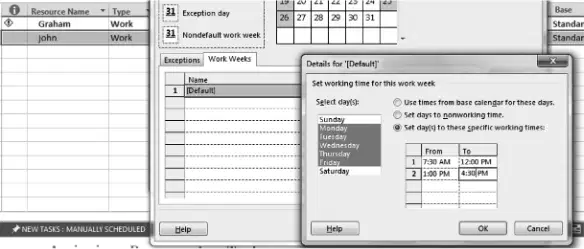
To set Monday through Friday to specific working times for John, which option must be selected in the Details for "[Default]" dialog?
Use times from base calendar
Set days to nonworking time
Set day(s) to these specific working times
Override resource calendar with project calendar
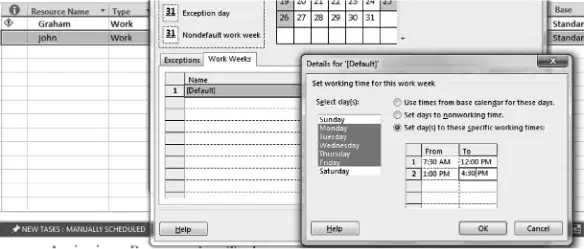
After selecting Monday through Friday, what From and To times should be entered to reflect John’s schedule?
8:00 AM to 5:00 PM
7:30 AM to 4:30 PM
9:00 AM to 6:00 PM
7:00 AM to 3:00 PM
What is the primary purpose of adding resources to your project before assigning them to tasks?
To automatically complete tasks without scheduling
To make them available for assignment to tasks within the project
To lock the project calendar from changes
To convert cost resources into materials
In MS Project 2016, which action switches the view to Gantt Chart before assigning a resource to a task?
Click Gantt Chart on the View tab in the Task Views group
Open Task Details Form from the Resource tab
Choose Timeline on the View tab under Zoom
Enable Network Diagram from the Report tab
When assigning a single resource in the task table, where do you click to select and check the resource name?
In the Resource Names field of the relevant task
In the Duration field of the task
In the Task Name column header
In the Indicators column to open the dialog
While assigning Graham to the Finish Electrical task, what is the correct step to confirm the assignment using the drop-down list?
Click the down arrow in Resource Names and check the box next to Graham
Type Graham in the Notes field and press Enter
Right-click the task and choose Mark on Track
Open Assign Resources and set Graham’s Max Units to 0%
What should you do if the Resource Names column is not visible in the task table while preparing to assign a resource?
Use the scroll bar or move the separator between the Gantt-chart area and the task table to display it
Switch to Calendar view and back to Gantt Chart
Run a report to refresh the table
Delete and reinsert the task to reveal the column
According to the note in Figure C.14, what does a burning man (red person) icon in the Indicators field signify?
The resource is overallocated
The task is on the critical path
The task has a deadline
The task contains a hyperlink
What is the primary purpose of assigning multiple resources to a single task in MS Project 2016?
To reduce the amount of time needed to complete the task
To increase the task’s baseline cost automatically
To lock the task against rescheduling
To prevent resource leveling from changing assignments
Which Ribbon tab and group contain the Assign Resources button used to add multiple resources to a task?
Resource tab, Assignments group
View tab, Task Views group
Task tab, Schedule group
Project tab, Properties group
What is the correct sequence to assign multiple resources using the Assign Resources dialog for the Install Appliance task?
Select the task, open Assign Resources, choose Graham and click Assign, then choose John and click Assign, and finally click Close
Open Task Information, set constraint type, then add Graham and John in Notes, click OK
Select John in Resource Sheet, set Max Units, then link tasks, and click Close
Switch to Network Diagram, select Graham and John, and click Auto Schedule
Where in the Assign Resources dialog do you select the people to add to the task?
In the Resource Name column of the dialog
In the Task Name column of the Gantt table
In the Indicators field of the task row
In the Duration box of Task Information
Which step explicitly closes the Assign Resources dialog after adding Graham and John to the task?
Click the Close button
Press F9 to recalculate
Open Task Details Form
Turn on Manual Scheduling

