
NEW
Font size
 Worksheets
Design exam preparation
Total questions: 27
Worksheet time: 14mins
What software do we use to create 3D Objects
Photoshop
Tinkercad
Code.org
Google classroom
What button do we use on the mouse to rotate the workplane?
Left click
Right click
Spacebar
Delete
What is the correct name for the tube shape?
Tubey
Cylinder
Cube
Box
What is the shortcut for Undo on the Keyboard?
Ctrl + Z
Ctrl + V
Ctrl + y
Ctrl + C
How do you zoom in on Tinkercad?
Spacebar
arrows
scroll wheel on mouse
send an invite
Which of these are common to all computers?
Input
Storage
Output
Process
All of the responses
In which century did computers begin to use electrical components?
21st Century
18th Century
19th Century
20th century
Computers do not use electrical components.
What can you use to input data into a computer with?
Mouse
Camera
Keyboard
Microphone
All of the responses
An algorithm is ?
An ancient african music
a series of commands
a digital device
type of computer
a calculator
Output can be in the form of?
Video
Sound
Virtual reality
images
all of the responses.
Pair programming is
Watching two programs at the same time
A program about fruit
Two people writing code
Writing code for two programs at the same time
All of the responses
What are the roles in pair programming ?
Captain and first mate
Navigator and captain
Driver and passenger
Navigator and driver
In pair programming the person writing the code is called?
Author
Coder
Driver
Captain
Boss
In pair programming the person thinking about the “big picture” is called?
Thinker
Navigator
Brains
Big picture dude
Pair programming can help
a. Find errors you might miss
b.Suggest improvements
c.Decide on a target audience
B and C
A and B
When pair programming it is good practise to
a. Accept feedback
b. Switch roles
c. Take breaks often
a and b
b and c
In which of the following stages of the development process is a team MOST likely to interview a potential user of an app?
investigating and reflecting
designing
prototyping
testing
coding
Which of the following best describes the purpose of a design specification?
Tracking errors that arise through user testing
Documenting comments that will need to be added to a program.
Describing the requirements for how a program will work or users will interact with it
Listing detailed questions that will be asked of users during interviews
Evaluating the success of the app

What will the "background-color" of the "topButton" be when the program is finished running?
Red
Orange
Blue
Green
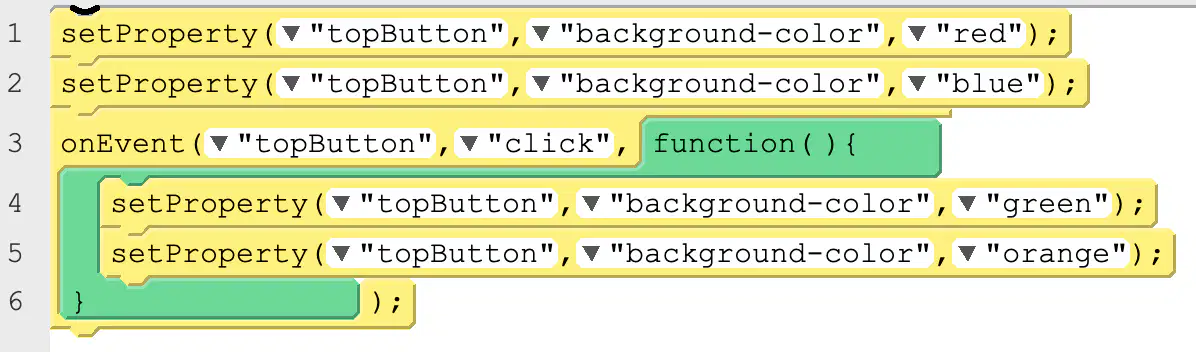
If the user does NOT click the button what color will "topButton" be when this program finishes running?
blue
green
orange
red
purple

The following program is run. Then the user clicks the "topButton" button ONCE. What will be displayed in the console?
cat bird dog
dog cat bird
cat dog bird
bird cat dog
cat cat cat

The following program is run. Then the user clicks the “bottomButton” ONCE and then clicks the “topButton” ONCE. What will be displayed in the console?
chicken pig cow
cow pig chicken
pig chicken cow
pig chicken
old Mac Donald
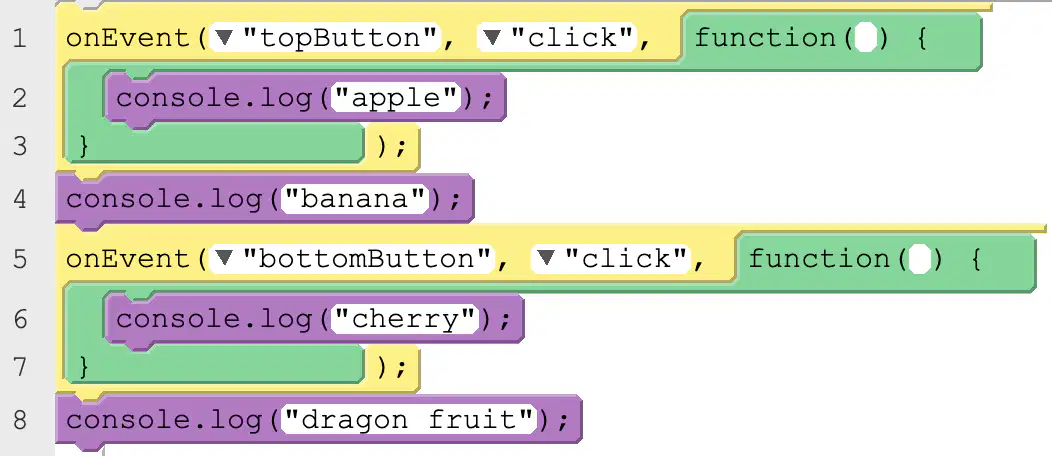
The following program is run. Then the user clicks the “bottomButton” TWO TIMES. What will be displayed in the console?
apple banana cherry cherry dragon fruit.
banana dragon fruit cherry cherry
banana cherry apple cherry dragon fruit.
cherry chery apple banana dragon fruit.

Which line of code in this program is MOST likely to result in an error?
1
2
3
4
There will be no error.
Which of the following BEST describes the differences between sequential and event-driven programming?
In sequential programming commands run one at a time. In event-driven programming all commands run at the same time.
In sequential programming commands run faster than in event-driven programming.
In sequential programming each command is run many times in sequence. In event-driven programming all commands are run a single time as an event.
In sequential programming commands run in the order they are written. In event-driven programming some commands run in response to user interactions or other events
Which of the following is NOT a reason to include comments in programs
Comments help the computer decide whether certain components of a program are important.
Comments help programmers debug issues in their own code
Comments help document how code was written for other programmers to use
Comments enable programmers to track their work throughout the development process
Comments are not useful.
The Code section of App Lab does not contains this UI controls:
data
control
variables
volume

