
 Worksheets
QBA 1720 Exam 1 Review
Total questions: 57
Worksheet time: 57mins
Why should we take the time to format spreadsheets?
It helps communicate the data more clearly
It makes the work look more professional
Both of these are good reasons
How do you know how to format a spreadsheet in the “real world?”
You’ll need to create or conform to the specific standards for an individual company or industry
You can choose whatever you want for the spreadsheet formatting or do not format at all; its optional
The colors and fonts used in this class are standard for almost every business in the US
What should be typed first to indicate that you are creating a formula or function?
(a)
What is the difference between a formula and function?
a function is a built-in formula
a formula is a built-in function
they are exactly the same
What is syntax?
The process of copying formulas down a column
The error message that pops up when you have an error in a formula
The prompts Excel gives you regarding what inputs to use in a function
1. The syntax for the SUM function looks like this: =SUM(number1, [number2],…) What is this syntax telling you?
Type the values from all the cells you want; Excel does the rest
Only two cells can be added together using the SUM function
Select all cells you want to add together and close with a parenthesis
How is the ROUND function different from using the decrease decimal button?
They're not different; they do the same thing
The round function actually removes extra digits; the decrease button only hides extra decimal places from view
The round function always rounds to the nearest whole number; the decrease button shows one decimal place
If you create a formula in this tab that refers to a cell in the 1 Formatting tab, how would that tab name appear in the formula?
**1 Formatting**
"Formatting"
'1 Formatting'!
What portion of this formula should be calculated first?
Y = (X + CD) + D^2 * X + C
D^2
X + CD
X + C
True or False: Qualitative values are measurable, numeric values
True
False
What is the purpose of creating an absolute reference to a cell in a formula?
To ensure when your formula is copied that the value in the same exact cell is used for each copied formula
To ensure that the formula refers to the next consecutive cell value depending on how the formula is copied
To ensure that the value in the referenced cell can never be changed
What symbol indicates a lock in your formula
(a)
Which of the following is an example of qualitative data?
Letter grade
Grade percentage
Credit hours taken
True or False: You use a mixture of absolute and relative references in a single formula
True
False
If you wanted to lock your reference to cell D2 in a formula to copy that formula across a row, what should it look like?
(a)
If you wanted to lock your reference to cell D7 in a formula and copy that formula down a column, what should it look like?
(a)
You have a table of students' genders and exam grades. In which scenario would you use an "IF(AND)" function?
Find the female students who earned at least a 75% on their exam
Find the students who earned at least a 75% on their exam
Find the students who were female or earned at least a 75% on their exam
What would the output be if the logical test in the following statement was true? =IF(C4>50, "Doh!", "Nailed It!")
(a)
What would the output be if the logical test in the following statement was false? =IF(C4>D8, "Red", "Blue")
(a)
Given this syntax: IF(Logical_Test, Value_If_True, Value_If_False) what would be an example of a "Logical_Test"
C4 + B5
C4<=B5
Both of these
What is the purpose of binary encoding ?
To change data into a form that makes it harder to understand
To turn quantitative data into qualitative data
To turn qualitative data into values that can be analyzed using advanced statistical analysis
What is the purpose of the match functions in the Index (Match, Match) function?
To find the row and column numbers
To find the row numbers only
To find the column numbers only
What is the purpose of the Index function in the Index (Match, Match) function?
To find all row values
To find all column values
To find the value of the cell where the row and column numbers intersect
In the Index function syntax. = Index (array, row_number, col_number) what does "array" mean?
The lookup value or key
All of the data cells in the table
The sum of the row number and column number
What is the output of a match function?
The value in a certain cell
A row or column number
The heading of a column or row
In function syntax, what do square brackets mean?
Ex: = SUM(number1, [number2],…)
Ex: = MATCH(lookup_value, lookup_array, [match_type])
That portion of the function is required
That portion of the function is also part of another function
That portion of the function is optional
We always include the [match_type] argument in a Match function, even though it is optional. Why?
We need an exact match
It is considered good form to specify all function arguments even if they are optional
Recursive considerations of legitimate form require it
1. Why do some cell references get locked and some do not?
Because we're copying the formulas down a column instead of across a row
Because references to variables should shift in the direction a formula is copied (down a column or over a row), while constants should not
Because you have to lock all references in a formula
Why do we compare the highest pay first when finding the Levels with an IFS statement?
Because you're using an IFS statement; IFS functions always start by comparing the highest value.
Because IFS statements stop at the first true condition; if you're looking at minimums and you compare the lowest minimum first, all values would be greater than the lowest minimum.
Because you're looking at quantitative variables; when comparing quantitative variables you always start with the highest comparison value.
When looking to see if at least one condition is true, which function should you use?
(a)
What could be used for the "value_if_true" according to the syntax of an IF statement?
A number
Text
A formula
any of these could be used
Which part(s) of an index (match, match) function is done first?
Index
Matches
They are done at the same
How does the index function work?
It shows the row and column positions using the lookup values
It searches for the lookup values and displays the value from those cells
It uses the row/column data from the match functions to display the value of the cell where those intersect
It shows the value of the cell so the match functions have a lookup value to search for
Which parts of an index (match, match) function have to be locked to copy it down and across a table correctly?
The row numbers and column letters of the ranges
The column letter of the lookup value in the first match
The row number of the lookup value in the second match
All of these
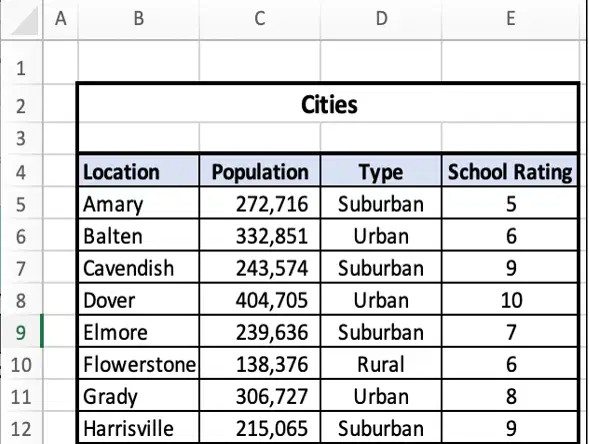
In the Cities table below, what would be the result of this function? =Match(School Rating, B4:E4,0)
4
1
E
E5
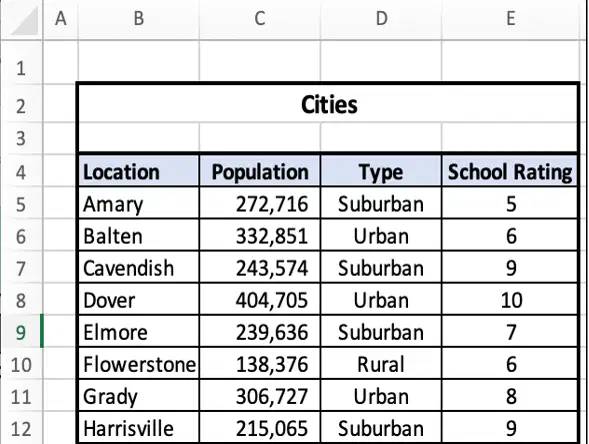
In the Cities table below, what would be the result of this function? =Index(B5:E12,4,3)
(a)
How are rounding to 0 places and showing 0 decimal places different?
They're the same; both hide extra decimal places
Rounding hides the extra decimals, while showing 0 deletes the extra decimals
Rounding deletes the extra decimals, while showing 0 hides the extra decimals
Why do we compare the min sales from highest to lowest?
Because if we did low to high, all sales would be greater than 0 and be in the same level
Because the IFS statement would stop at the first true statement
Both of these are reasons why
How do we copy a formula or function all the way down a column?
Put the cursor in the bottom right corner of the first cell and double click
Press Cmd or Ctrl + Shift and the Down Arrow
By manually typing in each value. Excel is terrible for efficiency
What is the keyboard shortcut to select cells down a column?
Press Cmd or Ctrl + Shift and the Right Arrow
Put the cursor in the bottom right corner of the first cell and double click
By manually typing in each value. Excel is terrible for efficiency.
Press Cmd or Ctrl + Shift and the Down Arrow
Which statement(s) are true about the functions used to find the number of values in a range?
Use Count for numbers CountA for text
CountA could be used for both numbers and text
Count could be used for both numbers and text
Both A and B
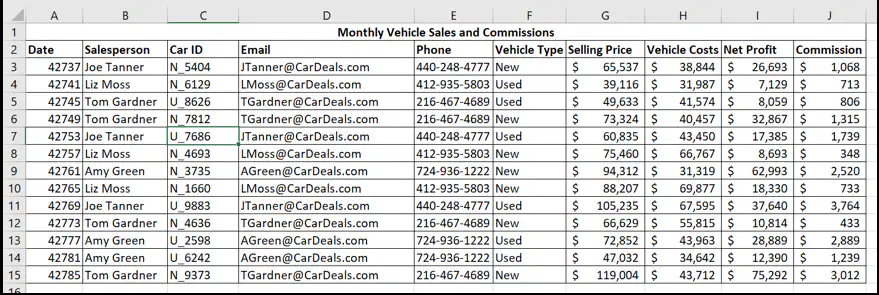
What value would this function return? =Index(A3:J15, 5, 2)
Liz Moss
412-935-5803
Joe Tanner
440-248-4777
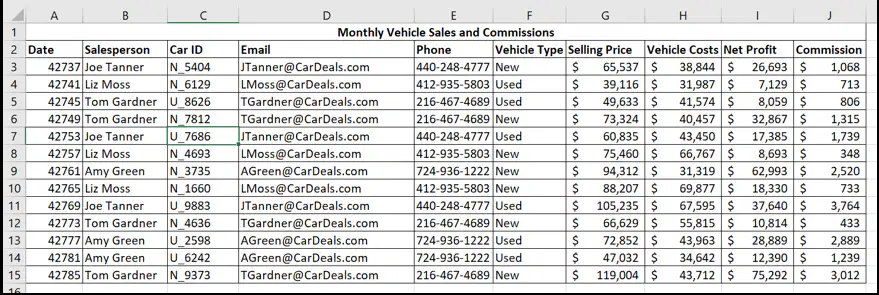
What value would this function return? =Match("N_7812",C3:C15,0)
(a)
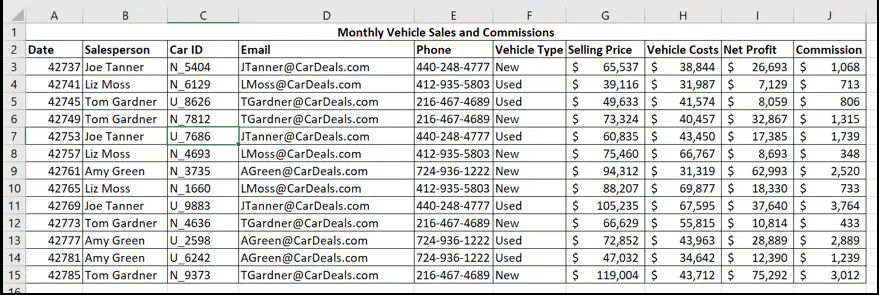
What value would this function return? =Index(A3:J15, 3, 8)
Used
N_4693
$41,574
$49,633
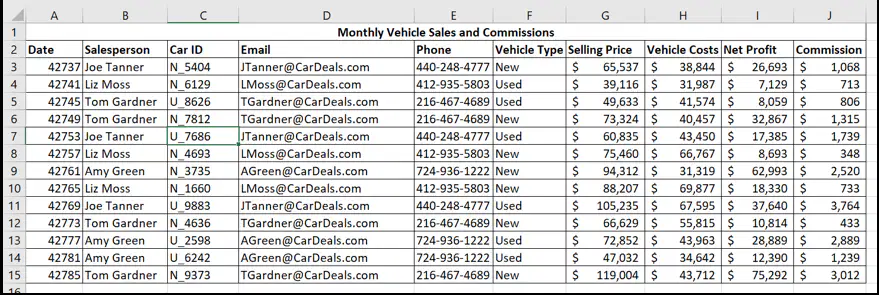
What value would this function return? =Match("Selling Price", A2:J2 ,0)
(a)
Do you sort or filter first?
Sort
Filter
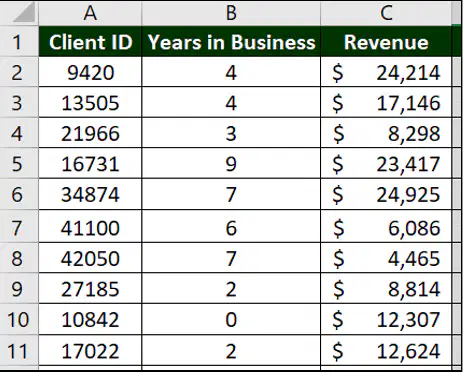
Based on the image to the right, what would would be the result of the following syntax =MATCH(21966, A2:A11, 0)
(a)
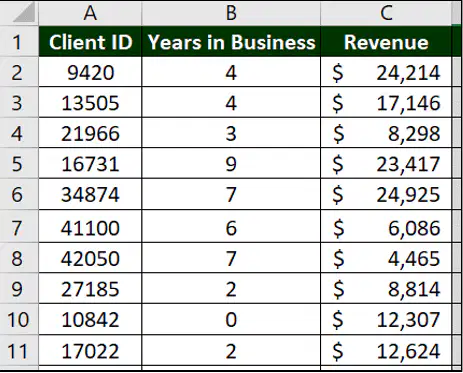
Based on the image to the right, what would be the result of the following syntax: =MATCH(6086, C2:C11, 0)
(a)
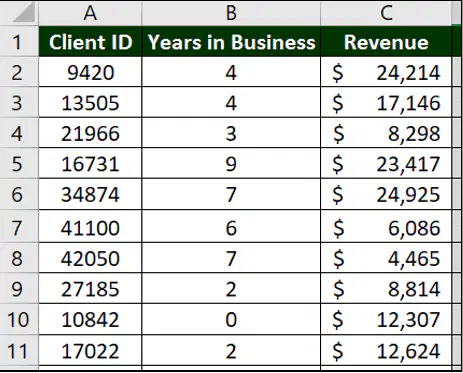
Based on the image to the right, what would be the result of the following syntax: =MATCH("Years in Business", A1:C1, 0)
(a)
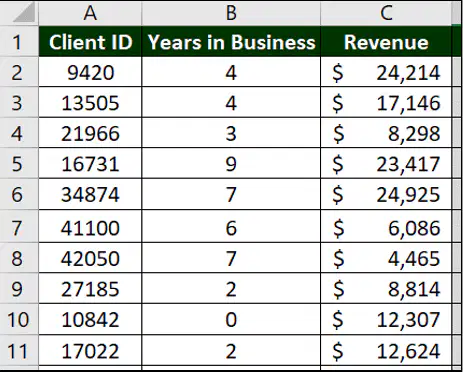
Based on the image to the right, what would be the result of the following syntax: =INDEX(A2:C11, 3, 2)
3
8298
4
17146
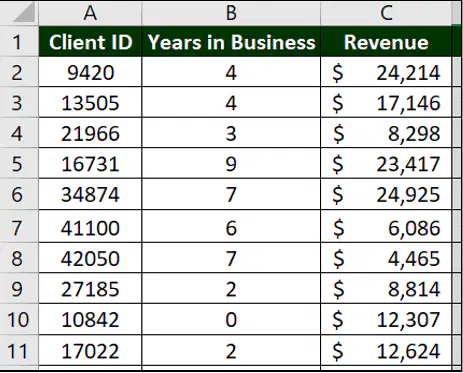
Based on the right, what would be the result of the following syntax: =INDEX(A2:C11, MATCH(13505, A2:A11, 0), MATCH("Revenue", A1:C1, 0))
4
C3
Client ID
17146
You want to identify employees who have a small client list. You want to display a 'Yes' if the number of clients is less than 10 and a dash if it is not. What Excel function should you use?
=IF(OR
=IF
=IF(AND
=IFS(
You want to identify employees who have a lot of clients or who have been with the company more than 10 years. You want to display a 'Yes' for those employees and a dash for everyone else. What Excel function should you use?
=IF(AND
=IF(OR
=IFS(
=IF(
You want to identify employees who have a lot of clients and who have been with the company more than 10 years. You want to display a 'Yes' for those employees and a dash for everyone else. What Excel function should you use?
(a)
You want to categorize employees based on the number of clients they have. You want to label employees that have less than 5 clients as 'Level 1', between 5-10 clients as 'Level 2', and more than 10 clients as 'Level 3'. What Excel function should you use?
(a)
You are writing an IFS function to catorize employees based on how long they have been with the company. Based on the syntax below, what will Excel display if B24=6. '=IFS(B24<=1, "New", B24>=2, "Level 1", B24>=5, "Level 2", B24>=8, "Level 3")
(a)
You want to identify employees who bring in a lot of money. You want to display a 0 if their client revenue is greater than 20K and a 1 if not. What is the correct syntax?
=IF(B23>20000, 1, 0)
=IF(B23>20000, 0, 1)
C. =IF(B23>20000, "1", "0")
=IF(B23>20000, "0", "1")

