Continuous Frontend Deployments at Scale: 7000 Deployments/Month with GitOps
At Wayground, 50+ frontend engineers deploy 7,000+ times per month: 1,000 production deployments plus 6,000 PR preview updates every week. No deployment windows, no approval queues, no waiting. Deploy in minutes, rollback in under a minute.
This isn’t reckless speed, it’s true continuous deployment. 27,000 tests run in parallel on every commit, every branch deploys independently, every PR gets a live preview, and rollbacks happen with a single click. GitOps and ArgoCD orchestrate everything, and engineers own the entire flow from code to production.
What We Achieved:
- 1,000+ deployments/month to production across 50 engineers, zero queues.
- Dynamic environments: Branch deployments + PR previews via ArgoCD (~1200 PRs/month, ~5 commits per PR = 6,000 preview environment deployments/month).
- Testing at scale: 27,000 unit tests + 200 E2Es, parallelised from 40min → 10min.
- Standardisation: One Jenkins shared library, one Helm chart.
- Instant rollbacks: < 1 minute with immutable artifacts.
The Impact:
- Deploy any branch anytime, self-service.
- Fast feedback loops from live PR previews, higher velocity.
- Ship small, stacked changes instead of big-bang releases.
What drove this rebuild
Before this system, we struggled with three critical deployment challenges:
1. Pipeline Chaos
Every micro-frontend had its own custom Jenkins pipeline. Debugging was a nightmare, and onboarding a new service took 3 days.
2. Single Dev Branch Bottleneck
All 50+ engineers pushed to the same dev branch to get their code deployed. Constant merge conflicts, broken builds, and one bad commit blocking everyone’s deployments.
3. Rollback Hell
Our custom S3 versioning system was manual and fragile. A single rollback took 30–40 minutes with potential downtime.
Our Solution Philosophy
We needed a system where deployment is boring — fast, safe, and routine. Three principles guided our design:
1. Standardisation Through Shared Infrastructure
2. GitOps as the Foundation
3. Self-Service with Dynamic Environments
Architecture Overview
Think of our deployment pipeline as a five-stage assembly line:
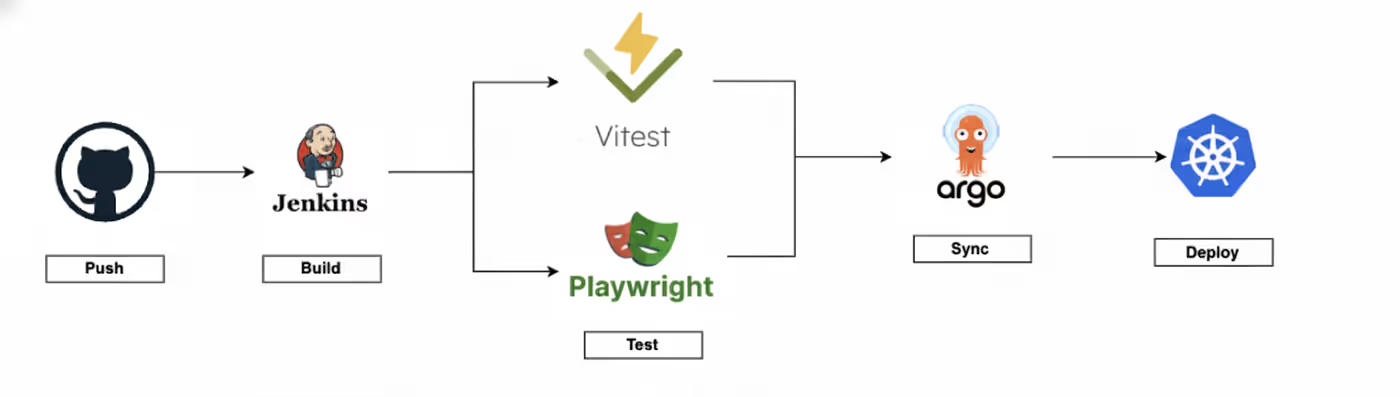
What happens at each stage:
- Developer pushes code to any branch.
- Jenkins builds two Docker images (build + nginx webserver), tags them with commit SHA.
- Jenkins runs 27,000 unit tests + 200 e2es (sharded across multiple nodes, 10 minutes).
- Jenkins writes deployment config to Git.
- ArgoCD detects the Git change and syncs.
- Kubernetes deploys nginx pods serving your static files.
Two ways ArgoCD creates deployments:
- Git Generator — Watches config files → deploys any branch automatically.
- PullRequest Generator — Watches PR labels → creates preview environments.
Every deployment is labeled (branch name, frontend type, environment) so you can filter, manage, and clean up easily.
That’s the whole system. Now let’s look at each piece:
1. Standardisation — One Jenkins shared library for Everything
The Problem
Custom pipelines for each micro-frontend meant debugging was hard and onboarding took days.
The Solution
Create a shared Jenkins library that handles all build complexity, requiring each micro-frontend to provide only a Dockerfile.
How It Works
Every micro-frontend follows a simple contract: provide a single Dockerfile. That’s it.
Our shared Jenkins library handles the rest, building two Docker images:
1. Build Image — Contains the compiled application (npm build)
2. Webserver Image — Copies build artifacts into nginx, tagged with commit SHA
Both are immutable and traceable. The webserver image is what gets deployed.
Why This Scales
- New frontend pipeline in under an hour: Write Dockerfile, configure pipeline, done.
- One place to improve: Optimize the shared library, all pipelines benefit.
- Consistency everywhere: Same build process, same deployment, same notifications
- Clear ownership: Frontend teams own Dockerfiles, platform team owns shared library
2. Testing at Scale — 27,000 Tests, Parallelised for Speed
The Problem
Deploying 1000 times a month requires catching bugs before production. Running 27,000 unit tests and 200 e2e tests sequentially would take 40+ minutes, creating a bottleneck that kills velocity.
The Solution
Shard tests across multiple parallel Jenkins nodes running on cost-efficient AWS spot instances, turning 40 minutes into 10.
How It Works
Every commit triggers our full test suite:
- 27,000 unit tests across all micro-frontends.
- 200 end-to-end tests covering critical user flows.
- Tests are sharded and distributed across multiple Jenkins nodes.
- Jenkins nodes run on AWS auto scaling group spot fleet for cost efficiency.
- Parallel execution: 40 minutes → 10 minutes.
Test sharding strategy:
- Unit tests split by test file count (balanced distribution).
- Each shard reports results independently.
- Jenkins aggregates all results before proceeding to deployment.
Why This Gives Confidence
- Fast feedback: 10-minute test runs mean developers know immediately if something broke.
- Deploy fearlessly: Comprehensive coverage catches regressions before merge.
- No waiting: Parallel execution means tests don’t block the deployment pipeline.
3. Dynamic Environments — Deploy Any Branch, Anytime, Self-serve
The Problem
All engineers shared one dev branch for deployments, creating constant conflicts and blocking releases. No way to preview changes before merging.
The Solution
Use ArgoCD’s Git and PullRequest generators to automatically create isolated environments for every branch and PR, eliminating the shared dev branch entirely.
How It Works
ArgoCD uses two generators to create environments on-demand:
Branch Deployments (Git Generator)
Push any branch → Jenkins builds image → Adds config file to Git → ArgoCD detects and deploys
Folder structure:
config/frontend-deployment/
[micro-frontend]/
[branch-1]/
[env]/config.yaml
[branch-2]/
[env]/config.yaml
ArgoCD watches for these config files and automatically creates isolated deployments per branch.
PR Previews (PullRequest Generator)
Build succeeds → `preview-ready` label auto-added → ArgoCD polls GitHub → Creates ephemeral environment → Auto-cleans up when PR closes.
With ~1200 PRs raised per month and ~5 commits per PR, we handle 6,000+ preview deployments weekly. Every commit updates the live preview URL automatically, giving continuous feedback throughout the development cycle.
Pull request applicationset
...
generators:
- pullRequest:
github:
labels: ["preview-ready"]
requeueAfterSeconds: 60
...
Uses the PR’s head commit SHA for the image, polls every 60 seconds for changes.
Why This Works
- No more merge conflicts blocking everyone: Each branch deploys independently.
- Live preview environment for stakeholder review: ~6,000 preview deployments/month.
- Test production-like environments: Not just localhost.
- Self-service: Engineers create/destroy environments without asking anyone.
4. Instant Rollbacks — Under 1 Minute, Zero Downtime
The Problem
Traditional rollbacks require rebuilding from old commits or reverting code and waiting for CI/CD, often causing 30+ minutes of downtime.
The Solution
Leverage GitOps with immutable Docker images tagged by commit SHA, making rollbacks a simple config update pointing to an existing artifact.
How It Works
GitOps + immutable artifacts make rollbacks trivial:
- Every deployment = a Git commit
- Docker images = immutable (commit SHA tags)
- Images stay in registry indefinitely
- Nginx pods have pre-built static files ready to serve
The Rollback Process:
Rollback with a single click in ArgoCD to select any previous revision. Done in < 1 minute with zero downtime.
Why It’s Fast
- No rebuild needed: Just YAML config update pointing to existing image.
- Rolling updates: Kubernetes gradually shifts traffic, zero downtime.
- Clear separation: App code (in images) vs infrastructure config (in Git).
- ArgoCD handles everything: Deployment history, sync, health checks, orchestration.
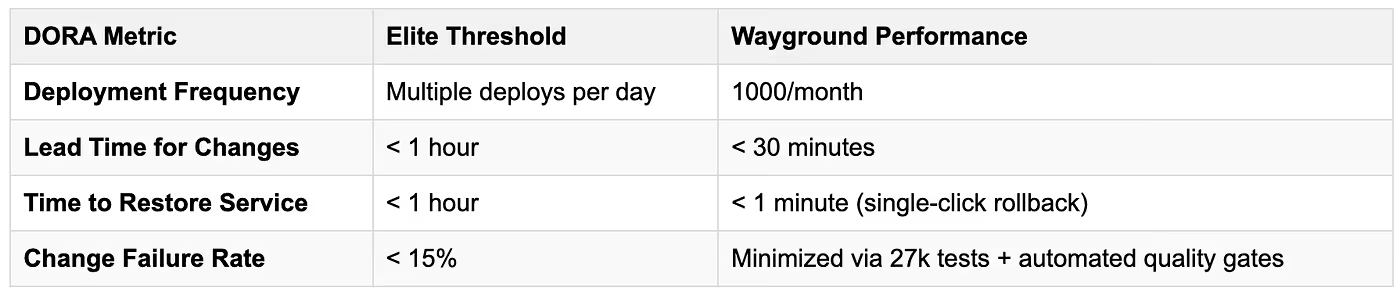
Performance Analysis: DORA Metrics Comparison
The DevOps Research and Assessment (DORA) program defines four key
metrics to evaluate software delivery performance. Organizations are classified into four performance tiers: Elite, High, Medium, and Low.
Our system’s performance against DORA’s Elite tier thresholds: